About Dialog
The About Dialog is a small window that tells you exactly which version of R7.Activator is installed on this computer. It is the first thing to check when you want to know whether an update applies to you, or when you are reporting a problem and need to say which version you are running.
Open the About Dialog
To check the installed version:
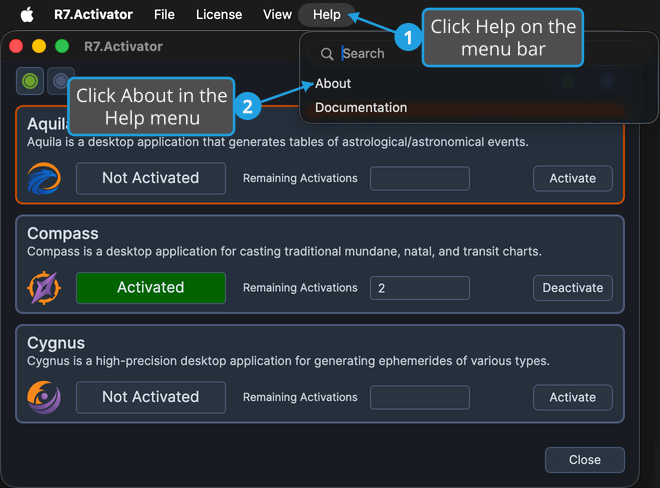
- Click Help on the menu bar.
- Click About Dialog in the Help menu.
- Read the version number, then click the Close button.
macOS
On macOS the Help menu's About item reads About rather than About Dialog, as the screenshot below shows. It opens the same dialog.
What the Dialog Shows
| Element | What it shows |
|---|---|
| Application icon and name | The R7.Activator icon beside the application name |
| Version | The version number installed on this computer |
| Copyright line | Copyright © 2026 Rhythm Seven Software |
| Close | Dismisses the dialog and returns you to the main window |
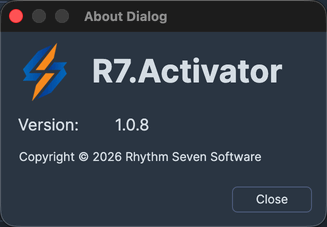
The dialog opens centered over the main window and cannot be resized.
tip
Compare the version shown here with the version offered on the download page when the update notification button appears in the toolbar. See Update Notification.