Welcome to R7.Activator
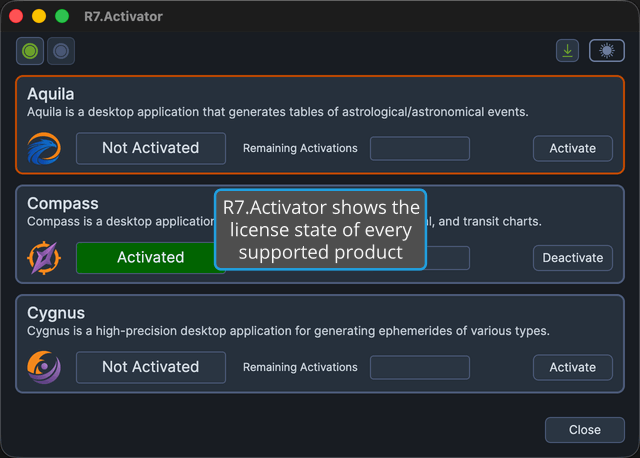
R7.Activator is a single-window desktop utility that activates and deactivates licenses for the Rhythm Seven Software products Aquila, Compass, and Cygnus on this computer. It shows the license state of every supported product at once, and gives you the commands to unlock a product you have bought, hand an activation back so it can be used on another machine, or reset every activation registered to you.
What You Can Do with R7.Activator
Each capability below has its own page:
- See every product's license state at a glance: the Application List fills the body of the window with one panel for each supported product, all visible at the same time.
- Read whether a product is licensed here: the Activation Status fields on each panel report the product's state and how many activations it has left.
- Unlock a product you have bought: Activate License licenses a product on this computer using the registered name and activation code issued with your purchase.
- Free an activation for another computer: Deactivate License releases a product's activation from this machine so it can be used elsewhere.
- Start over when your activations are used up: Deactivate All Licenses resets every activation of a product registered to you, on this computer and on any others.
- Reach every menu command from a predictable place: the Menu Bar holds the File, License, View, and Help menus.
- Run the commands you use most in one click: the Toolbar puts the Activate and Deactivate commands one click away.
- Match your working environment: Toggle Theme switches between the Dark and Light themes and remembers your choice.
- Check which version you are running: the About Dialog shows the installed version number.
- Learn when a newer version is published: the Update Notification button takes you straight to the download page.
- Close the application: Exit Application covers the three ways to shut R7.Activator down.
Documentation Sections
- Main Window: the R7.Activator window and the controls around its edges, including the menu bar, the toolbar, the theme toggle, and the ways to close the application.
- License Management: the application list, the activation status fields, and the commands that activate and deactivate your product licenses.
- Help: the installed version number, the online documentation, and update notifications.
Where to Start
New to R7.Activator? Start with the Main Window for an orientation to the window and everything on it, then read Application List to learn how each product's panel works.
Looking for a specific command? The Menu Bar lists the application's menu commands and links to the page that documents each one.
You can open this documentation from inside the application at any time. See Open Documentation.