Toolbar
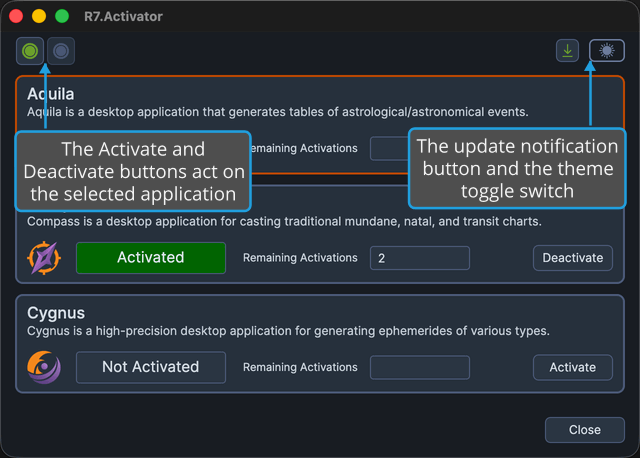
The toolbar is the button strip directly above the application list, below the menu bar on Windows. On the left it holds the Activate and Deactivate buttons, whose tooltips read "Activate the selected application's license" and "Deactivate the selected application's license". Both act on whichever application is currently selected in the application list, so select the product's panel before you use them. See Application List.
The update notification button and the theme toggle switch sit at the window's right edge. Neither is tied to the selection. The update notification button appears only when a newer version of R7.Activator has been published.
On macOS the in-window menu strip is hidden, so the toolbar is the topmost strip in the window, as the screenshot below shows.
Toolbar Commands
| Command | Description | Details |
|---|---|---|
| Activate | Licenses the selected application on this computer | Activate License |
| Deactivate | Releases the selected application's activation from this computer | Deactivate License |
| Update notification button | Opens the R7.Activator download page in your default web browser. Shown only when a newer version is available | Update Notification |
| Theme toggle switch | Switches between the Dark and Light themes | Toggle Theme |
Deactivate All has no toolbar button. It is available only from the License menu. See Menu Bar.