Welcome to Cygnus
Cygnus generates custom ephemerides of the celestial bodies. Each study samples the bodies you select at a fixed interval across the date range you choose, measures them from a geocentric, topocentric or heliocentric coordinate origin, and presents the results as an ephemeris table of records or as an interactive time-series graph.
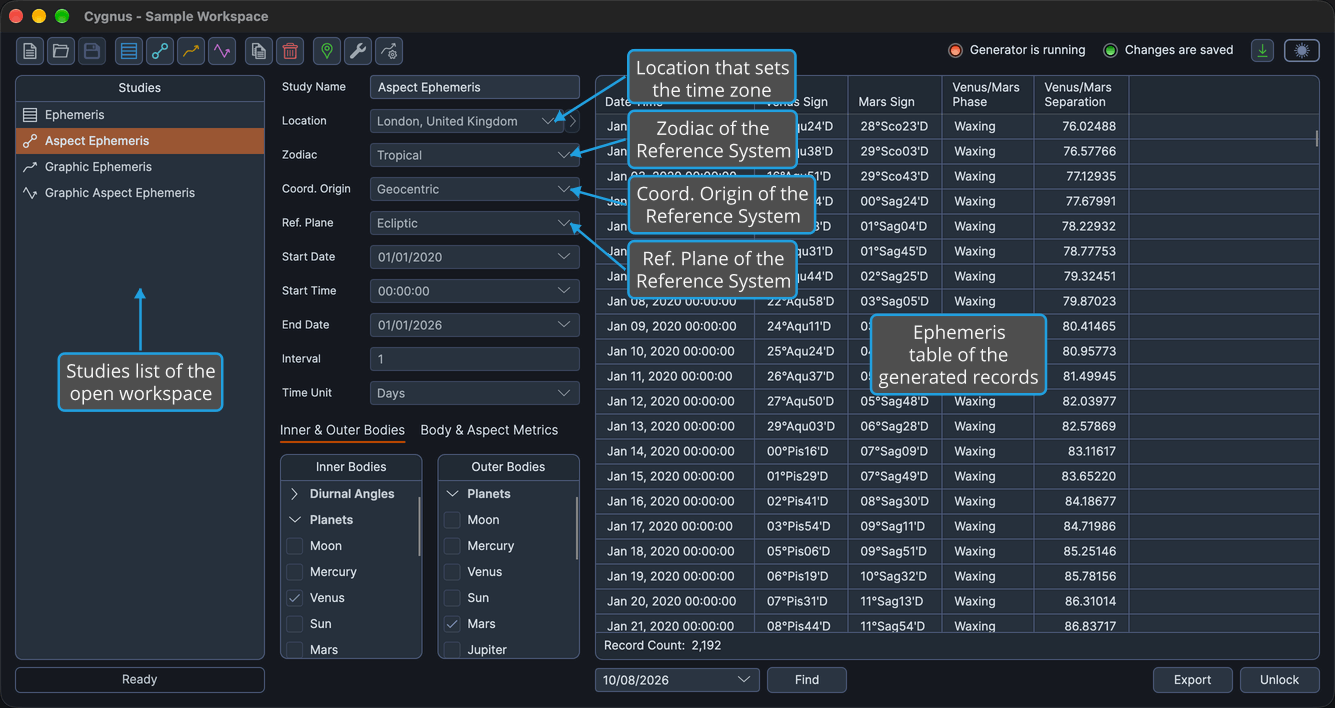
You keep your studies in a workspace. The Studies list on the left of the main window shows every study in the workspace, and the study you select fills the study area beside it, with its settings on the left and its results on the right.
Every study is generated for a location and a Reference System. The location is required whatever the coordinate origin, because the dates and times of the results are given in its time zone; the Reference System is the study's zodiac, coordinate origin and reference plane.
What You Can Do with Cygnus
Cygnus offers four study types:
- Ephemeris Study: Generate a custom tabular ephemeris of the positions of the bodies you choose, over the period and at the interval you need.
- Aspect Ephemeris Study: Track how the cycle angle, phase and separation of pairs of bodies change over time, alongside the positions of the bodies.
- Graphic Ephemeris Study: See how the positions, latitudes, distances and speeds of bodies evolve over time as curves on a graph rather than rows of numbers.
- Graphic Aspect Ephemeris Study: Watch the cycle angle and separation of pairs of bodies rise and fall over time on a graph.
The rest of this guide shows how to set up, generate and work with your studies:
- Main Window: Reach every command from the menu bar or the toolbar, move between studies in the Studies list, see at a glance whether a study is generating and whether your changes are saved, and switch between the Light and Dark themes.
- Workspace Management: Start a new workspace, open one you saved earlier, and save your studies with their settings and generated results as a
.cygnusworkspace. - Study Management: Add a study of any of the four types, copy a study to make a variation of it, delete the studies you no longer need, and arrange the Studies list in the order you want.
- Study Configuration: Name each study, choose its location, Reference System, date range, interval, bodies and metrics, and save the setups you use often as presets.
- Study Generation: Generate a study's records or graph across its date range while a progress bar shows how far it has come, and cancel a generation started with the wrong settings.
- Working with Records: Read the records of an Ephemeris or Aspect Ephemeris study in the ephemeris table, find the record nearest a date, choose and arrange the table's columns, and copy records to the clipboard, drag them into another application or export them to CSV.
- Working with Graphs: Read exact dates and values on the ephemeris graph of a Graphic Ephemeris or Graphic Aspect Ephemeris study, pan and zoom its time window, and adjust the range of a value axis.
- Open a Record's Chart in Compass and Open a Graph Point's Chart in Compass: Double-click a record or a plotted point to open the chart for that moment in the companion application Compass.
- Unlock Study: Clear a generated study's results and return it to its editable state, so that you can change its settings and generate it again.
- Locations and Settings: Maintain the saved locations your studies use, import and export them as CSV, set the defaults that new workspaces and studies start from, and choose the color each body is plotted in.
- Help: Check your version of Cygnus and its license status, open the online documentation, and get a newer version when one is available.