Unlock Study
Change a study's settings and generate it again after you have seen its results. Click Unlock in the button bar below the results and confirm. Then adjust the settings and click Run again.
A study locks when it is generated: its settings and bodies lists cannot be edited and the Run button is hidden, although its metrics lists stay available. This applies to every study type, including Graphic Ephemeris and Graphic Aspect Ephemeris studies, which lock when the graph is generated. Unlocking returns the study to its editable state.
Unlock a Study
The Unlock button is enabled when the selected study holds results and is not generating.
To unlock a study:
- Click Unlock in the button bar below the study's results.
- Confirm the unlock when Cygnus warns that the study's results will be deleted (see Confirm a Confirmation Request).
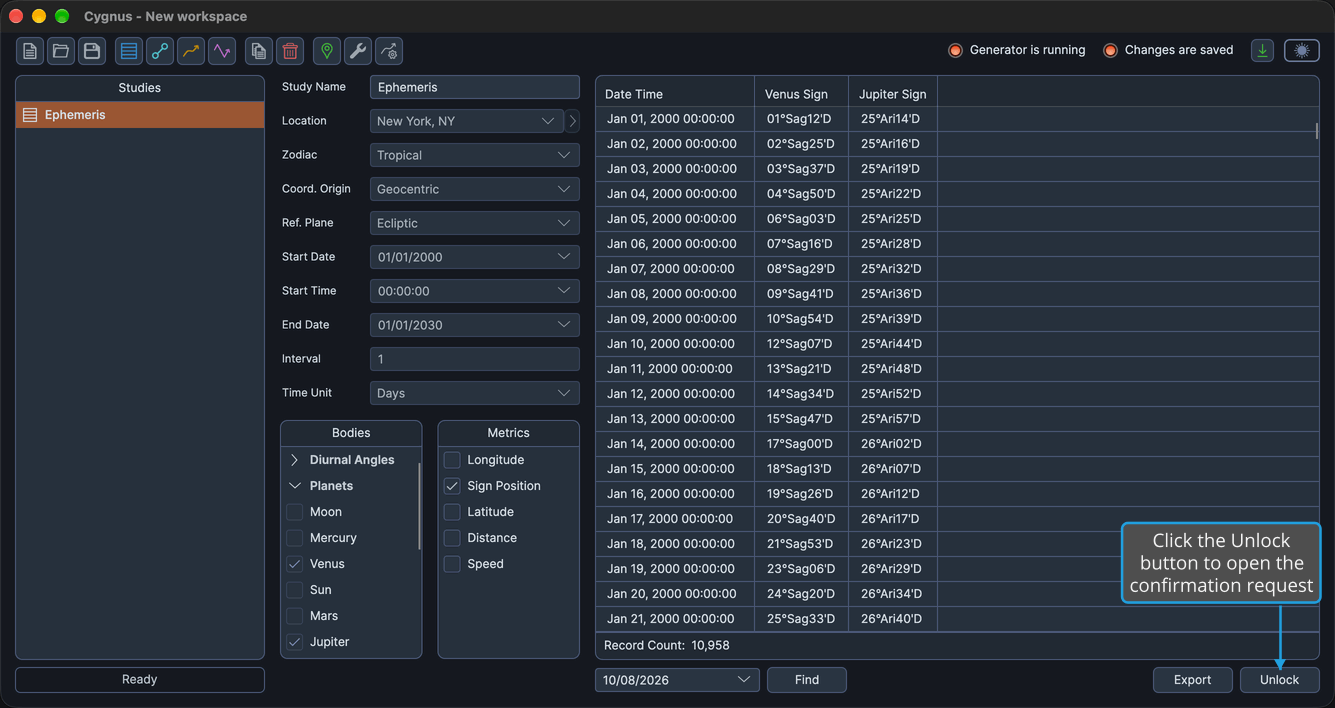
The study's records are deleted (on a graphic study, its plotted curves), its settings and lists become editable again and the Run button reappears. Value-axis ranges you adjusted on a graphic study are kept (see Adjust a Graph Value Axis Range). The workspace now has unsaved changes; save the workspace to keep them (see Save Workspace).
To keep the study locked with its results, decline the request instead (see Decline a Confirmation Request).
After unlocking, change the study's settings and click Run to generate it again (see Generate Study).
On every study type, checking or unchecking a metric in a metrics list updates the ephemeris table's columns or redraws the graph without unlocking the study. Changing which bodies are included requires unlocking the study and generating it again.
Related Topics
- Generate Study: generate the study's records or graph.
- Cancel Study Generation: stop a generation in progress, which also unlocks the study.
- Adjust a Graph Value Axis Range: set the value-axis ranges an unlock keeps.
- Save Workspace: keep the unlocked study's changes.