Export Records to CSV
Analyze a generated ephemeris in a spreadsheet or another program by saving its records to a CSV file. Show the columns you want in the ephemeris table, click Export, and choose a name and folder for the file.
The CSV file holds every record of the study, with the ephemeris table's currently visible columns in their displayed order. The Export button sits in the button bar below the ephemeris table and is enabled once the study has been generated. Records export is available on Ephemeris and Aspect Ephemeris studies only: Graphic Ephemeris and Graphic Aspect Ephemeris studies have no ephemeris table and no Export button.
Choose the Columns to Export
The export follows the ephemeris table as it is shown, so set up its columns before you export:
- The table's columns come from the metrics selected for the study: see Body Metrics List and, on Aspect Ephemeris studies, Aspect Metrics List.
- To show or hide individual columns of the generated table, use the Column Visibility Menu.
- To change the order of the columns, see Reorder Record Columns.
Export Records to a CSV File
To export the records of a generated study:
- Click Export in the button bar below the ephemeris table.
- In the save dialog, choose a name and folder for the CSV file and save it (see Save a File in the Save Dialog).
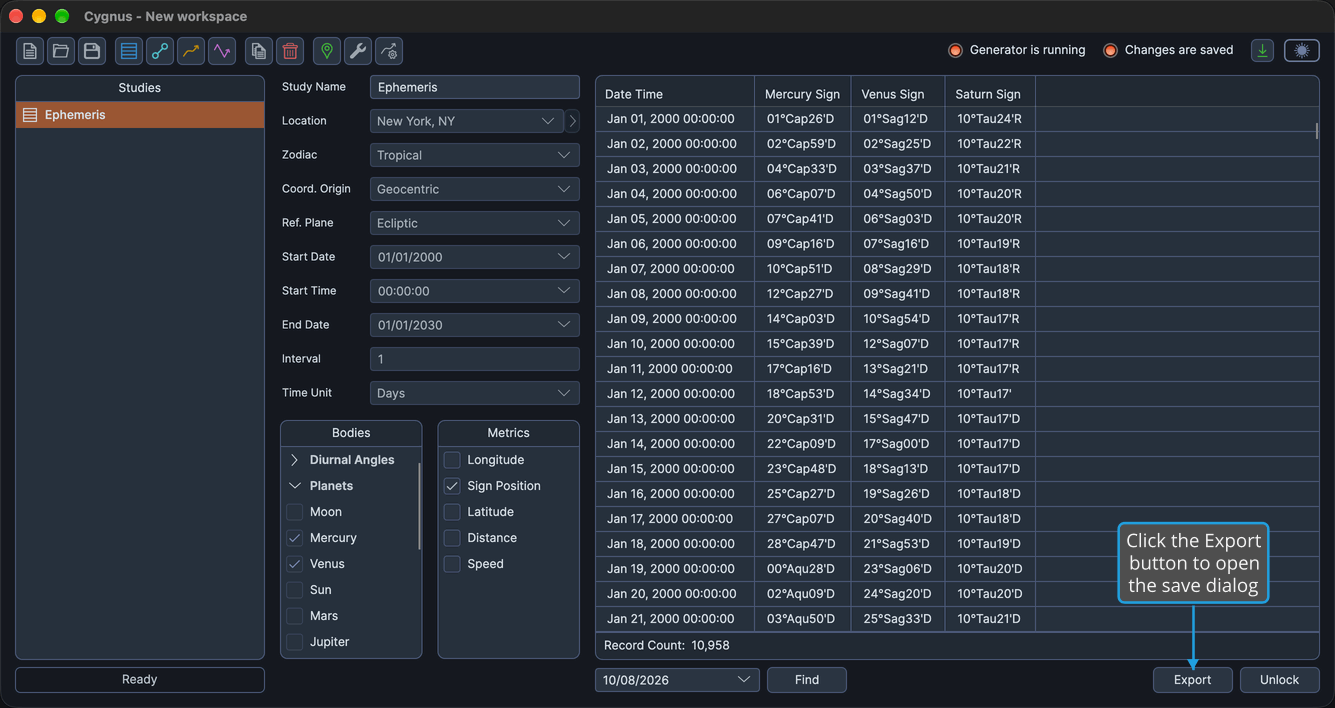
The save dialog suggests the study's name with the .csv extension. Cygnus writes a CSV file holding every record, with the table's visible columns in their displayed order.
To back out without writing anything, cancel the dialog instead (see Cancel the Save Dialog).
Related Topics
- Ephemeris Table: read the generated records before you export them.
- Column Visibility Menu: show or hide the columns the export includes.
- Reorder Record Columns: set the column order the export follows.
- Copy Records to the Clipboard: copy selected records as Markdown or tab-delimited text.
- Drag Records into Another Application: move selected records into a spreadsheet without saving a CSV file.
- Generate Study: generate the records to export.