Find a Record by Date
Go straight to the records for a particular date in a long ephemeris. After generating the study, enter or pick a date in the date box below the ephemeris table, and click Find or press Enter.
The date box and the Find button appear in the button bar under the ephemeris table once the study has been generated. They are available on Ephemeris and Aspect Ephemeris studies only: Graphic Ephemeris and Graphic Aspect Ephemeris studies have no date box and no Find button.
Find the Record Nearest a Date
The date box follows your system's short date format: while it is empty, it shows the layout of that format, such as __/__/____. Enter the digits of the date in the order the layout gives them.
To go to the record for a date:
- Enter the date in the date box below the ephemeris table.
- Click Find.
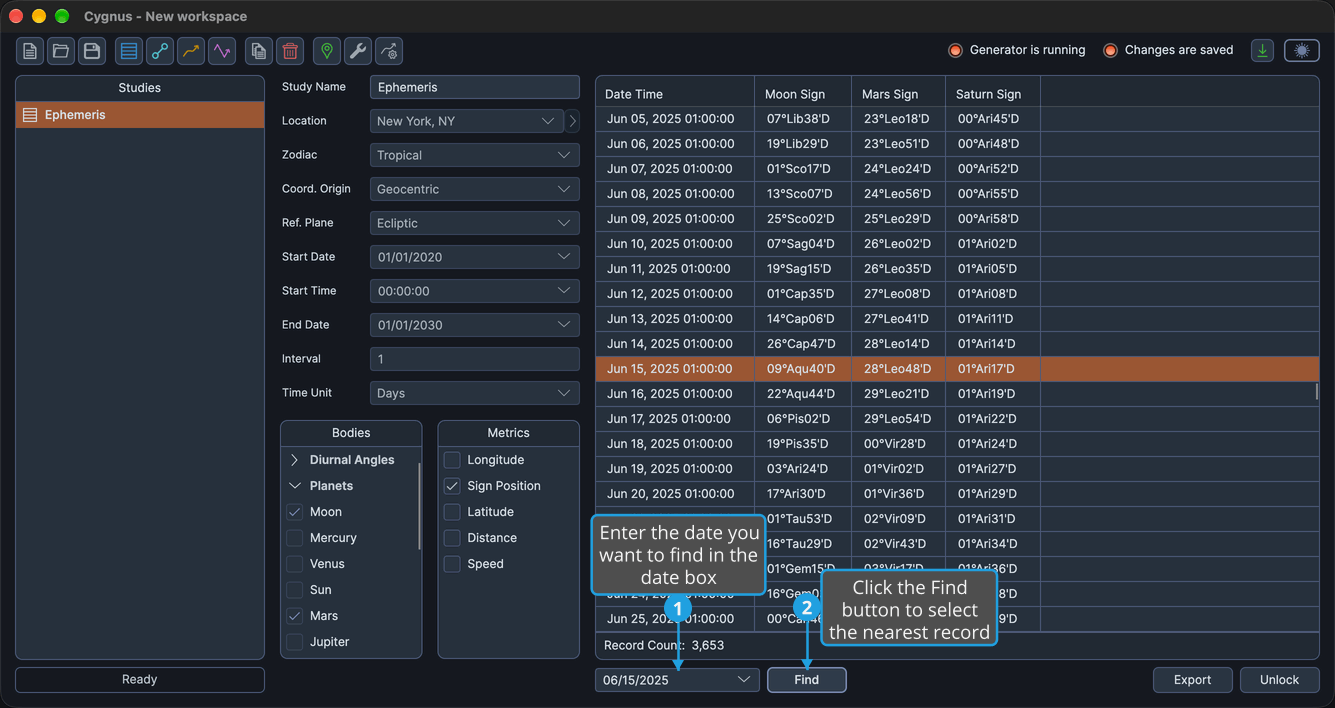
The ephemeris table selects the record nearest midday on the chosen date and scrolls to center it.
Find stays unavailable until the date box holds a date. To pick the date from a calendar rather than enter it, click the date box's drop-down button. While the date box has keyboard focus, you can also press Enter in place of clicking Find.
Related Topics
- Ephemeris Table: read and select the records of a study.
- Copy Records to the Clipboard: copy the selected record's date or the selected records.
- Open a Record's Chart in Compass: see the full chart for a record's date and time.
- Generate Study: produce the records of a configured study.