Column Visibility Menu
Hide individual ephemeris table columns you do not need, or bring one back, without changing a whole metric. Right-click any column heading of the ephemeris table, check or uncheck the columns in the menu, and close the menu.
The menu lists every column of the table with a check box: a checked column is shown and an unchecked one is hidden. The menu stays open while you work, so you can change several columns in turn. Your column choice is saved with the study when the menu closes.
This is one of two ways to control which columns the ephemeris table shows. The other is to check or uncheck metrics in the study's metrics lists, which shows or hides a metric's columns for every body or pair: see Body Metrics List and Aspect Metrics List. The menu is available on Ephemeris and Aspect Ephemeris studies only. Graphic Ephemeris and Graphic Aspect Ephemeris studies have no ephemeris table and no Column Visibility Menu.
Show or Hide an Ephemeris Table Column
To show or hide a column:
- Right-click any column heading of the ephemeris table.
- Check or uncheck the check box beside the column's name in the menu to show or hide the column.
- Press Esc to close the menu.
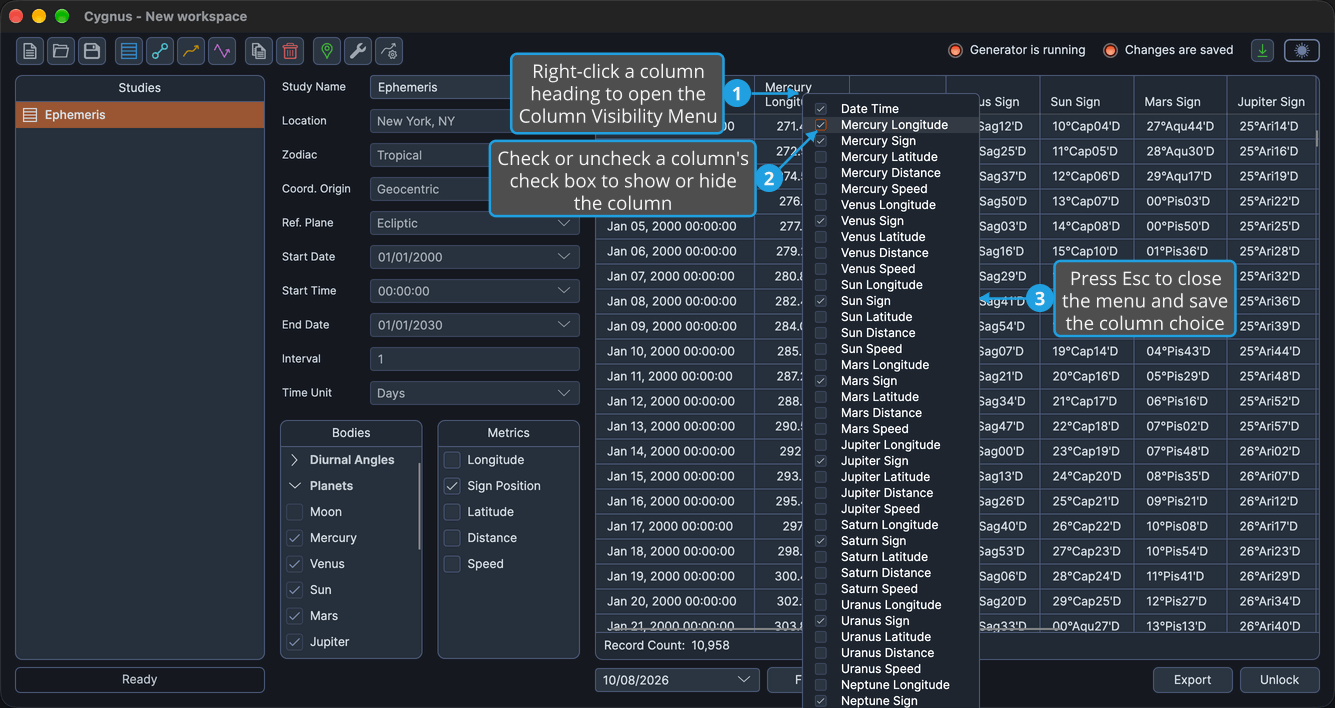
The column appears in the table when its check box is checked and disappears when it is unchecked. You can also close the menu by clicking outside it. When the menu closes, the column choice is saved with the study, and the workspace has unsaved changes until you save it (see Save Workspace).
Columns that have no values under the study's reference plane stay in the menu but are unavailable. Under the Equatorial reference plane, every {Body} Sign column is unavailable and cannot be shown.
Menu Item Structure
The menu lists the columns of the ephemeris table, so its items depend on the bodies you have selected and, on Aspect Ephemeris studies, on the body pairs they form. The items follow this pattern: {Body} stands for the name of a selected body, and {Inner}/{Outer} for a pair of an inner body and an outer body.
| Block | Menu Item |
|---|---|
| Fixed first item | Date Time |
| Per body | {Body} Longitude, or {Body} Right Asc under the Equatorial reference plane |
| Per body | {Body} Sign |
| Per body | {Body} Latitude, or {Body} Declination under the Equatorial reference plane |
| Per body | {Body} Distance |
| Per body | {Body} Speed |
| Per pair, Aspect Ephemeris only | {Inner}/{Outer} Cycle Angle |
| Per pair, Aspect Ephemeris only | {Inner}/{Outer} Phase |
| Per pair, Aspect Ephemeris only | {Inner}/{Outer} Separation |
On an Ephemeris study, the body items repeat for each body checked in the Bodies list, in list order. On an Aspect Ephemeris study, they repeat once for each distinct body checked in the Inner Bodies or Outer Bodies list, ordered by aspect rank with faster-moving bodies first, and the pair items repeat for each valid pair of an inner body and a slower-moving outer body. For what each column contains, see Column Structure.
Related Topics
- Ephemeris Table: read and select the records of a study.
- Body Metrics List: show or hide a body metric's columns for every body.
- Aspect Metrics List: show or hide a pair metric's columns for every pair.
- Reorder Record Columns: put related columns side by side.
- Export Records to CSV: save the records with the visible columns in their displayed order.