Welcome to Aquila
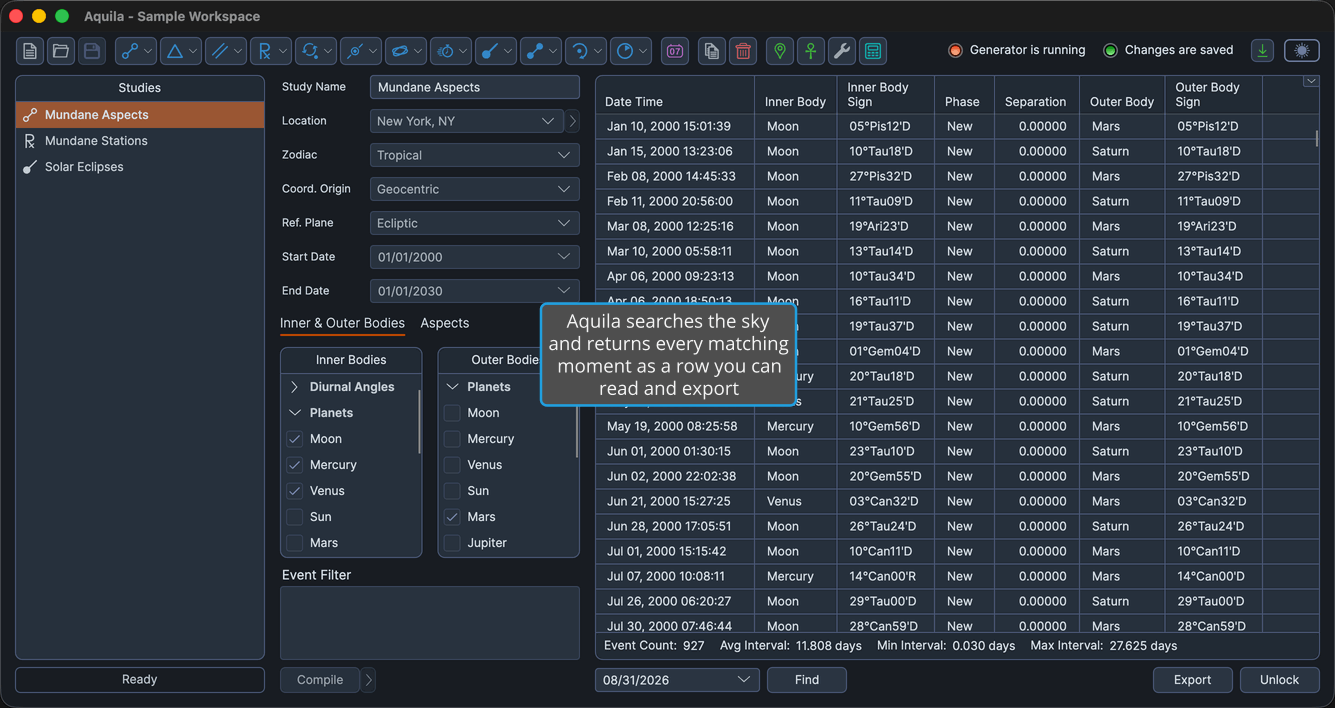
Aquila is a desktop application for astrological research. You describe a technique, a period and a set of celestial bodies, and Aquila searches the sky for you, returning every moment that matches as a row in a table you can read, filter, copy and export.
Work is organized into workspaces. A workspace holds as many studies as a line of inquiry needs, and each study answers one question: when do these bodies aspect each other, when does this pattern close, when does a transit reach this natal point. Generator studies produce the raw events; Timeline Studies merge the events of several generator studies into a single chronology so that findings from different techniques can be read side by side. A workspace is a single .aquila file, so an entire investigation travels as one document.
What You Can Do with Aquila
Aquila's documentation is organized the way the application is. These are the areas you will work in.
The Research Workflow
- Find your way around the application: locate the menu bar, toolbar, Studies list and status indicators that frame every session.
- Organize research into workspaces: start a new workspace, reopen a saved one, and preserve your work as a single
.aquilafile. - Build up a workspace of studies: add a study of any technique, duplicate one to test a variant, remove the ones you no longer need, and arrange the list so it reads coherently.
- Configure a study before generating its events: set the location and Reference System, bound the period, choose the bodies, enter the angles or degrees the technique searches for, and write an optional event filter.
- Generate a study's events: start the search, watch its progress, and cancel it if the range turns out broader than you meant.
- Read, extract and reuse the events: scan the events table, choose which metrics it shows, jump to a date, copy rows to the clipboard, export to CSV, and open any moment as a chart in Compass.
- Merge several studies into one chronology: gather the events of the generator studies you select into a single ordered timeline and work with it as a whole.
- Set up the data every study draws on: maintain your locations and natal records, and set the application and workspace defaults that new work inherits.
The Study Catalog
- Mundane Aspect Studies: date the exact aspects, closest approaches, critical-degree coincidences and lunar phases formed between transiting bodies.
- Aspect Pattern Studies: find the windows in which Grand Trines, Kites, Stelliums, T-Squares, Yods and Grand Squares close in the sky.
- Mundane Parallel Studies: track the declination contacts between transiting bodies that longitude aspects miss entirely.
- Mundane Station Studies: list station dates, whole retrograde cycles, and the stations that fall on a sensitive degree.
- Planetary Cycle Studies: report a planet's entire synodic cycle, landmarks and intervals together, as a single row.
- Critical Degree Transit Studies: date the crossings of your own list of sensitive degrees, and of the sign boundaries.
- Declination Studies: work in latitude and declination, from nodal crossings and latitude extremes to solar-limit crossings and heliacal visibility.
- Longitudinal Studies: measure motion along the zodiac through speed extremes, maximum elongations and completed arcs.
- Eclipse Studies: list the solar and lunar eclipses of a period, and pick out the ones that fall on a critical degree.
- Transit Studies: measure the sky against a natal record, from straightforward transiting aspects to pattern activations, station activations, house ingresses and eclipse contacts.
- Direction & Profection Studies: advance a natal record symbolically through time with primary directions, solar arc directions, secondary progressions and profections.
Getting Help
- About Dialog: check which version of Aquila you are running and the state of your license.
- Open Documentation: return to this documentation from inside the application.
- Update Notification: recognize the button that appears when a newer version of Aquila is available.