Ephemeris Settings
Every calculation a study performs depends on where the observer stands and on which zodiac, origin and plane the positions are measured in. The Ephemeris settings state that frame once, and the study generates all of its events against it.
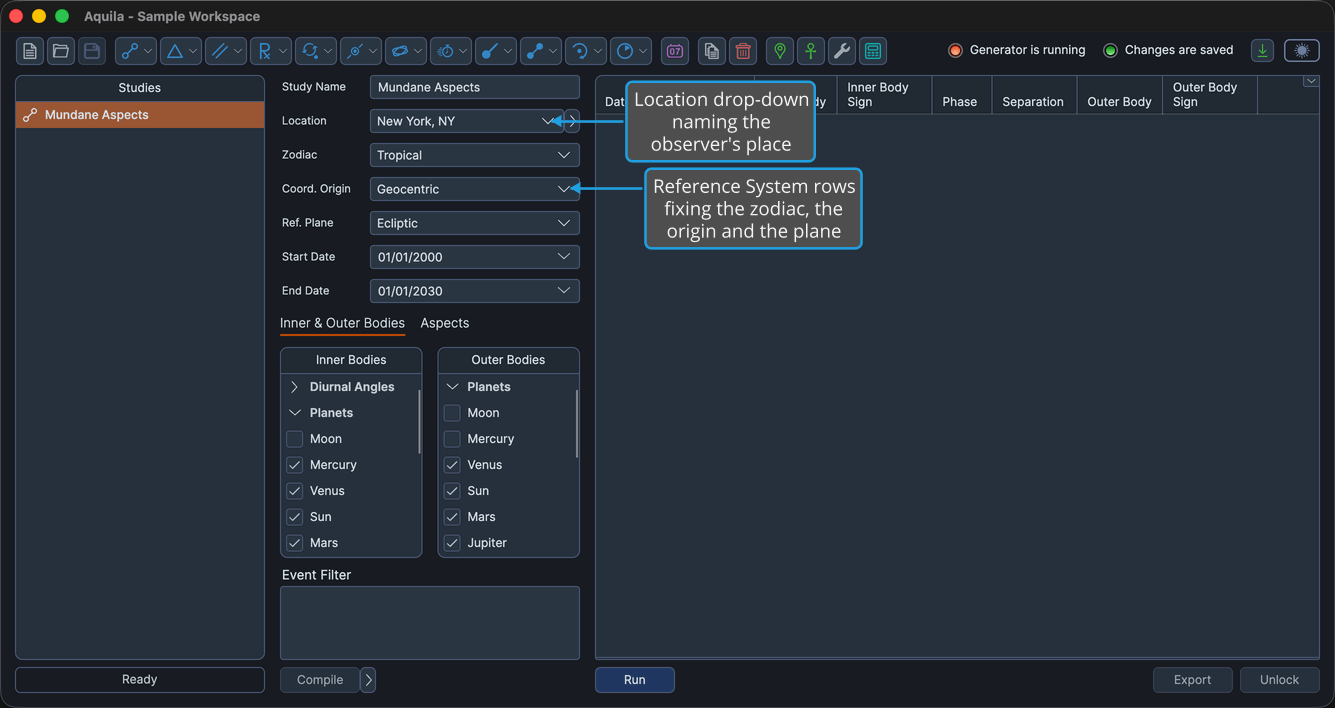
The panel holds four rows. Location names the observer's place. Zodiac, Coord. Origin and Ref. Plane are collectively the Reference System: together they fix how a position is expressed. Most study views host the panel as the shared Ephemeris settings control, either directly beneath the Study Name or on an Ephemeris tab; the Mundane Arcs and Solar Limit Transits views lay the same rows out inline in the settings column.
Set the Study's Astronomical Frame
Every row arrives holding a value, because a new study is built from the workspace defaults. Change only the settings you want to adjust:
- The observer's place: the Location drop-down. Every date and time the study reports is calculated and displayed in this location's time zone.
- The frame the positions are measured in: the Zodiac, Coord. Origin and Ref. Plane drop-downs. These fix which zodiac longitudes are expressed in, which body the positions are centered on, and which plane they are referred to.
The rows are read-only while the study is locked. Unlock the study to change them again.
A location is required for every study, including geocentric and heliocentric ones. Event dates and times are calculated and displayed in the location's time zone, so events cannot be calculated without one.
Location
The Location drop-down lists the places you have saved. Each row shows the location's name, and the location itself carries a latitude, a longitude and a time zone.
The list is not fixed: you build it yourself in the Locations Editor, where locations can also be imported from a file or exported to one. The location library is shared with the other Rhythm Seven astrology applications, so a location added in one of them appears here immediately.
Zodiac
The Zodiac drop-down fixes which zodiac longitudes are expressed in.
| Option | What It Means |
|---|---|
| Tropical | Longitudes are measured from the vernal equinox. |
| Sidereal | Longitudes are measured against the fixed stars. |
Coord. Origin
The Coord. Origin drop-down fixes which body the positions are centered on. The choices offered depend on the study: most studies offer all three, and fourteen study types offer only the two Earth-centered origins because their technique has no heliocentric meaning.
On the thirty-four study types that do not narrow the setting:
| Option | What It Means |
|---|---|
| Geocentric | Positions are measured from the center of the Earth. |
| Topocentric | Positions are measured from the observer's place on the Earth's surface. |
| Heliocentric | Positions are measured from the Sun. |
On the fourteen study types that narrow it, Heliocentric is not offered:
| Option | What It Means |
|---|---|
| Geocentric | Positions are measured from the center of the Earth. |
| Topocentric | Positions are measured from the observer's place on the Earth's surface. |
The fourteen are Heliacal Phenomenon, Inferior Planetary Cycles, Lunar Phases, Maximum Elongations, Mundane Stations, Primary Directions, Profections, Retrograde Cycles, Secondary Progressions, Solar Arc Directions, Solar Limit Transits, Station Activations, Station Hotspots and Superior Planetary Cycles. A workspace saved with one of these studies set to Heliocentric reopens with it set to Geocentric.
Ref. Plane
The Ref. Plane drop-down fixes which plane the positions are referred to.
| Option | What It Means |
|---|---|
| Ecliptic | Positions are referred to the plane of the Earth's orbit, and are reported as longitude and latitude. |
| Equatorial | Positions are referred to the plane of the Earth's equator, and are reported as right ascension and declination. |
The row is shown only on studies whose technique leaves the plane open. Where the technique fixes the plane, the Ref. Plane drop-down and its label are hidden. Where the row is shown, both options are always available.