Create Study
Research in Aquila begins by choosing a technique. Every study type in the application, from Mundane Aspects to Profections, is added to the workspace through this one command: the study menus on the menu bar and the toolbar's drop-down buttons all pass the type you selected to the same create command.
The command builds the study, seeds it from the Workspace Defaults and your default presets, appends it to the bottom of the Studies list, and selects it, so its settings view opens immediately and you can start configuring it without a further click.
Create a Study
Every study type is added the same way: click the menu that carries it on the menu bar, then click the study type on that menu. The Transit Studies, Direction Studies and Profections menus list their study types directly, with no submenus, so a study type on any of them is two clicks away. To add a Transiting Aspects study, for example:
- Click Transit Studies → Transiting Aspects on the menu bar.
Study types on the Mundane Studies menu sit one level deeper, because that menu groups its 29 types under nine themed submenus. Adding a Mundane Aspects study, for example, takes three clicks:
- Click Mundane Studies → Aspects on the menu bar.
- Click Mundane Aspects in the Aspects submenu.
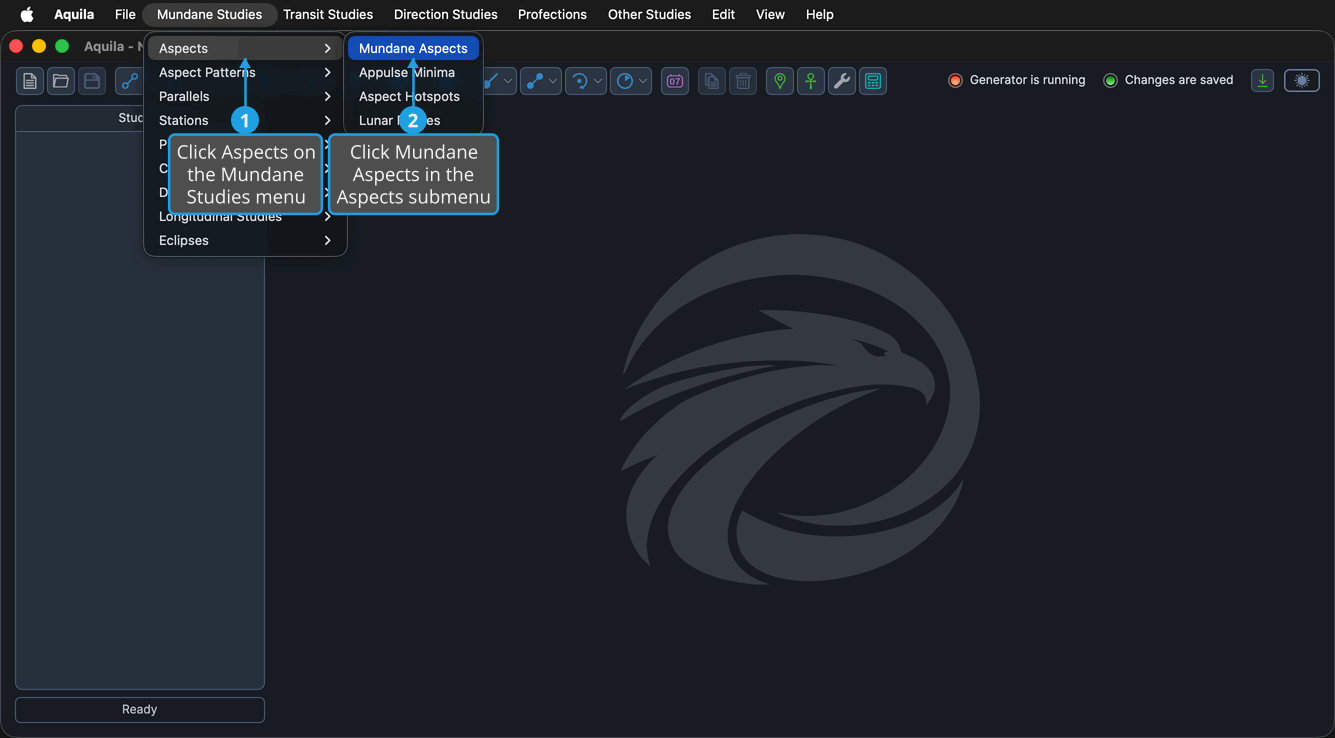
The twelve drop-down buttons on the toolbar carry the same study types grouped by technique instead. Click a drop-down button to open its flyout, then click a study type on the flyout to create the study the same way. See Toolbar for what each drop-down button offers.
Create a Timeline Study
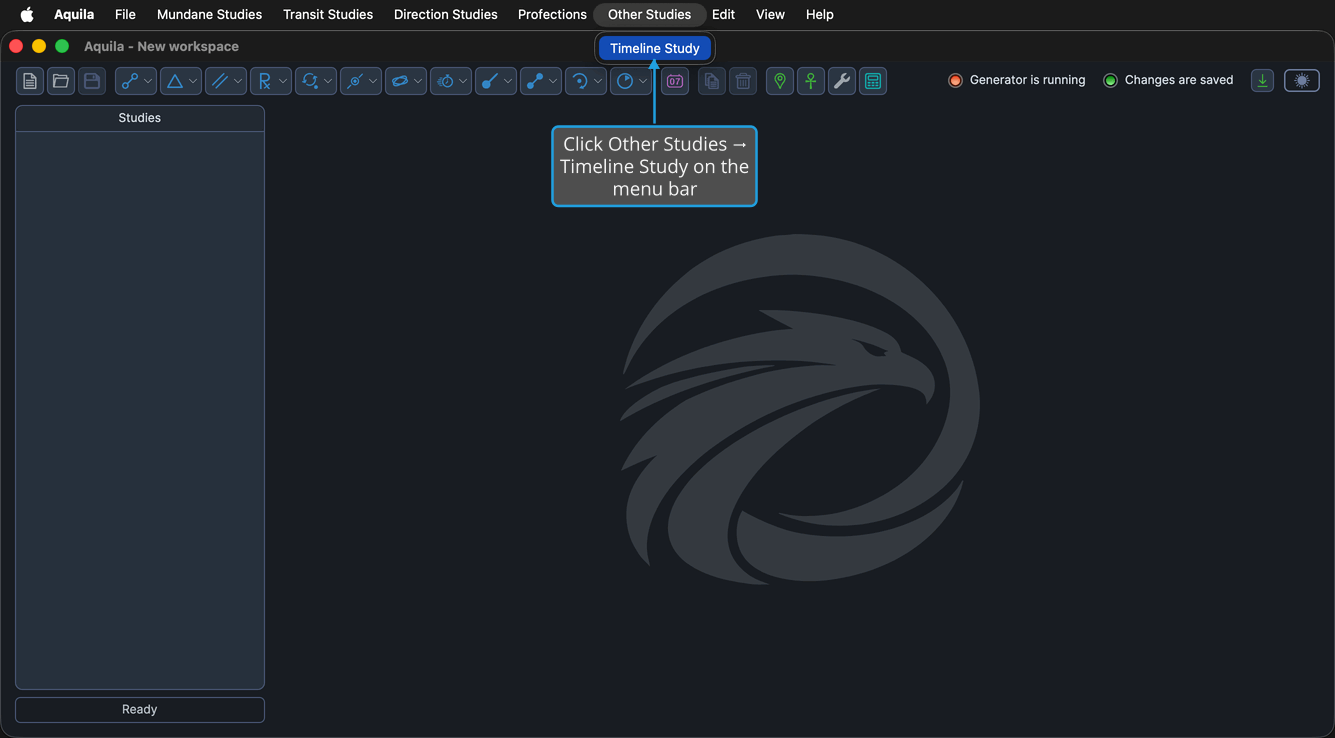
A Timeline study generates nothing of its own. It merges events that other studies in the workspace have already generated, so it is created by its own command rather than from a study menu.
To add one:
- Click Other Studies → Timeline Study on the menu bar.
A study named "Timeline" appears at the bottom of the Studies list and is selected, so the Timeline view opens immediately.
What the New Study Starts With
However you create it, a new study arrives in a consistent state:
- It is named after its type, so a new Mundane Aspects study is called "Mundane Aspects."
- Its settings are seeded from the Workspace Defaults, which the workspace itself took from the Application Defaults when it was created.
- It appears at the bottom of the Studies list and is selected automatically, so its view is already open in the content region.
Rename the study straight after you create it, in the Study Name box at the top of its settings. That keeps the Studies list readable once the workspace holds several variants of one technique.
Where Each Study Type Lives
The table below gives the menu route to every study type and the section of this documentation that covers it.
| Menu Path | Study Types | Documented In |
|---|---|---|
| Mundane Studies → Aspects | Mundane Aspects, Appulse Minima, Aspect Hotspots, Lunar Phases | Mundane Aspect Studies |
| Mundane Studies → Aspect Patterns | Grand Trines, Kites, Stelliums, T-Squares, Yods, Grand Squares | Aspect Pattern Studies |
| Mundane Studies → Parallels | Mundane Parallels | Mundane Parallel Studies |
| Mundane Studies → Stations | Mundane Stations, Retrograde Cycles, Station Hotspots | Mundane Station Studies |
| Mundane Studies → Planetary Cycles | Inferior Planetary Cycles, Superior Planetary Cycles | Planetary Cycle Studies |
| Mundane Studies → Critical Degree Transits | Hotspot Transits, Sign Ingresses | Critical Degree Transit Studies |
| Mundane Studies → Declination Studies | Nodal Transits, Latitude Extrema, Solar Limit Transits, Heliacal Phenomenon | Declination Studies |
| Mundane Studies → Longitudinal Studies | Speed Extrema, Maximum Elongations, Mundane Arcs | Longitudinal Studies |
| Mundane Studies → Eclipses | Solar Eclipses, Solar Eclipse Hotspots, Lunar Eclipses, Lunar Eclipse Hotspots | Eclipse Studies |
| Transit Studies | Transiting Aspects, Aspect Activations, Conjunction Activations, Grand Trine Activations, Stellium Activations, T-Square Activations, Yod Activations, Grand Square Activations, Kite Activations, Transiting Parallels, Parallel Activations, Station Activations, House Ingresses, Solar Eclipse Activations, Lunar Eclipse Activations | Transit Studies |
| Direction Studies | Primary Directions, Solar Arc Directions, Secondary Progressions | Direction & Profection Studies |
| Profections | Profections | Direction & Profection Studies |
| Other Studies | Timeline Study | Timeline Studies |
For the exact command list of each menu, including the Edit, View, and Help menus, see Menu Bar.