Delete Study
Workspaces accumulate trial studies: variants you tested once, techniques that turned out not to apply, and copies you made that you no longer need. Deleting a study removes it, and any events it has generated, from the workspace, keeping the Studies list short enough to read.
Deletion asks for confirmation, because a study that took a long time to generate takes as long to generate again.
Delete a Study
To remove a study from the workspace:
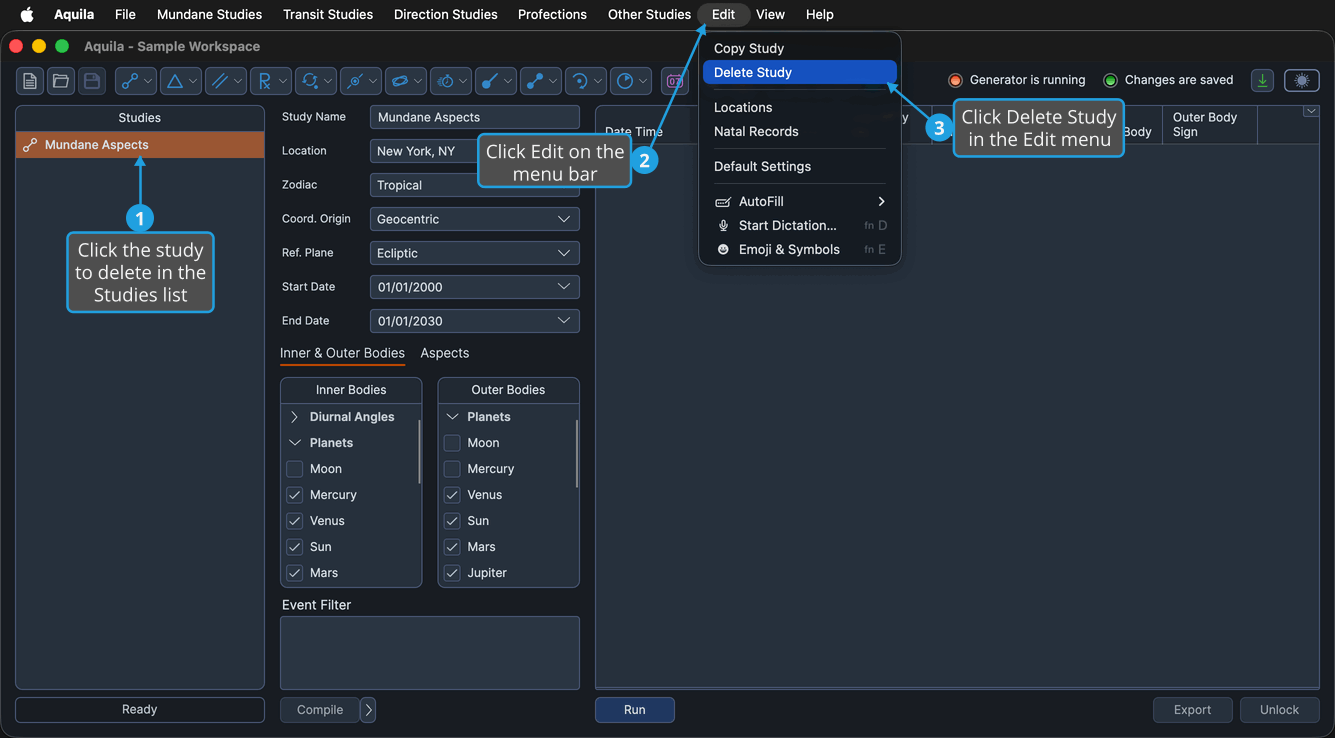
- Click the study to delete in the Studies list.
- Open the Edit Menu.
- Click Delete Study in the Edit menu.
- Click Yes in the Confirmation Request prompt, which asks "Delete the selected study?"
The study leaves the Studies list and the study above it becomes selected. If you deleted the last study, no study remains selected. Aquila marks the workspace as having unsaved changes, so the deletion is not permanent until you save.
The Delete Study button on the toolbar, the Delete item on the Studies list right-click menu, and the Delete key while the Studies list has focus all run the same command.
The command needs a study selected in the Studies list, and is unavailable while the workspace is locked by a save or a load, or while the selected study is generating events.