Body Metrics List
See only the positional measurements you need for each body. The body metrics list is a checklist of the metrics shown for every selected body: check or uncheck a metric's check box, and the ephemeris table's columns or the graph update at once, before or after the study is generated.
| Study Type | List | Where It Appears | Effect of a Selected Metric |
|---|---|---|---|
| Ephemeris | Metrics | Beside the Bodies list | Adds the metric's column for every selected body to the ephemeris table |
| Aspect Ephemeris | Body Metrics | On the Body & Aspect Metrics tab, beside the Aspect Metrics list | Adds the metric's column for every selected body to the ephemeris table |
| Graphic Ephemeris | Metrics | Beside the Bodies list | Plots the metric's curves for every selected body on the graph |
Graphic Aspect Ephemeris studies have no body metrics list; their pair metrics are chosen in the Aspect Metrics List.
On Ephemeris and Aspect Ephemeris studies, this list is one of the two ways to choose which body columns the ephemeris table shows. The other is the menu that opens when you right-click a column heading, described in Column Visibility Menu.
Every metric is already part of the generated results, so selecting or clearing a metric never requires generating the study again, and the list stays available after the study is generated. On a Graphic Ephemeris study, changing which bodies are plotted is different: it requires unlocking the study and generating it again, as described in Unlock Study.
Select an Ephemeris, Aspect Ephemeris or Graphic Ephemeris study in the Studies list before you follow the procedures on this page. On an Aspect Ephemeris study, click the Body & Aspect Metrics tab before you follow the procedures on this page.
Show or Hide a Body Metric
Choose whether a positional metric is shown for every selected body.
- Click the metric's check box.
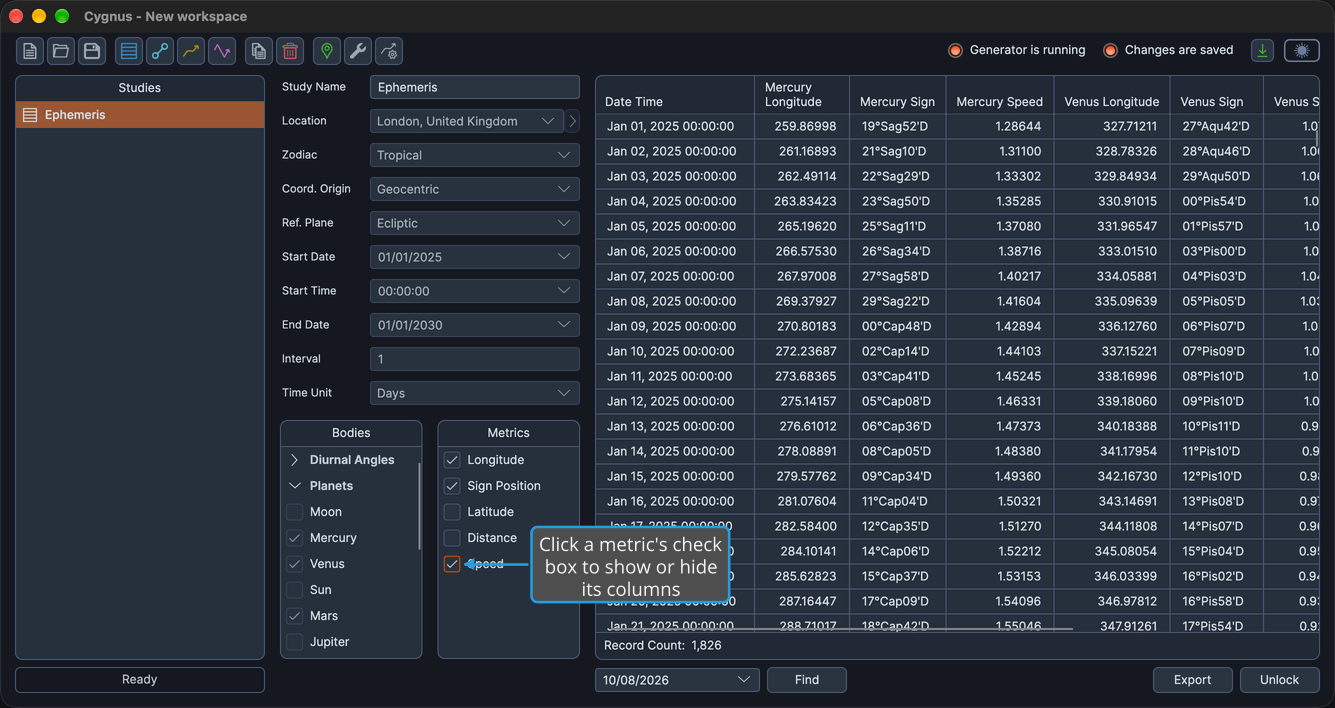
On Ephemeris and Aspect Ephemeris studies, selecting a metric adds its column for every selected body to the ephemeris table, and clearing it removes those columns. On Graphic Ephemeris studies, the metric's curves are added to or removed from the graph. While the list has the keyboard focus, pressing Space toggles every highlighted metric row at once.
Select Several Body Metrics at Once
Select a range of body metrics in one action.
-
Highlight the metric rows you want to select.
tipTo highlight a range, click its first metric row and Shift-click its last. To highlight metric rows that are not next to each other, Cmd-click (Ctrl-click on Windows) each row.
-
Right-click one of the highlighted metric rows.
-
Click Select in the context menu.
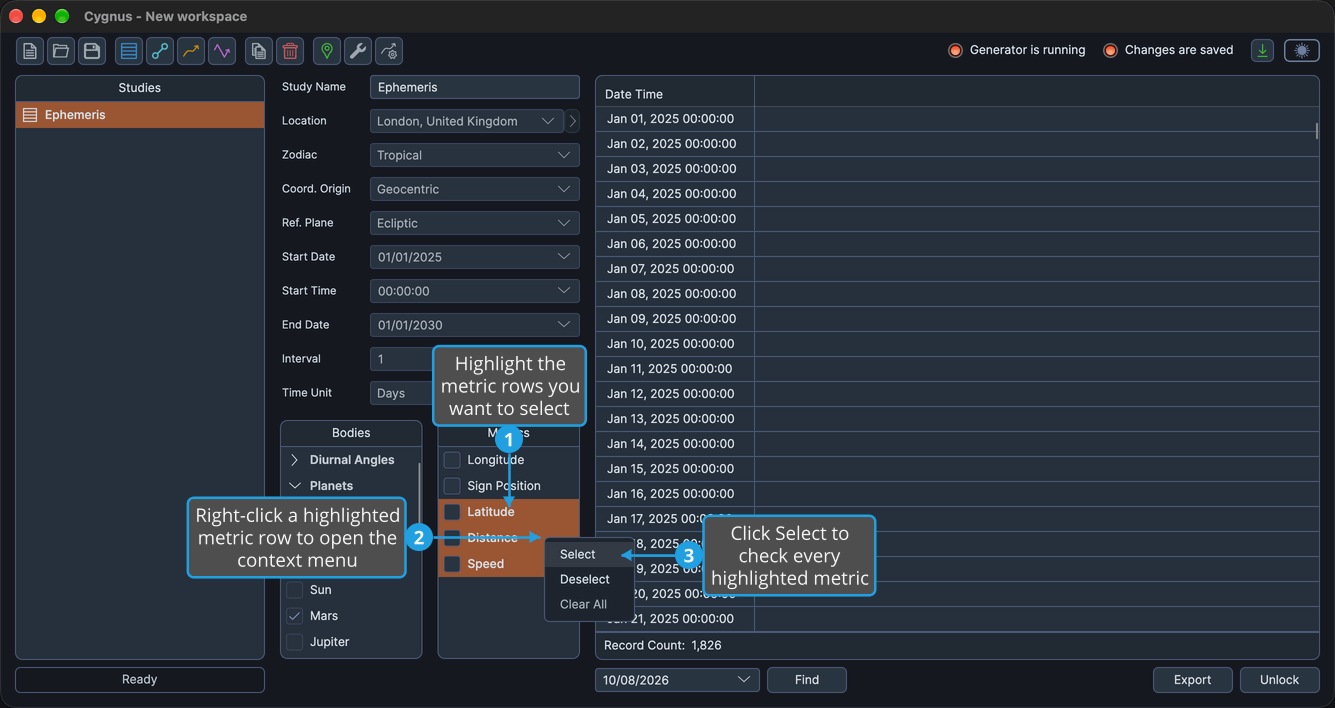
Every highlighted metric is selected, and its columns or curves are shown. The highlight clears when the menu closes.
Deselect Several Body Metrics at Once
Clear a range of body metrics in one action.
-
Highlight the metric rows you want to clear.
tipTo highlight a range, click its first metric row and Shift-click its last. To highlight metric rows that are not next to each other, Cmd-click (Ctrl-click on Windows) each row.
-
Right-click one of the highlighted metric rows.
-
Click Deselect in the context menu.
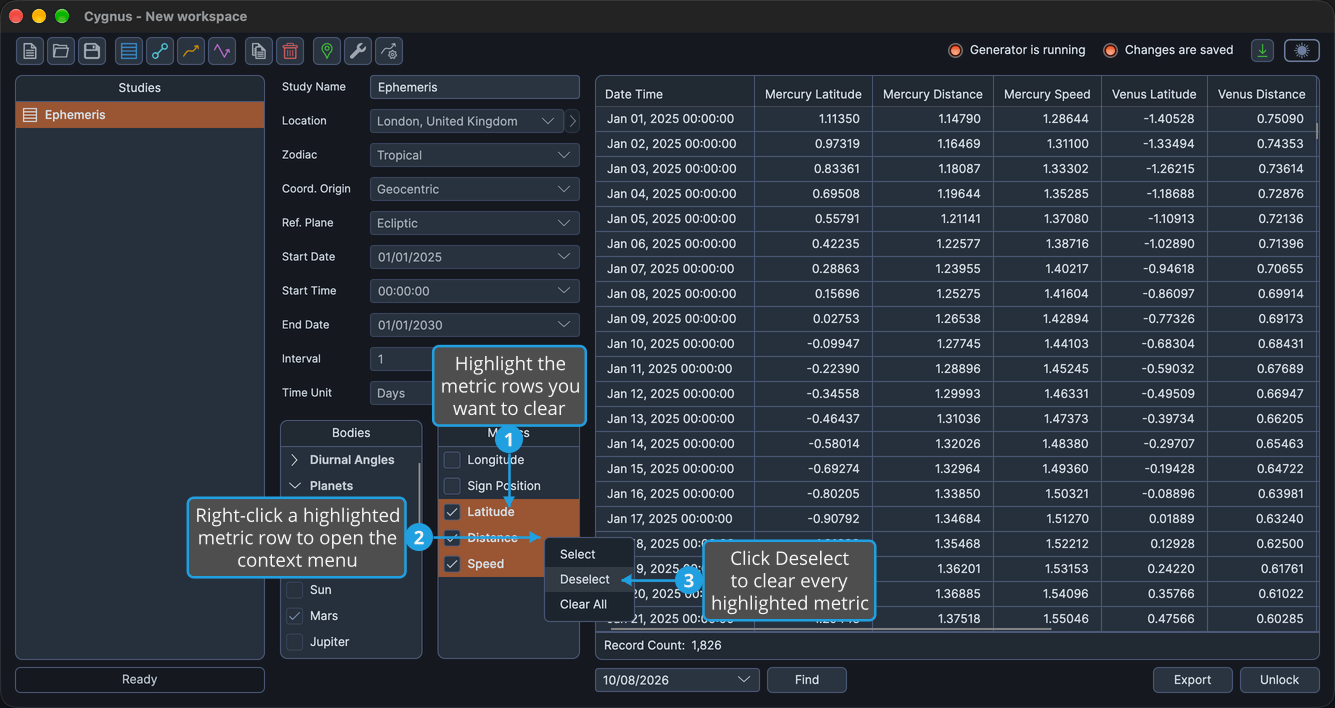
Every highlighted metric is cleared, and its columns or curves are hidden. The highlight clears when the menu closes.
Clear All Body Metrics
Clear every body metric in the list.
- Right-click any metric row in the list.
- Click Clear All in the context menu.
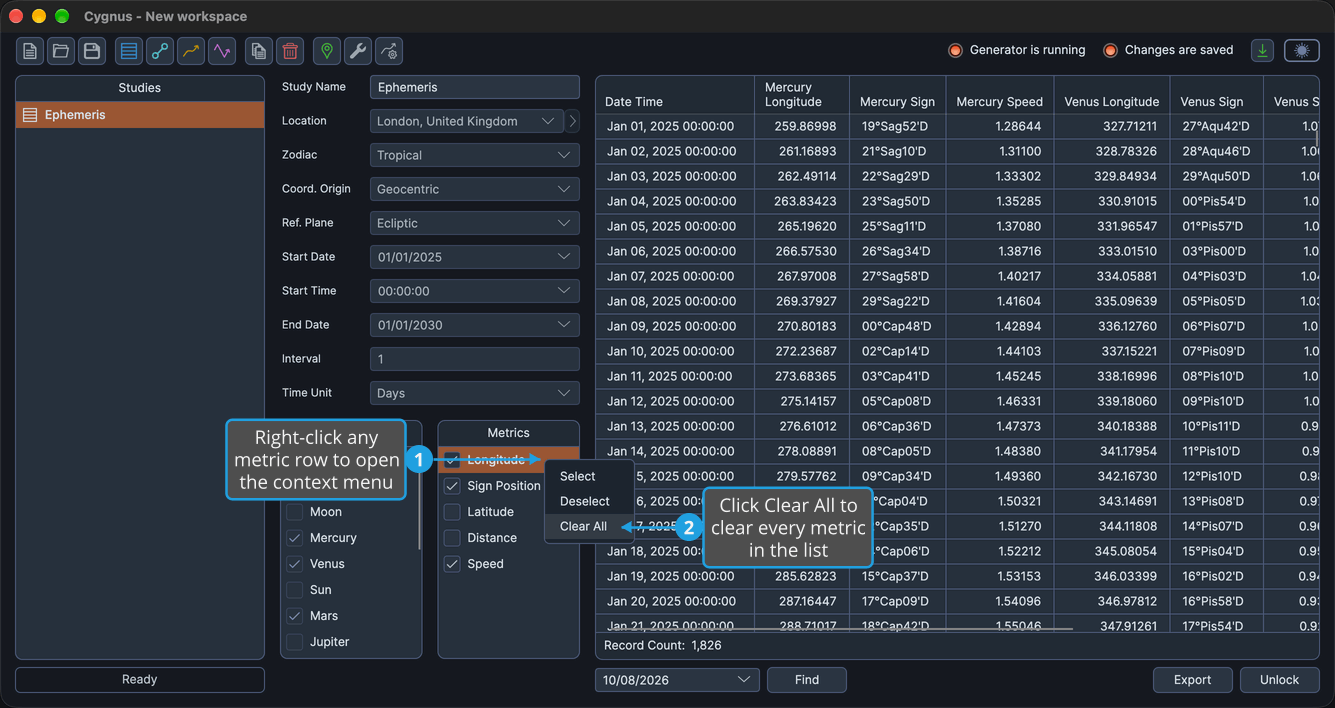
Every metric in the list is cleared, so the ephemeris table shows no body metric columns, or the graph plots no curves.
Metrics Offered
The metrics offered depend on the study type, and their labels depend on the study's reference plane, set in Location and Reference System. Under the Equatorial reference plane, Longitude and Latitude read Right Asc and Declination. Distances are in AU, and speeds are in degrees per day.
Ephemeris and Aspect Ephemeris Studies
The Metrics list of an Ephemeris study and the Body Metrics list of an Aspect Ephemeris study offer five metrics. A new study shows Sign Position only.
With the Ecliptic reference plane:
| Metric | Details |
|---|---|
| Longitude | Reads Right Asc under the Equatorial reference plane |
| Sign Position | Selected in a new study |
| Latitude | Reads Declination under the Equatorial reference plane |
| Distance | In AU |
| Speed | In degrees per day |
With the Equatorial reference plane:
| Metric | Details |
|---|---|
| Right Asc | Takes the place of Longitude |
| Sign Position | Selected in a new study; can be unavailable when no selected body can show it, and stays in the list |
| Declination | Takes the place of Latitude |
| Distance | In AU |
| Speed | In degrees per day |
Graphic Ephemeris Studies
The Metrics list of a Graphic Ephemeris study offers only the four plottable metrics; Sign Position is not among them. A new study plots Longitude only.
With the Ecliptic reference plane:
| Metric | Details |
|---|---|
| Longitude | Plotted in a new study; reads Right Asc under the Equatorial reference plane |
| Latitude | Reads Declination under the Equatorial reference plane |
| Distance | In AU |
| Speed | In degrees per day |
With the Equatorial reference plane:
| Metric | Details |
|---|---|
| Right Asc | Takes the place of Longitude; plotted in a new study |
| Declination | Takes the place of Latitude |
| Distance | In AU |
| Speed | In degrees per day |
Metrics Row Context Menu
Right-clicking any metric row opens this menu, with no separator. It stays available after the study is generated.
| Item | Description |
|---|---|
| Select | Selects every highlighted metric |
| Deselect | Clears every highlighted metric |
| Clear All | Clears every metric in the list |