Location and Reference System
Make sure a study is computed for the right place, zodiac, coordinate origin and reference plane. Four drop-downs below the study name hold these settings: Location, and the three settings that make up the study's Reference System, Zodiac, Coord. Origin and Ref. Plane. Choose them before you generate the study, as described in Generate Study.
Every study needs a location, whatever its coordinate origin. The dates and times of a study's results are computed and shown in the location's time zone, so no study can be generated without one.
The four drop-downs are locked while the study holds generated results. To change a setting after the study is generated, unlock the study first, as described in Unlock Study.
Set the Location and Reference System
Each drop-down shows the study's current setting. A new study starts from the workspace defaults, then from the default ephemeris preset when one is marked. Change only the settings you want. No choice changes the options of another drop-down, so you can set them in any order.
Before you start, select the study in the Studies list.
- Location: select the place whose time zone the study's dates and times are shown in.
- Zodiac: select the zodiac the study's positions are expressed in.
- Coord. Origin: select the coordinate origin the positions are measured from. Switching to or from Heliocentric changes the bodies that the study's body lists offer. Selected bodies that the new origin also offers stay selected, and a selected Sun becomes a selected Earth (and back).
- Ref. Plane: select the study's reference plane. Equatorial relabels the Longitude and Latitude metrics as Right Asc and Declination.
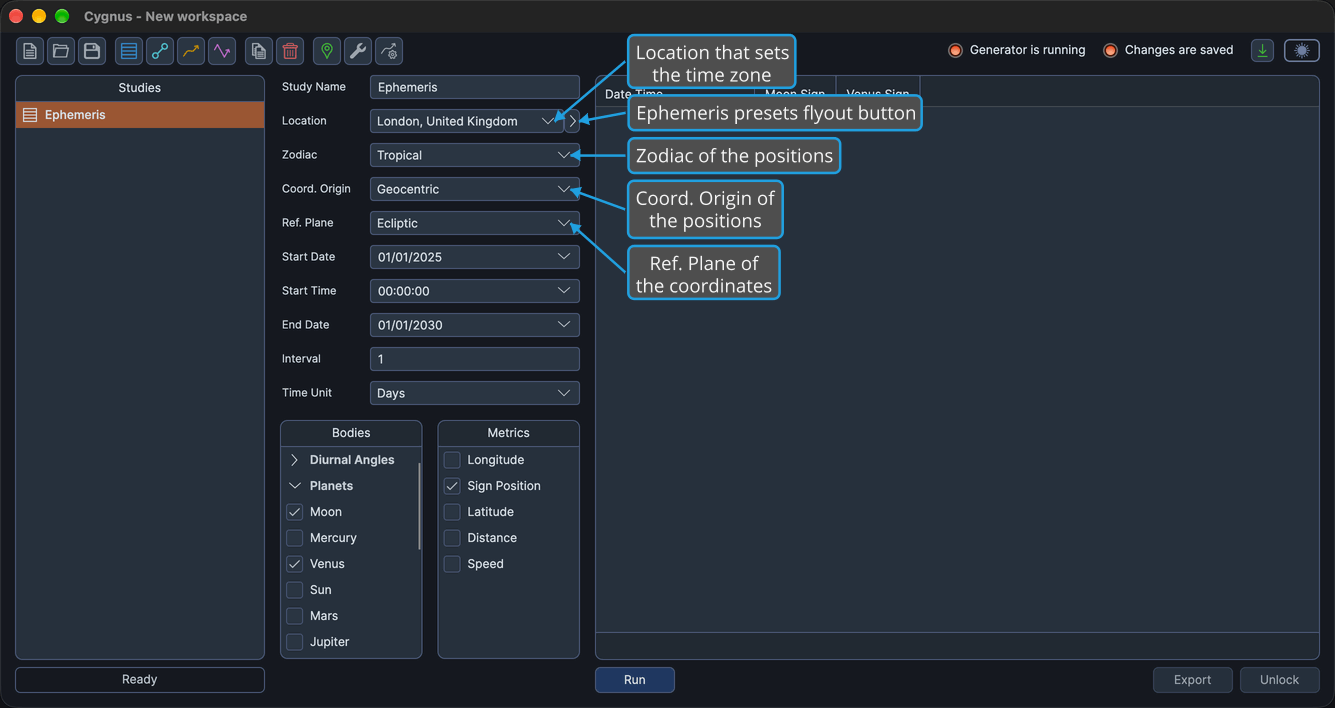
Each change is an unsaved change to the workspace. The workspace defaults are set in the Default Settings Editor. To set all four drop-downs at once from a saved set, use the presets flyout button beside the Location drop-down, as described in Ephemeris Presets.
Drop-Down Options
Location
The Location drop-down lists your saved locations by name. You add, edit, import and delete locations in the Locations Editor, and every study offers the same locations.
Zodiac
The Zodiac drop-down offers two zodiacs:
- Tropical
- Sidereal
Coord. Origin
Every study type offers all three coordinate origins. Geocentric and Topocentric offer the same bodies, and Heliocentric offers its own set.
| Option | Bodies Offered |
|---|---|
| Geocentric | Includes the Sun, the Moon, the Diurnal Angles and the Lunar Axis |
| Topocentric | The same bodies as Geocentric |
| Heliocentric | Includes Earth in place of the Sun and the Moon, and has no Diurnal Angles and no Lunar Axis |
For every body offered under each origin, see Bodies List.
Ref. Plane
The reference plane decides how the Longitude and Latitude metrics are labeled in the metrics lists and in the ephemeris table's columns.
| Option | Metric Labels |
|---|---|
| Ecliptic | Longitude and Latitude |
| Equatorial | Right Asc and Declination |