Bodies List
Choose exactly which celestial bodies your ephemeris covers. Check the box of each body to include, expanding its group by clicking the group's header row if needed. To change several bodies at once, highlight their rows, right-click one of them and choose Select or Deselect; choose Clear All to clear every body.
Ephemeris and Graphic Ephemeris studies show one list, Bodies. Aspect Ephemeris and Graphic Aspect Ephemeris studies show two lists on their Inner & Outer Bodies tab: Inner Bodies, which offers every body for the study's origin, and Outer Bodies, which offers the same bodies without the Diurnal Angles. Every list works the same way. Select the study in the Studies list before you follow the procedures on this page. On an Aspect Ephemeris or Graphic Aspect Ephemeris study, click the Inner & Outer Bodies tab before you follow the procedures on this page.
The bodies offered follow the study's coordinate origin, set in Location and Reference System. Geocentric and Topocentric share one set of bodies, and Heliocentric has its own, with Earth in place of the Sun and the Moon and no Diurnal Angles or Lunar Axis. When you switch the origin to or from Heliocentric, selected bodies that the new origin also offers stay selected, and a selected Sun becomes a selected Earth (and back).
Bodies in a New Study
A new Ephemeris or Graphic Ephemeris study starts with the bodies of the default preset for Bodies lists already selected: the Mercury -> Pluto preset, unless you have marked another preset as the default.
A new Aspect Ephemeris or Graphic Aspect Ephemeris study starts with both its Inner Bodies and Outer Bodies lists empty. Check at least one inner body and one outer body before you generate the study: until both lists have a body, the Run button stays unavailable. If you mark an Inner Bodies or Outer Bodies preset as the default, new aspect studies start with it, as described in Bodies List Presets.
The check boxes and the body row menu are locked while the study holds generated results, although groups can still be expanded and collapsed. To change the bodies after the study is generated, unlock the study first, as described in Unlock Study.
Select or Deselect a Body
Include a body in the study or leave it out. If the body's group is collapsed, expand it first.
- Click the body's check box.
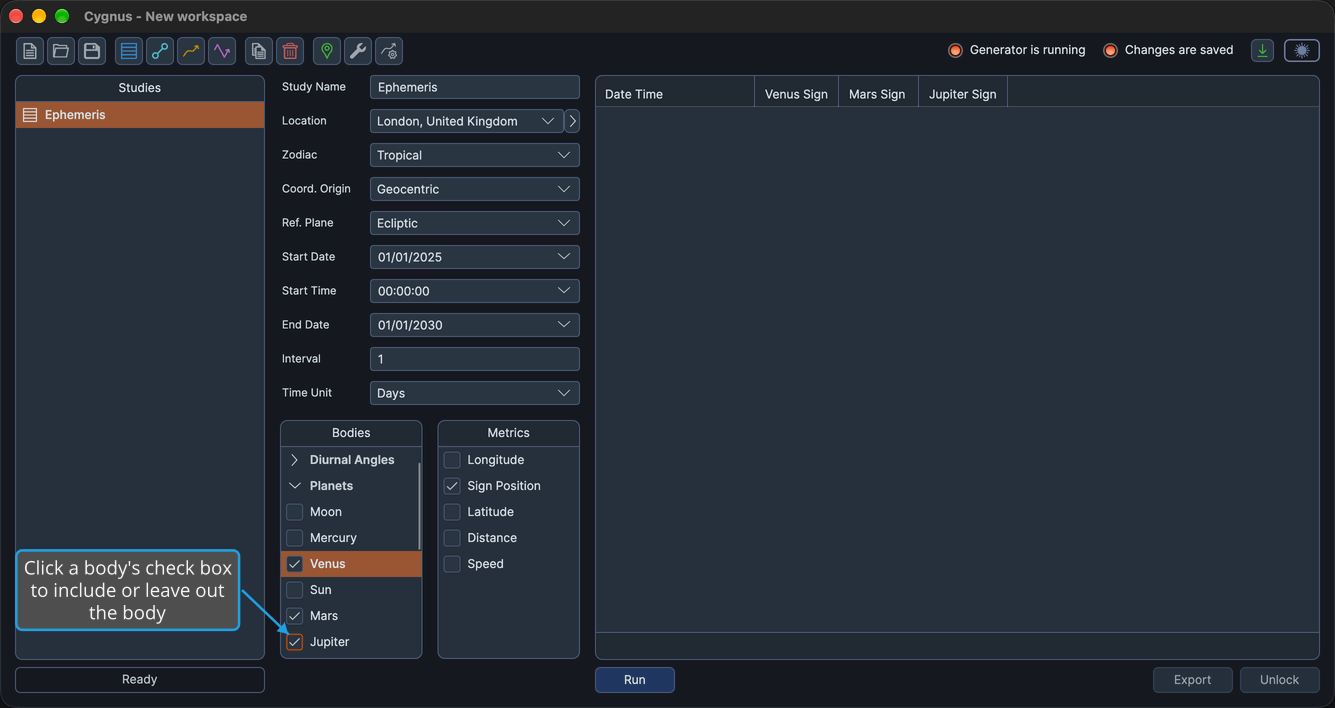
A selected check box includes the body in the study, and a cleared check box leaves it out. The change is an unsaved change to the workspace. While the list has the keyboard focus, pressing Space toggles every highlighted body row at once.
Expand or Collapse a Body Group
Show or hide the bodies of one group in the list.
- Click the group's header row.
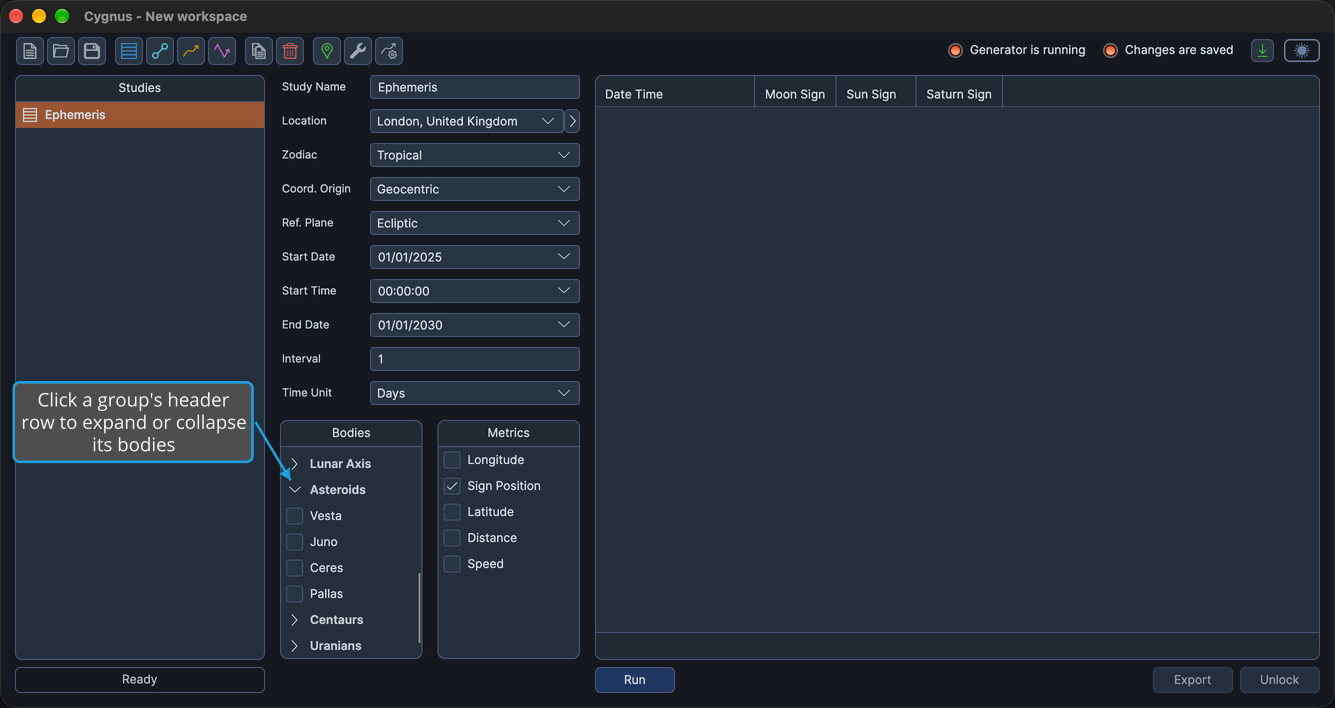
The group's chevron turns down and its bodies appear beneath the header row, or the chevron turns right and its bodies are hidden. Clicking the chevron itself does the same. With a header row focused, press Space or Enter to toggle the group, the Right arrow key to expand it, or the Left arrow key to collapse it. Groups expand and collapse even while the study holds generated results. Right-clicking a header row opens no menu.
Select Several Bodies at Once
Select a range of bodies in one action.
-
Highlight the body rows you want to select.
tipTo highlight a range, click its first body row and Shift-click its last. To highlight body rows that are not next to each other, Cmd-click (Ctrl-click on Windows) each row.
-
Right-click one of the highlighted body rows.
-
Click Select in the context menu.
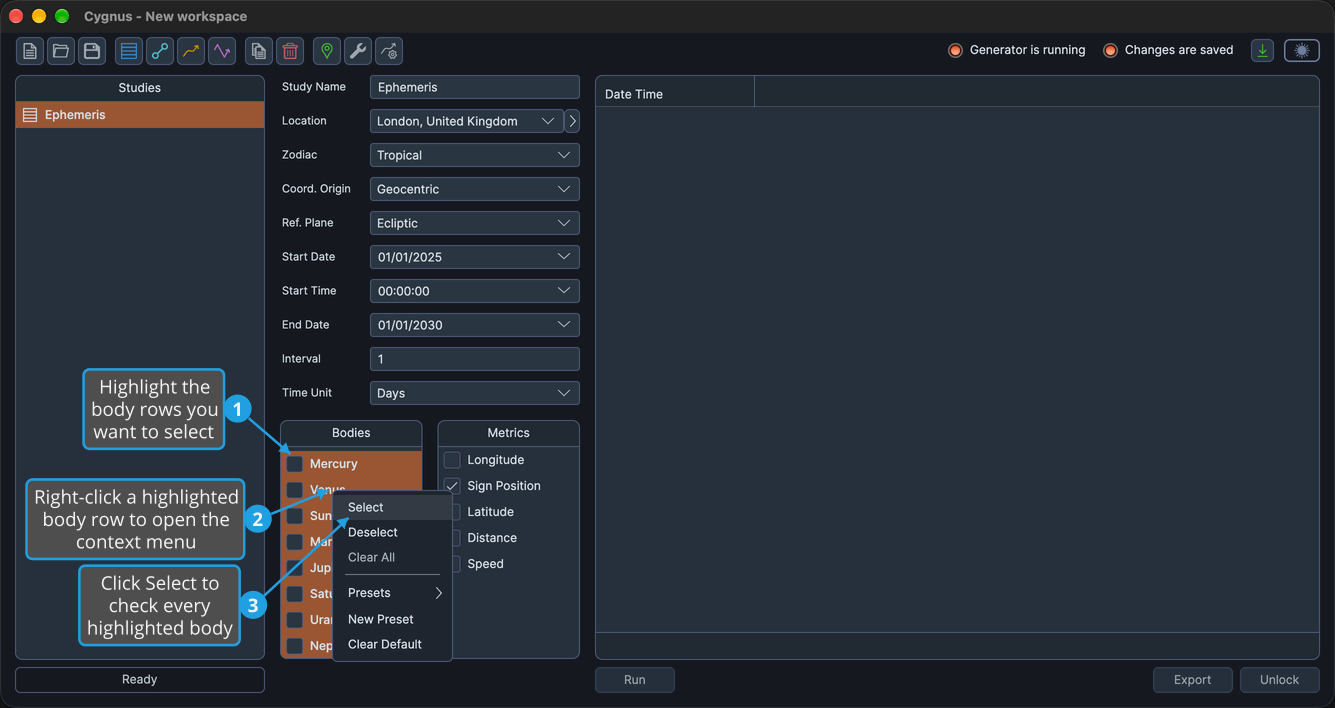
Every highlighted body is selected and included in the study. Group header rows are never highlighted, and the highlight clears when the menu closes.
Deselect Several Bodies at Once
Clear a range of bodies in one action.
-
Highlight the body rows you want to clear.
tipTo highlight a range, click its first body row and Shift-click its last. To highlight body rows that are not next to each other, Cmd-click (Ctrl-click on Windows) each row.
-
Right-click one of the highlighted body rows.
-
Click Deselect in the context menu.
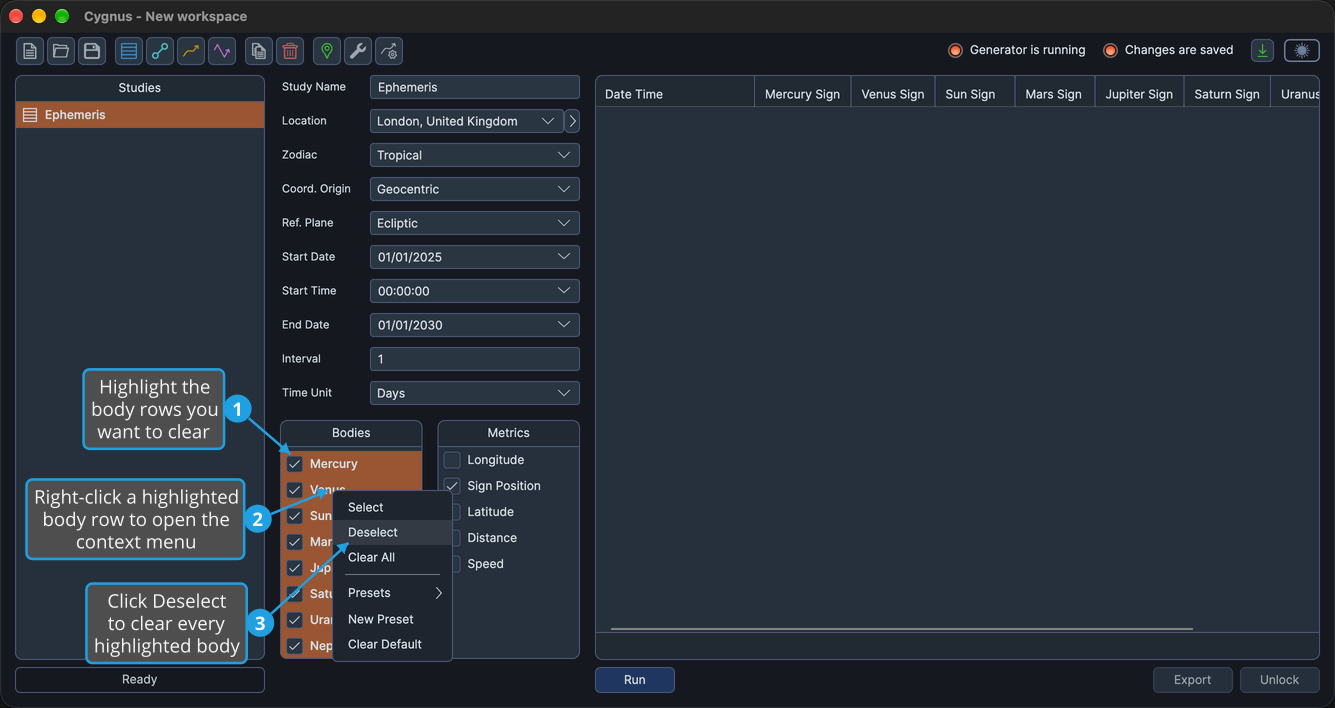
Every highlighted body is cleared and left out of the study. Group header rows are never highlighted, and the highlight clears when the menu closes.
Clear All Bodies
Clear every body in the list.
- Right-click any body row in the list.
- Click Clear All in the context menu.
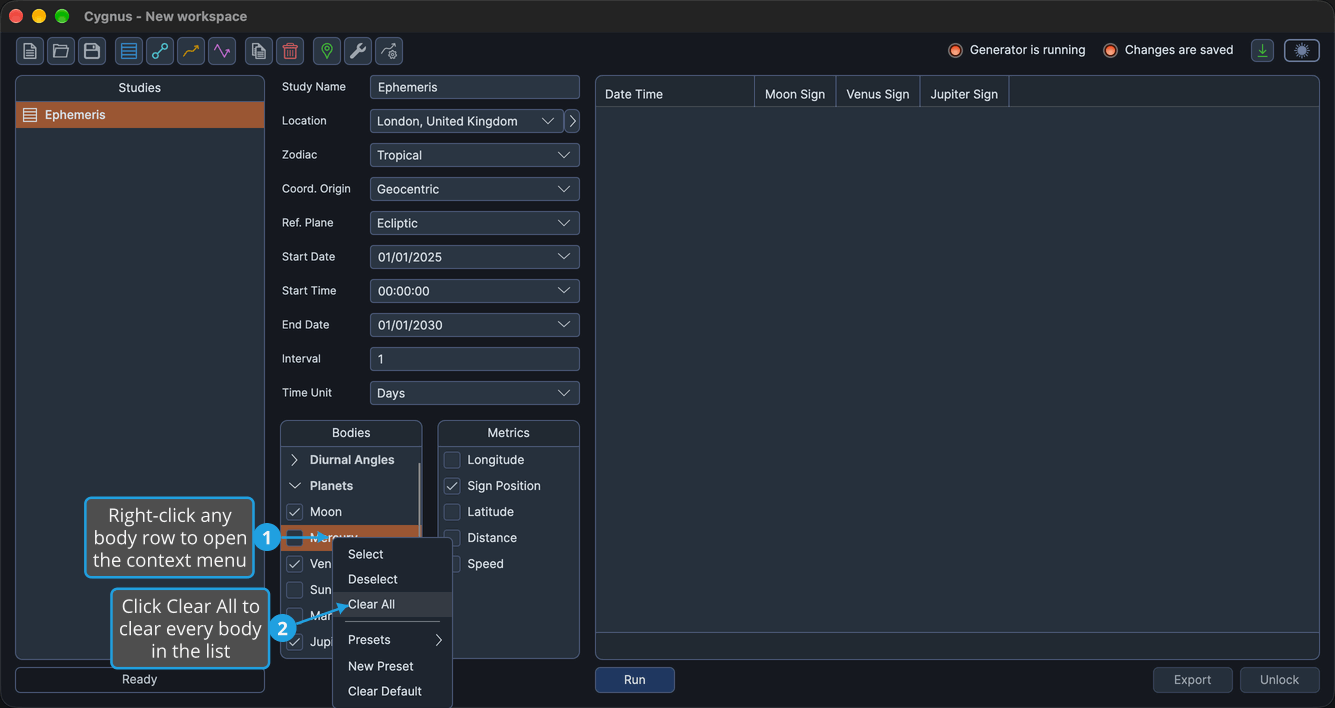
Every body in the list is cleared, so the list contributes no bodies to the study. Clear All acts on the whole list, whether or not any rows are highlighted. On a list with no body selected, Clear All is unavailable.
Bodies Offered
The bodies a list offers depend on the study's coordinate origin. Each table lists the bodies in the order the list shows them, with the group each one appears under.
Geocentric and Topocentric
The Bodies and Inner Bodies lists offer these 33 bodies. The Outer Bodies list offers the same bodies without the four Diurnal Angles, 29 in all.
| Body | Group |
|---|---|
| Ascendant | Diurnal Angles |
| Medium Coeli | Diurnal Angles |
| Descendant | Diurnal Angles |
| Imum Coeli | Diurnal Angles |
| Moon | Planets |
| Mercury | Planets |
| Venus | Planets |
| Sun | Planets |
| Mars | Planets |
| Jupiter | Planets |
| Saturn | Planets |
| Uranus | Planets |
| Neptune | Planets |
| Pluto | Planets |
| Tenet | Barycenters |
| Lunar Apogee | Lunar Axis |
| Mean Apogee | Lunar Axis |
| North Node | Lunar Axis |
| Mean Node | Lunar Axis |
| Vesta | Asteroids |
| Juno | Asteroids |
| Ceres | Asteroids |
| Pallas | Asteroids |
| Chiron | Centaurs |
| Pholus | Centaurs |
| Cupido | Uranians |
| Hades | Uranians |
| Zeus | Uranians |
| Kronos | Uranians |
| Apollon | Uranians |
| Admetos | Uranians |
| Vulkanus | Uranians |
| Poseidon | Uranians |
Heliocentric
The Bodies, Inner Bodies and Outer Bodies lists all offer these 24 bodies. Heliocentric has no Diurnal Angles or Lunar Axis group, and offers Earth in place of the Sun and the Moon.
| Body | Group |
|---|---|
| Mercury | Planets |
| Venus | Planets |
| Earth | Planets |
| Mars | Planets |
| Jupiter | Planets |
| Saturn | Planets |
| Uranus | Planets |
| Neptune | Planets |
| Pluto | Planets |
| Tenet | Barycenters |
| Vesta | Asteroids |
| Juno | Asteroids |
| Ceres | Asteroids |
| Pallas | Asteroids |
| Chiron | Centaurs |
| Pholus | Centaurs |
| Cupido | Uranians |
| Hades | Uranians |
| Zeus | Uranians |
| Kronos | Uranians |
| Apollon | Uranians |
| Admetos | Uranians |
| Vulkanus | Uranians |
| Poseidon | Uranians |
Body Groups
The list shows its bodies under collapsible header rows, in this order. A header row appears only when the list holds a body of its group.
- Diurnal Angles
- Planets
- Barycenters
- Lunar Axis
- Asteroids
- Centaurs
- Uranians
A group opens by default when it holds a selected body. When no body in the list is selected, only Planets opens. Header rows are never highlighted and never open the body row menu.
These seven groups and the four color tabs of Graph Settings are two different groupings of the same bodies. They are not meant to correspond.
Body Row Context Menu
Right-clicking a body row opens this menu. A separator sits between Clear All and Presets, and the whole menu is unavailable while the study holds generated results.
| Item | Description |
|---|---|
| Select | Selects every highlighted body |
| Deselect | Clears every highlighted body |
| Clear All | Clears every body in the list |
| Presets | Opens the submenu of saved presets for this kind of list |
| New Preset | Saves the list's current selection as a preset |
| Clear Default | Removes the default mark, so no preset of this kind is applied to new studies |
The three preset items are described in Bodies List Presets.