Date Range and Interval
Make the ephemeris cover exactly the period and spacing you need. Five settings decide when a study samples and how often: Start Date, Start Time, End Date, Interval and Time Unit. The study samples from the start date and time up to the end date, once every interval of the chosen unit. Most ephemerides use an interval of 1 day.
The settings are the same on all four study types, and their dates and times are in the time zone of the study's location, as described in Location and Reference System.
A study can be generated only when its start comes before its end, its interval is greater than zero and bodies are selected. Until then, the Run button is unavailable. To generate the study, see Generate Study.
The fields are locked while the study holds generated results. To change them after the study is generated, unlock the study first, as described in Unlock Study.
Set the Date Range and Interval
Each field shows the study's current value; a new study starts from the workspace defaults. Change only the values you want.
Before you start, select the study in the Studies list.
- Start Date and Start Time: enter the date and time the study starts sampling. Each box also has a drop-down button that opens a calendar or a clock, so you can pick the value with the mouse.
- End Date: enter the date the study samples up to. The end must come after the start.
- Interval and Time Unit: enter the number of time units between samples in Interval, a positive whole number, and select the unit from Time Unit. For a daily ephemeris, enter 1 and select Days.
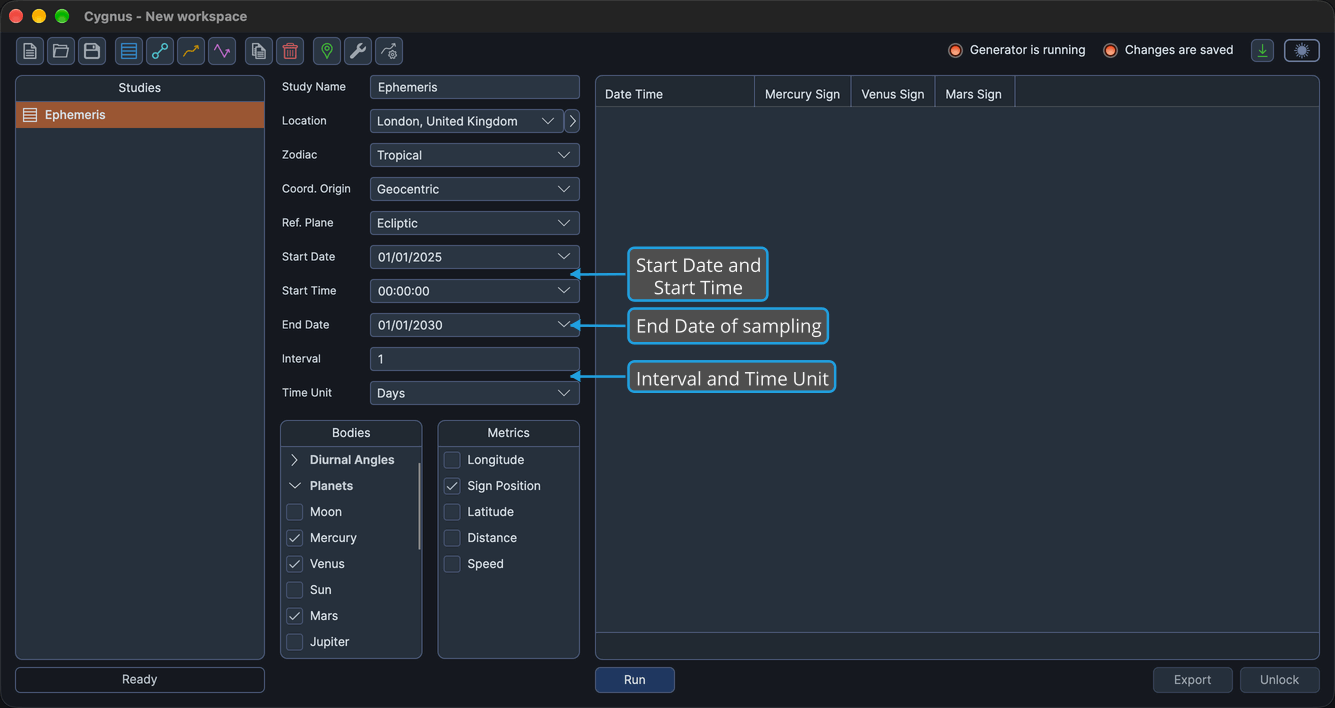
The workspace defaults are set in the Default Settings Editor.
Time Units
The Time Unit drop-down offers the same six units on every study type, from the finest to the coarsest:
- Seconds
- Minutes
- Hours
- Days
- Months
- Years