Default Settings Editor
Start new studies from the location, Reference System and date range you normally use. Choose Edit → Default Settings or click the Default Settings toolbar button, change values in the Application Defaults or Workspace Defaults column, click Save, then click Close.
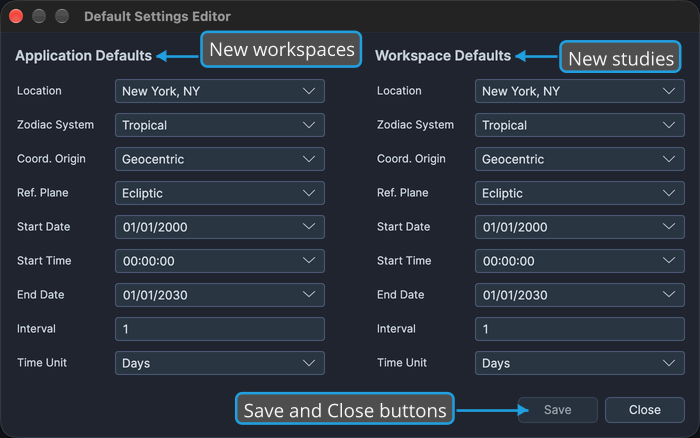
The editor shows the same nine settings in two side-by-side columns:
- Application Defaults are kept with Cygnus. Every new workspace takes them as its workspace defaults.
- Workspace Defaults belong to the open workspace and are saved with it. Each new study you create in the workspace starts with them.
Each column holds Location, Zodiac System, Coord. Origin, Ref. Plane, Start Date, Start Time, End Date, Interval and Time Unit. Studies already in the workspace keep their own settings when you change the defaults.
The Default Settings Editor is a modal window. You cannot open it while a workspace is being loaded or saved.
Open the Default Settings Editor
To open the Default Settings Editor:
- Open the Edit menu (see Open the Edit Menu).
- Click Default Settings in the Edit menu.
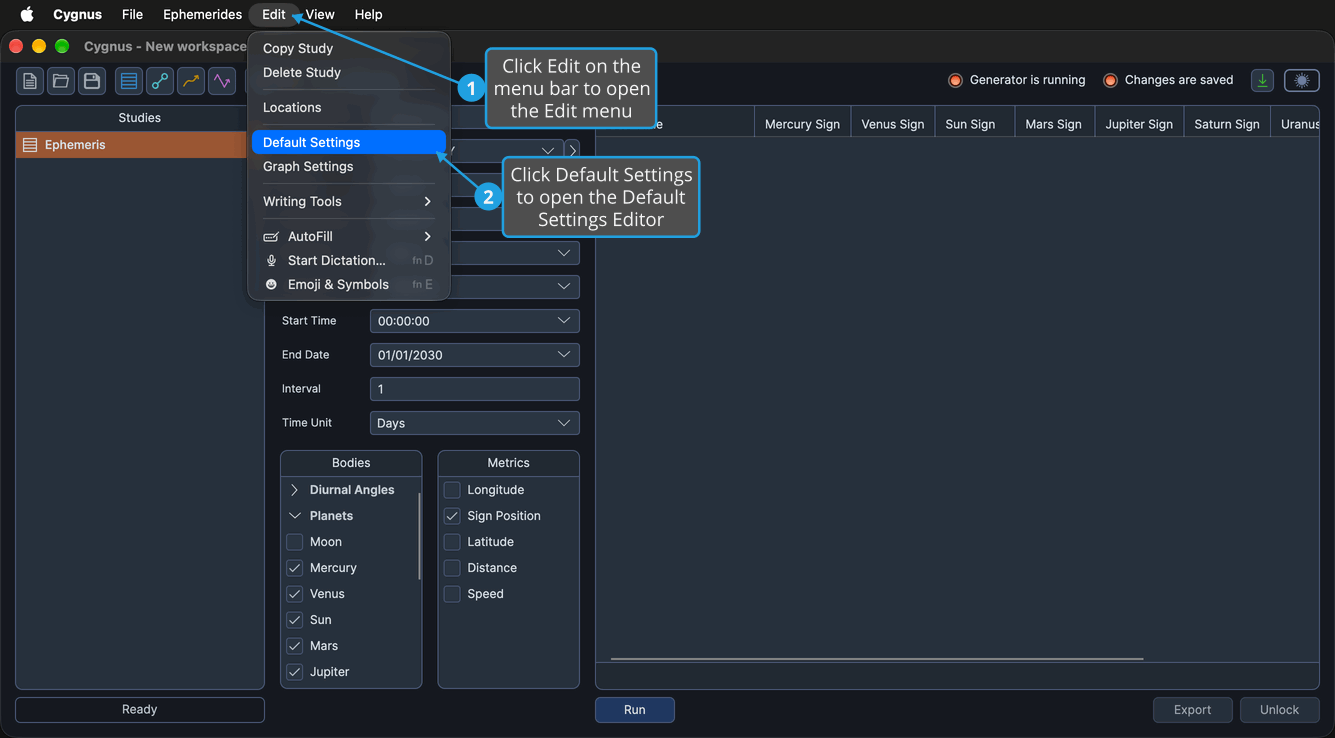
The Default Settings Editor opens over the main window, its Application Defaults and Workspace Defaults columns each showing their nine current settings.
On macOS, the Edit menu is in the menu bar at the top of the screen. You can also click the Default Settings button on the Toolbar.
Change the Application Defaults
The application defaults are the settings every new workspace starts with: when you create a workspace, its workspace defaults are set from them (see New Workspace). Changing the application defaults does not change the open workspace's defaults.
Edit the Application Coordinate Defaults
These settings govern the location and Reference System every new workspace starts with. Every setting in the Application Defaults column already shows its current value, and no setting changes another, so change only the ones you want, in any order:
- Select the default location from the Location drop-down.
- Select the default Reference System from the Zodiac System, Coord. Origin and Ref. Plane drop-downs.
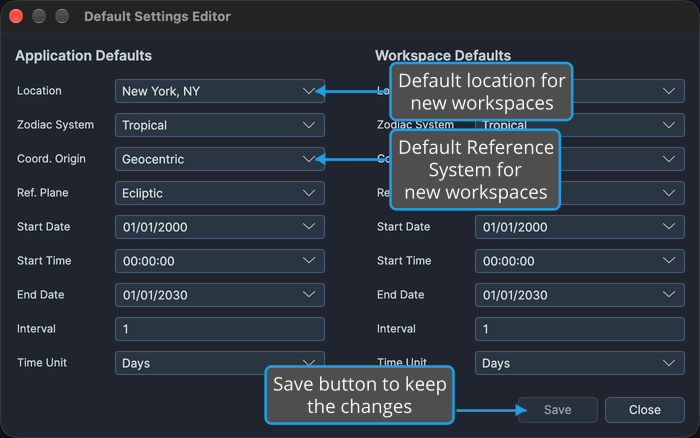
Then click Save to keep your changes.
The application defaults are saved with Cygnus and become the workspace defaults of every new workspace. Save stays unavailable until you make another change.
Edit the Application Date Defaults
These settings govern the date range and interval every new workspace starts with. Every setting in the Application Defaults column already shows its current value, and no setting changes another, so change only the ones you want, in any order:
- Set the default date range in the Start Date, Start Time and End Date fields.
- Set the default interval by entering a positive whole number in the Interval box and selecting its unit from the Time Unit drop-down.
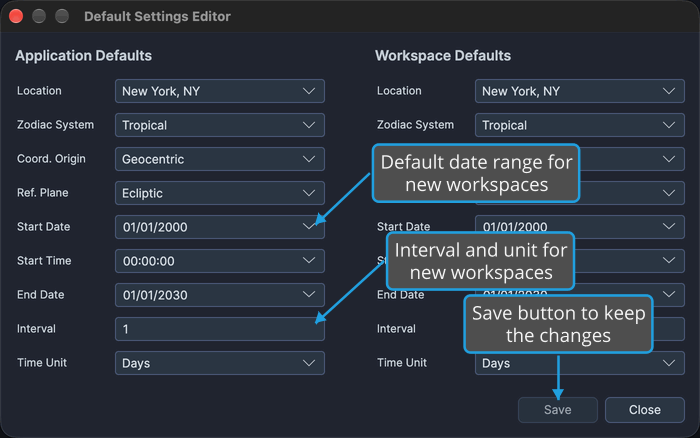
Most ephemerides use an interval of 1 day: enter 1 in the Interval box and select Days from the Time Unit drop-down. The Interval box accepts digits only.
Then click Save to keep your changes.
The application defaults are saved with Cygnus and become the workspace defaults of every new workspace. Save stays unavailable until you make another change.
Change the Workspace Defaults
The workspace defaults belong to the open workspace: each new study you create in it starts with them (see Create Study). Studies already in the workspace keep their own settings. A change to the workspace defaults is an unsaved change to the workspace, so save the workspace to keep it (see Save Workspace).
Edit the Workspace Coordinate Defaults
These settings govern the location and Reference System new studies in the open workspace start with. Every setting in the Workspace Defaults column already shows its current value, and no setting changes another, so change only the ones you want, in any order:
- Select the default location from the Location drop-down.
- Select the default Reference System from the Zodiac System, Coord. Origin and Ref. Plane drop-downs.
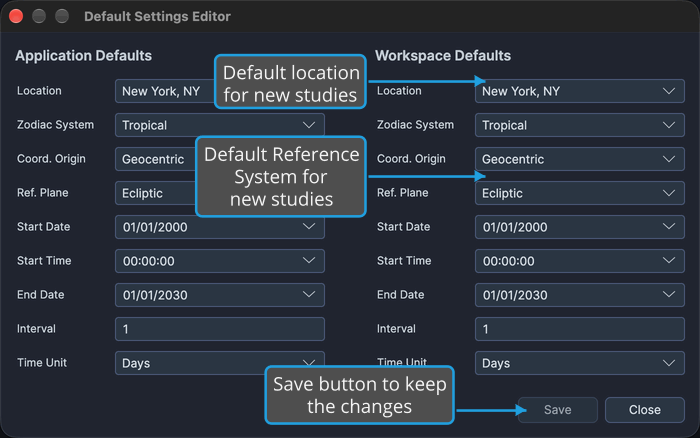
Then click Save to keep your changes.
Cygnus stores the workspace defaults in the open workspace, which now has unsaved changes: save the workspace to keep them (see Save Workspace). Each new study you create in it starts with them. The editor's Save button stays unavailable until you make another change.
Edit the Workspace Date Defaults
These settings govern the date range and interval new studies in the open workspace start with. Every setting in the Workspace Defaults column already shows its current value, and no setting changes another, so change only the ones you want, in any order:
- Set the default date range in the Start Date, Start Time and End Date fields.
- Set the default interval by entering a positive whole number in the Interval box and selecting its unit from the Time Unit drop-down.
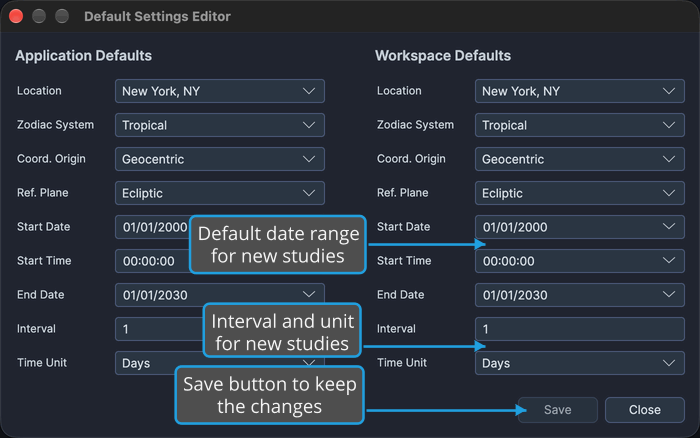
Most ephemerides use an interval of 1 day: enter 1 in the Interval box and select Days from the Time Unit drop-down. The Interval box accepts digits only.
Then click Save to keep your changes.
Cygnus stores the workspace defaults in the open workspace, which now has unsaved changes: save the workspace to keep them (see Save Workspace). Each new study you create in it starts with them. The editor's Save button stays unavailable until you make another change.
Close the Default Settings Editor
When neither column has unsaved changes, close the editor to return to the main window:
- Click Close.
The Default Settings Editor closes. The window's title-bar close button closes it too.
Close the Default Settings Editor and Save Changes
When either column has unsaved changes, Close and the title-bar close button first ask, "Would you like to save your changes before closing?" To save the changes and close the editor:
- Click Close.
- Save the changes in the Unsaved Changes prompt (see Save Changes from the Unsaved Changes Prompt).
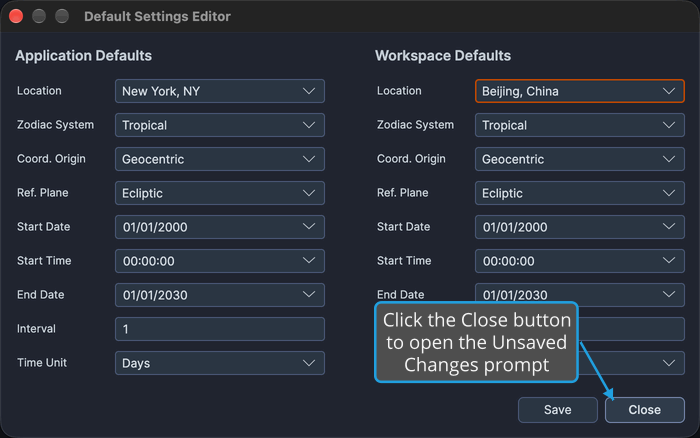
Cygnus saves the changed column and closes the editor. The application defaults are saved with Cygnus; the workspace defaults are stored in the open workspace, which then has unsaved changes until you save it.
To close the editor without saving, answer No instead (see Discard Changes from the Unsaved Changes Prompt). To keep the editor open, answer Cancel (see Cancel from the Unsaved Changes Prompt).
Settings in Each Column
The Application Defaults and Workspace Defaults columns hold the same nine settings, and each drop-down offers the same choices in both columns.
| Setting | Description | Values |
|---|---|---|
| Location | The location new studies start with. Every study needs one, because Cygnus gives the dates and times of an ephemeris in the time zone of its location. | Your saved locations, listed by name. You maintain them in the Locations Editor, and every study's Location drop-down offers the same list. |
| Zodiac System | The zodiac of the Reference System. | Tropical, Sidereal |
| Coord. Origin | The coordinate origin of the Reference System. | Geocentric, Topocentric, Heliocentric, all three always listed |
| Ref. Plane | The reference plane of the Reference System. | Ecliptic, Equatorial |
| Start Date | The date the ephemeris starts on. | A date |
| Start Time | The time of day the ephemeris starts at, on the start date. | A time |
| End Date | The date the ephemeris ends on. | A date |
| Interval | The number of time units between one sample of the ephemeris and the next. | A positive whole number; the box accepts digits only |
| Time Unit | The unit of the interval. | Seconds, Minutes, Hours, Days, Months, Years |
The Time Unit drop-down lists its units from the finest to the coarsest, and Cygnus always offers all six, including the sub-hour units Seconds and Minutes.
Related Topics
- Locations Editor: maintain the locations the Location drop-down offers.
- New Workspace: start a workspace whose workspace defaults come from the application defaults.
- Create Study: add a study that starts from the workspace defaults.
- Location and Reference System: change the location and Reference System of one study.
- Date Range and Interval: change the date range and interval of one study.
- Save Workspace: keep changed workspace defaults with the workspace.