Create Study
Add a new ephemeris of the kind you need to the workspace. Choose a study type from the Ephemerides menu, or click that type's button on the Toolbar. The four study-type buttons show icons only, in the same order as the Ephemerides menu. Each shows the icon that marks a study of its type in the Studies list, the same icon its Ephemerides menu item shows on Windows. The new study appears selected at the bottom of the Studies List, ready to configure.
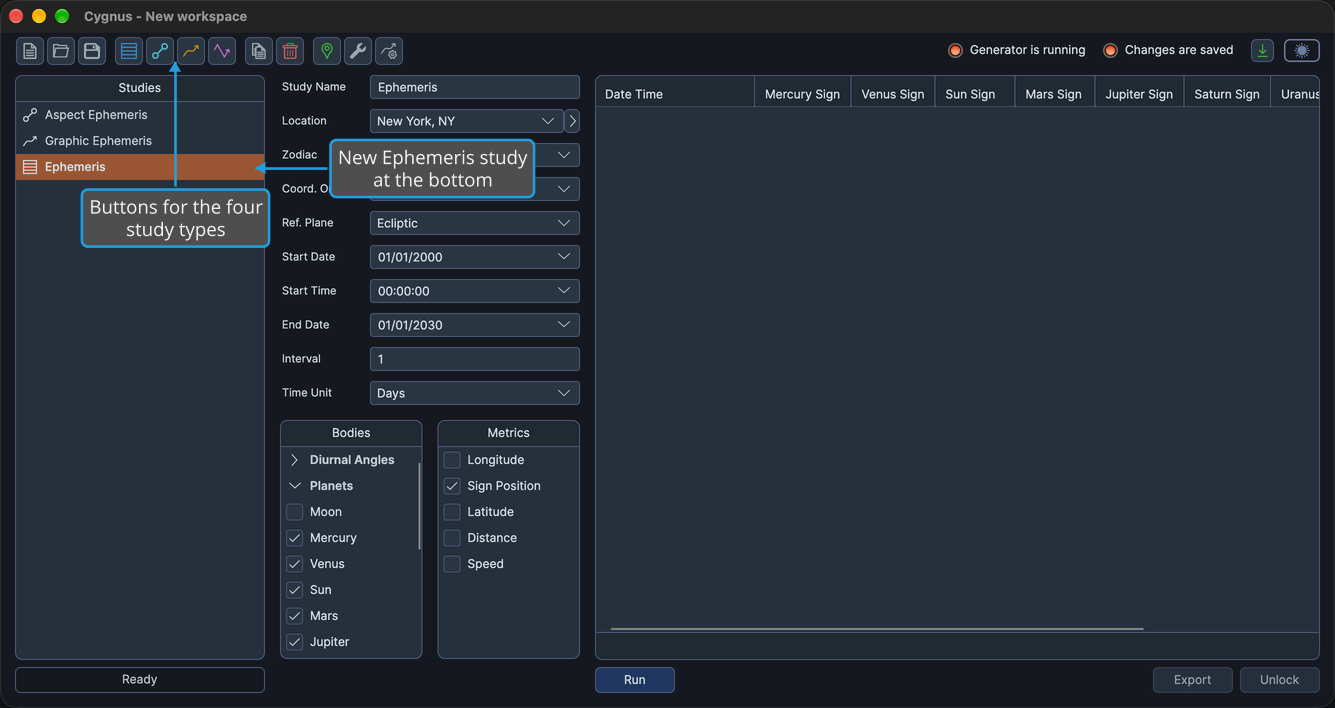
Cygnus offers four study types: Ephemeris, Aspect Ephemeris, Graphic Ephemeris and Graphic Aspect Ephemeris. You cannot create a study while a workspace is being loaded or saved.
On macOS, the Ephemerides menu is in the menu bar at the top of the screen. On Windows, it is in the menu bar of the Cygnus window.
Create an Ephemeris Study
To add an Ephemeris study to the workspace:
- Click Ephemerides on the menu bar.
- Click Ephemeris in the Ephemerides menu.
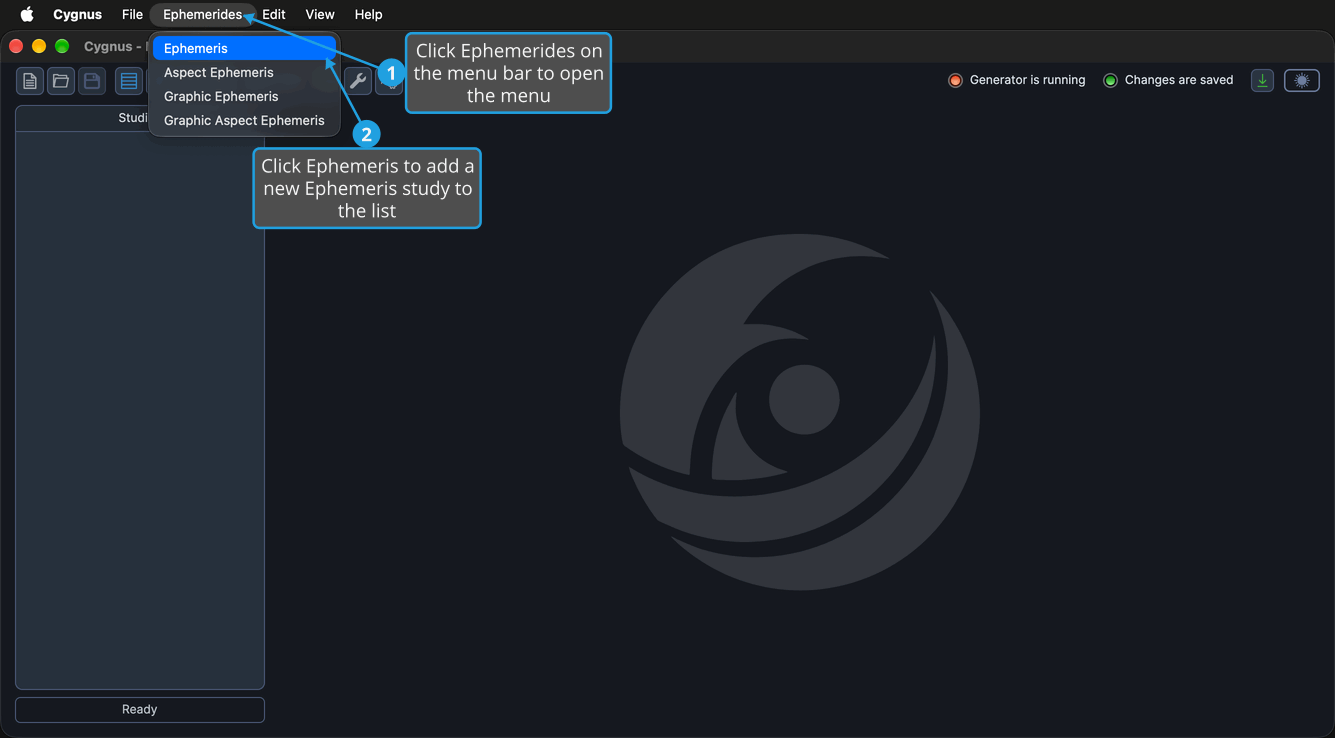
A study named "Ephemeris" is added at the bottom of the Studies list and selected. Its view holds an ephemeris table and side-by-side Bodies and Metrics lists, and it shows Sign Position only.
You can also click the Ephemeris button on the toolbar, the first of the four study-type buttons. It shows the same icon as an Ephemeris study in the Studies list and, on Windows, as Ephemeris in the Ephemerides menu. For the study's view and settings, see Ephemeris Study.
Create an Aspect Ephemeris Study
To add an Aspect Ephemeris study to the workspace:
- Click Ephemerides on the menu bar.
- Click Aspect Ephemeris in the Ephemerides menu.
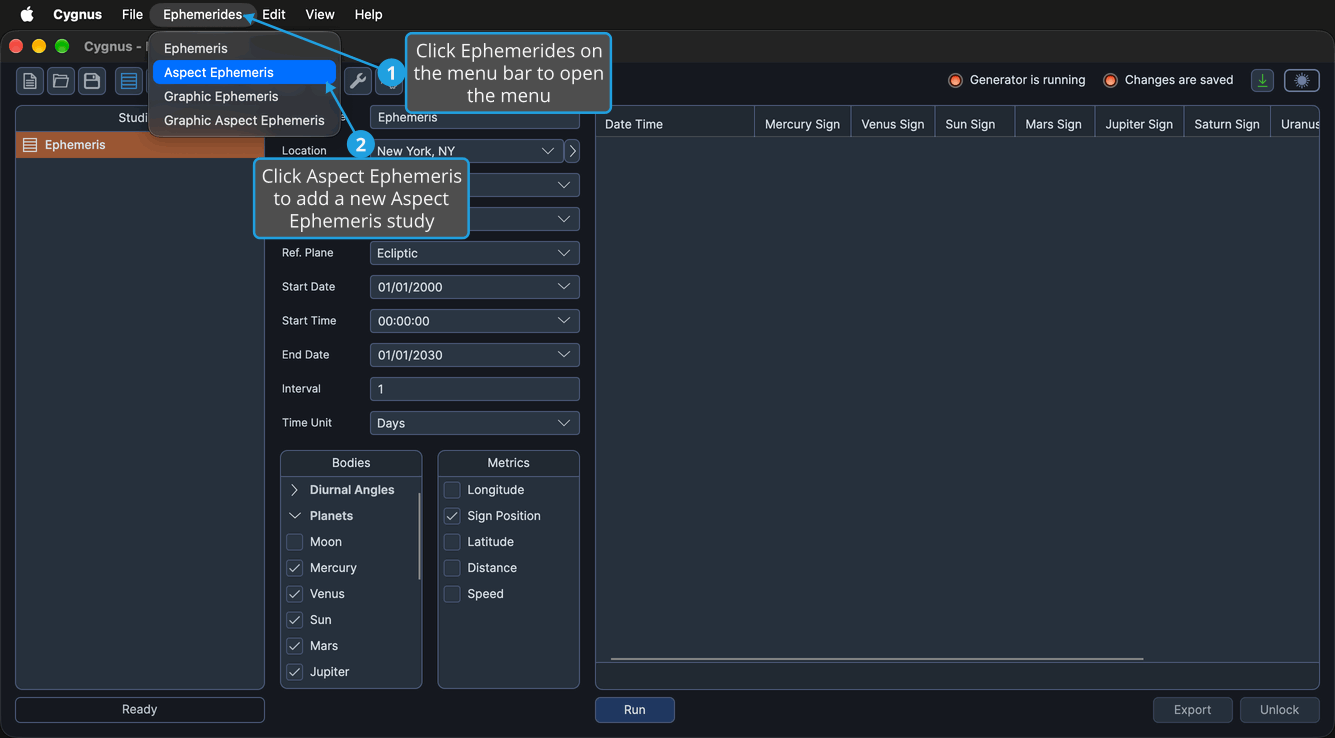
A study named "Aspect Ephemeris" is added at the bottom of the Studies list and selected. Its view holds an ephemeris table and the Inner & Outer Bodies and Body & Aspect Metrics tabs.
The Inner Bodies and Outer Bodies lists of a new Aspect Ephemeris study start empty unless you have marked a default inner or outer bodies list preset. Check at least one body in each list before you generate the study: until both lists have a body, the Run button stays unavailable.
You can also click the Aspect Ephemeris button on the toolbar, the second of the four study-type buttons. It shows the same icon as an Aspect Ephemeris study in the Studies list and, on Windows, as Aspect Ephemeris in the Ephemerides menu. For the study's view and settings, see Aspect Ephemeris Study.
Create a Graphic Ephemeris Study
To add a Graphic Ephemeris study to the workspace:
- Click Ephemerides on the menu bar.
- Click Graphic Ephemeris in the Ephemerides menu.
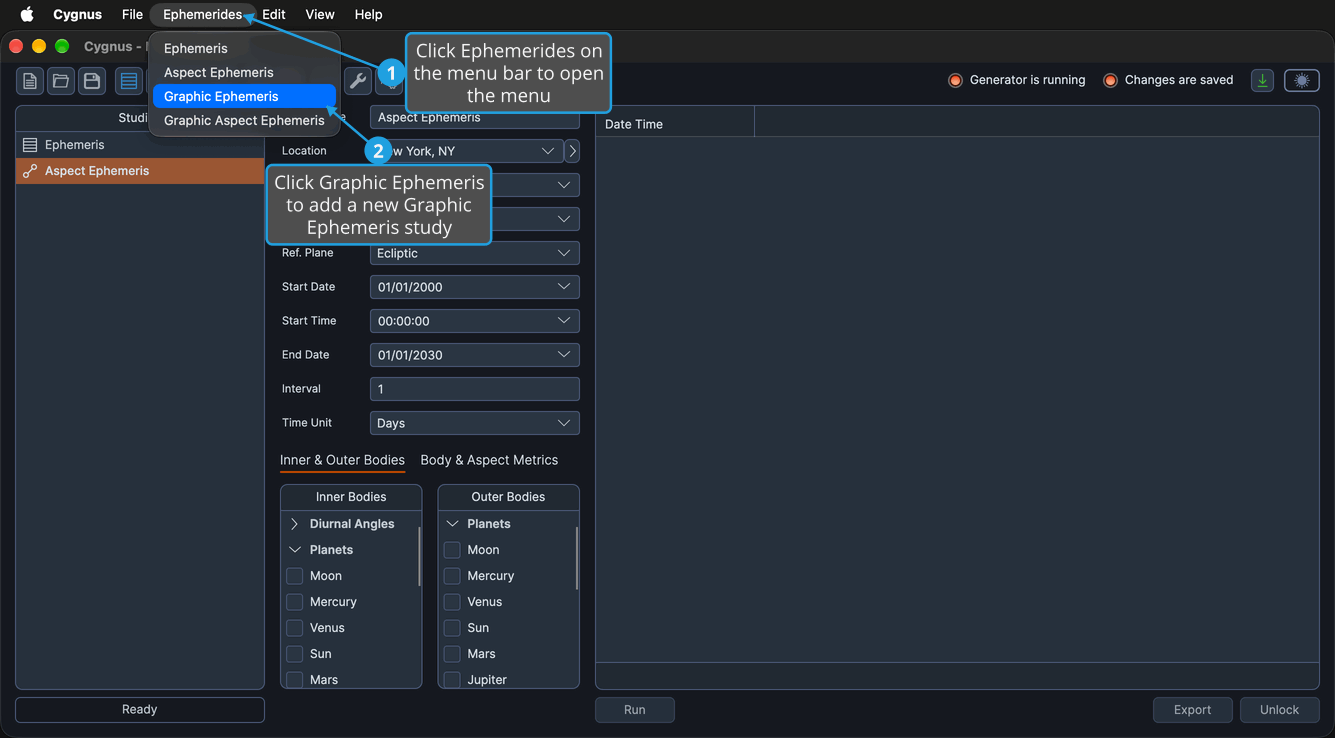
A study named "Graphic Ephemeris" is added at the bottom of the Studies list and selected. Its view holds a graph area and side-by-side Bodies and Metrics lists, and it plots Longitude only.
You can also click the Graphic Ephemeris button on the toolbar, the third of the four study-type buttons. It shows the same icon as a Graphic Ephemeris study in the Studies list and, on Windows, as Graphic Ephemeris in the Ephemerides menu. For the study's view and settings, see Graphic Ephemeris Study.
Create a Graphic Aspect Ephemeris Study
To add a Graphic Aspect Ephemeris study to the workspace:
- Click Ephemerides on the menu bar.
- Click Graphic Aspect Ephemeris in the Ephemerides menu.
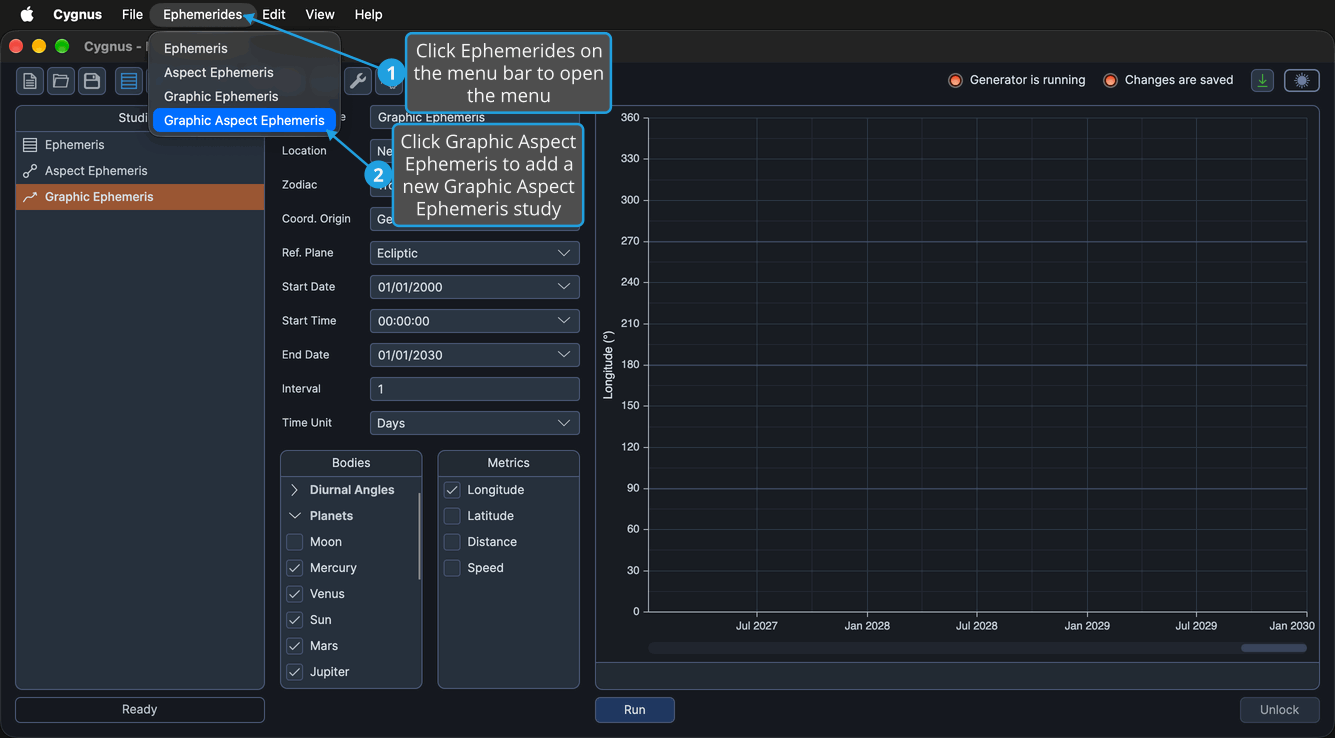
A study named "Graphic Aspect Ephemeris" is added at the bottom of the Studies list and selected. Its view holds a graph area and the Inner & Outer Bodies and Aspect Metrics tabs.
The Inner Bodies and Outer Bodies lists of a new Graphic Aspect Ephemeris study start empty unless you have marked a default inner or outer bodies list preset. Check at least one body in each list before you generate the study: until both lists have a body, the Run button stays unavailable.
You can also click the Graphic Aspect Ephemeris button on the toolbar, the fourth of the four study-type buttons. It shows the same icon as a Graphic Aspect Ephemeris study in the Studies list and, on Windows, as Graphic Aspect Ephemeris in the Ephemerides menu. For the study's view and settings, see Graphic Aspect Ephemeris Study.
New Study Settings
Every new study is named after its type and starts from the workspace defaults: its location, its Reference System (zodiac, coordinate origin and reference plane), its start date and time, its end date, and its interval and time unit. You set the workspace defaults in the Default Settings Editor.
Cygnus then applies the default ephemeris preset and the default bodies list presets, when any are marked. To mark a preset as the default, see Ephemeris Presets and Bodies List Presets.
To rename the new study or change its settings, see Study Name, Location and Reference System and Date Range and Interval.
Related Topics
- Copy Study: start a new study from an existing one.
- Generate Study: produce the records or graph of a configured study.
- Ephemeris Table: read the records of an Ephemeris or Aspect Ephemeris study.
- Ephemeris Graph: read the graph of a Graphic Ephemeris or Graphic Aspect Ephemeris study.
- Bodies List: choose the bodies a study includes.