Open a Graph Point's Chart in Compass
See the full astrological chart for a moment that stands out on the graph. Double-click a point on a curve of the ephemeris graph, and the chart opens in Compass, the companion application to Cygnus.
Compass opens a Mundane chart for the point's date and time, cast for the study's location and Reference System (its zodiac, coordinate origin and reference plane). The chart shows the study's selected bodies.
Open a Point's Chart
You can open a chart from any Graphic Ephemeris or Graphic Aspect Ephemeris study that has been generated and whose graph is showing. Compass must be installed.
To open the chart for a point:
- Double-click a point on a curve inside the plot.
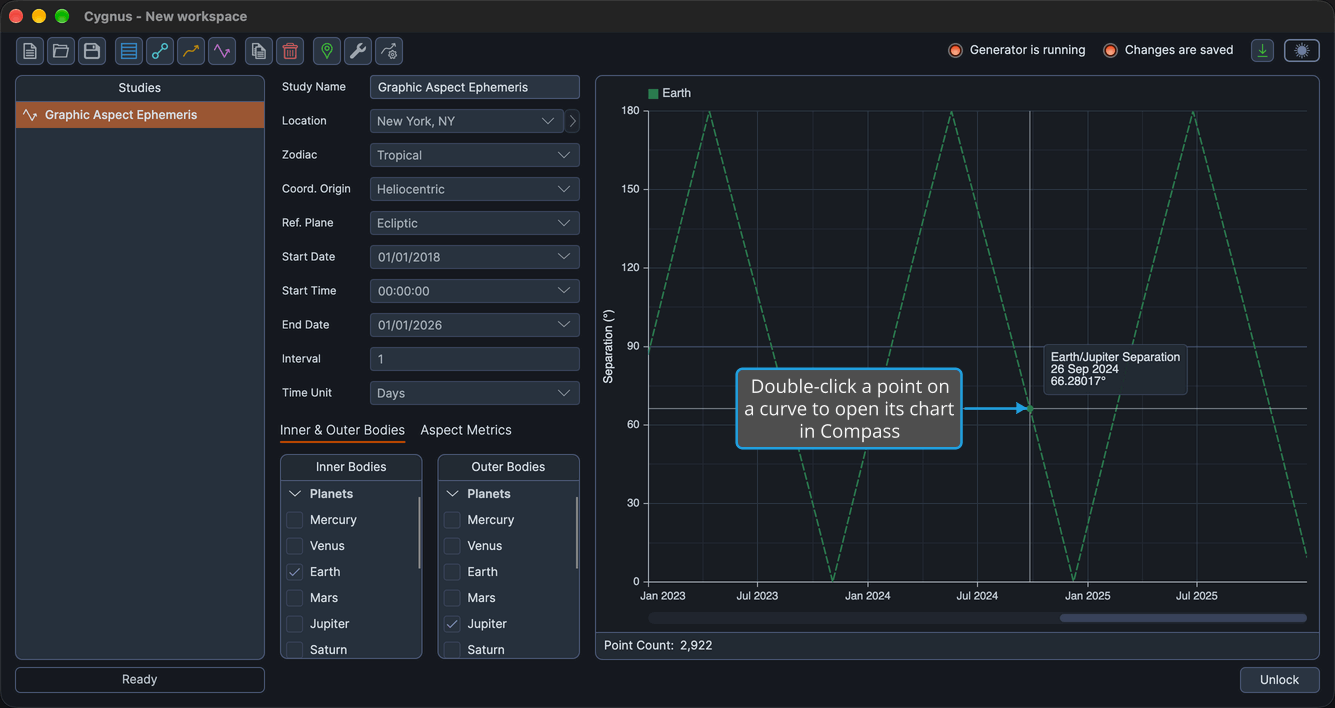
Compass opens the Mundane chart for that point's date and time.
The double-click must land on a curve inside the plot. A double-click on the time-axis strip resets the time window, as described in Pan and Zoom the Graph Time Window, and a double-click on a value axis restores that axis's range, as described in Adjust a Graph Value Axis Range.
If Compass is installed but not running, Cygnus starts it with the request. If Compass is not installed, nothing happens.
Related Topics
- Ephemeris Graph: the parts of the graph and how its curves are drawn.
- Graph Hover Readout: read the exact date and value of a point on a curve.
- Location and Reference System: set the location, zodiac, coordinate origin and reference plane the chart is cast for.
- Bodies List: choose the bodies the chart shows.
- Open a Record's Chart in Compass: open a chart from the ephemeris table of an Ephemeris or Aspect Ephemeris study.