Update Notification
R7.Activator tells you when a newer version has been published, so you do not have to check the website periodically. A small update notification button appears in the toolbar, and clicking it takes you straight to the download page.
Where the Button Appears
When a newer version is available, the update notification button sits at the right end of the toolbar, immediately to the left of the theme toggle switch. Hover over the button and its tooltip names the version that is waiting for you, in the form "Version n is available".
The button is not always there. R7.Activator checks for a newer version once at startup, after it has evaluated every product's license state. If that check fails, it fails quietly. So when the version you have installed is already the current one, or the check cannot be completed at all, no button appears in the toolbar.
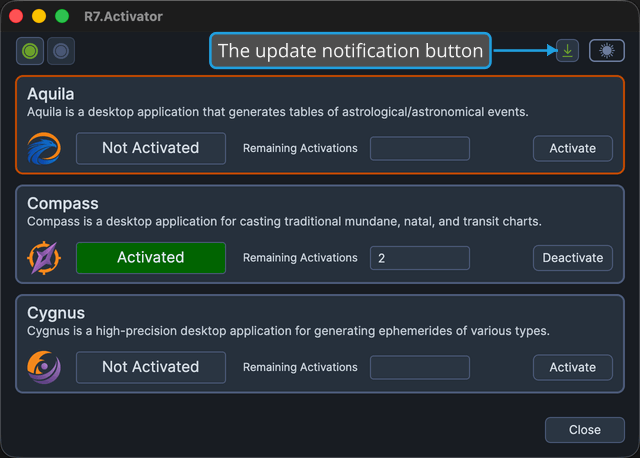
The absence of the button is not an error. It usually means you are already running the latest version. To confirm which version that is, see About Dialog.
Open the Download Page
To go to the newer version:
- Click the update notification button at the right end of the toolbar.
The R7.Activator download page opens in your computer's default web browser, and the application stays open behind it. If your default browser cannot be launched, a message reports what went wrong.