Payout Guide (Wise)
All affiliate commissions are paid in USD via Wise (formerly TransferWise). We chose Wise because it offers the best exchange rates and the lowest transfer fees globally, ensuring you keep more of what you earn.
1. Payout Schedule
Payments are batched and issued on the 16th of the month following the month of purchase.
- Example: All commissions earned in March are paid out on April 16th.
Before a commission is approved for payout, the 15-day "change of mind" refund window must clear without a refund request from the customer. In the rare event that a sale is refunded, the associated commission will be reversed. For full details, see the Terms and Conditions.
2. Setting Up Your Wise Account
To keep transfer costs as low as possible, we recommend that every affiliate holds a Wise USD account so that we can transfer commissions directly in USD.
- Create a Wise account at wise.com if you don't already have one.
- We recommend a Wise Business account for professional use, as it provides additional features for tracking income.
- Add a USD balance to your Wise account. If you reside outside the USA, this is especially important — a USD balance allows you to receive transfers directly in USD without triggering automatic currency conversion.
- You can then convert to your local currency on your own schedule, taking advantage of Wise's competitive exchange rates when the timing suits you.
3. Linking Your Wise Email to the Affiliate Portal
Your Wise email address is the key piece of information we need to send your payouts. Here's how to set it up:
- Log in to the Affiliate Portal at affiliates.rhythmseven.com.
- Navigate to Settings.
- Enter the email address associated with your Wise account in the Wise Email text box.
- Save your changes.
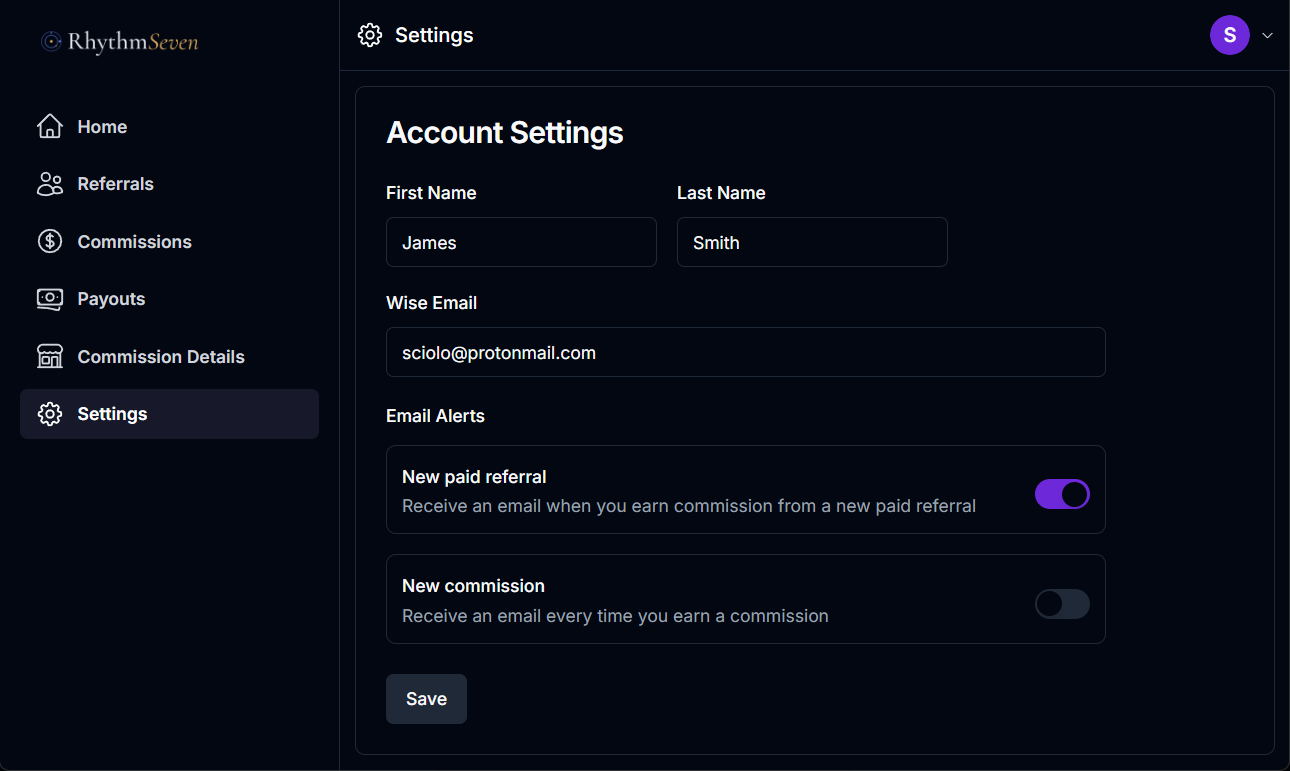
Important: The email address you enter must exactly match the email registered to your Wise account. This is the address Rhythm Seven Software will use to transfer your commissions. A mismatch will delay your payout.
4. How Transfers Work
- Rhythm Seven Software holds all commissions due to affiliates in a Wise USD account.
- On the 16th of each month, we transfer the total commissions owing to each affiliate directly to their Wise email address.
- If you have a USD balance on your Wise account, the funds arrive in USD with minimal transfer fees and no currency conversion on either side.
- You are then free to hold the USD or convert it to your local currency whenever you choose.
5. Tips for Minimizing Fees
- Maintain a USD balance on your Wise account so that incoming transfers land directly in USD without automatic conversion.
- Convert on your own schedule — Wise lets you hold multiple currencies and convert when exchange rates are favorable.
- Use a Wise Business account for cleaner income tracking and additional account management features.
Need Help?
If you have questions about your payouts or need assistance setting up your Wise account, please use our Contact Form.