Ambiguous Time Resolution
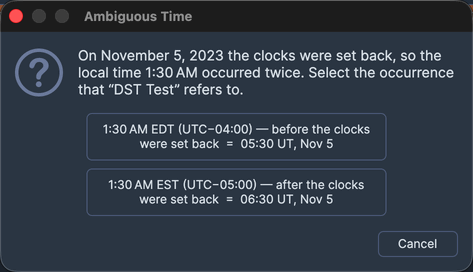
When you save a natal record whose time falls in a daylight-saving fall-back overlap, that wall-clock time occurred twice on the same day: once before the clocks went back and once after. Compass cannot know which instant you meant, so it raises the Ambiguous Time dialog to let you choose.
The dialog states that the time occurred twice and offers three choices: the earlier occurrence, the later occurrence, or Cancel. Choosing an occurrence stores the correct instant and continues the save. This is a dedicated dialog because it presents a three-way choice.
Resolving the time
Choose one of the following:
- To store the earlier of the two instants, click the earlier occurrence button. The save continues with that instant.
- To store the later of the two instants, click the later occurrence button. The save continues with that instant.
- To go back without saving, click the Cancel button. The save is aborted and the record is selected so you can adjust its time.