Application Selection
R7.Activator manages licenses for multiple R7 products from a single window. The Application dropdown lets you switch between products to view and manage each product's license independently.
Available Products
The Application dropdown contains the following products:
| Product | Description |
|---|---|
| Aquila | Selected by default when R7.Activator opens |
| Cygnus | Select from the dropdown to manage its license |
Switching Between Products
To select a different product:
- Click the Application dropdown.
- Select the desired product (Aquila or Cygnus) from the dropdown list.
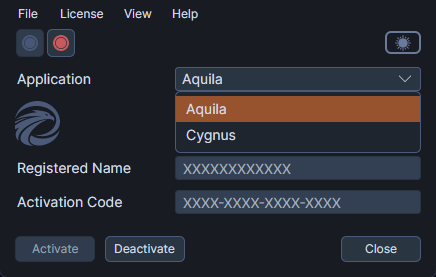
The content area updates to show the selected product's license status, including its activation state, credential fields, and remaining activations.
Independent License State
Each product maintains its own license state. Switching from one product to another does not affect the first product's license in any way. For example, if Aquila is activated and you switch to Cygnus, Aquila remains activated. You can switch back at any time to confirm its status.
This means you can have one product activated and the other not activated, or both activated, depending on your purchased licenses.