About Dialog
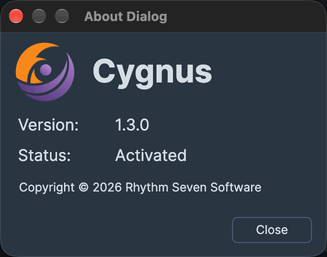
Check which version of Cygnus you have and whether it is licensed or in trial. Open the About Dialog from the Help menu, read the version and license status, and click Close when you are done.
The About Dialog is a small window that shows the Cygnus icon and name, the Version, the license Status and the copyright notice. It opens over the main window, and the main window is usable again once you close the dialog.
On macOS, the Help menu is in the menu bar at the top of the screen. On Windows, it is in the menu bar of the Cygnus window.
Open the About Dialog
To see the Cygnus version and license status:
- Click Help on the menu bar.
- Click About in the Help menu (About Dialog on Windows).
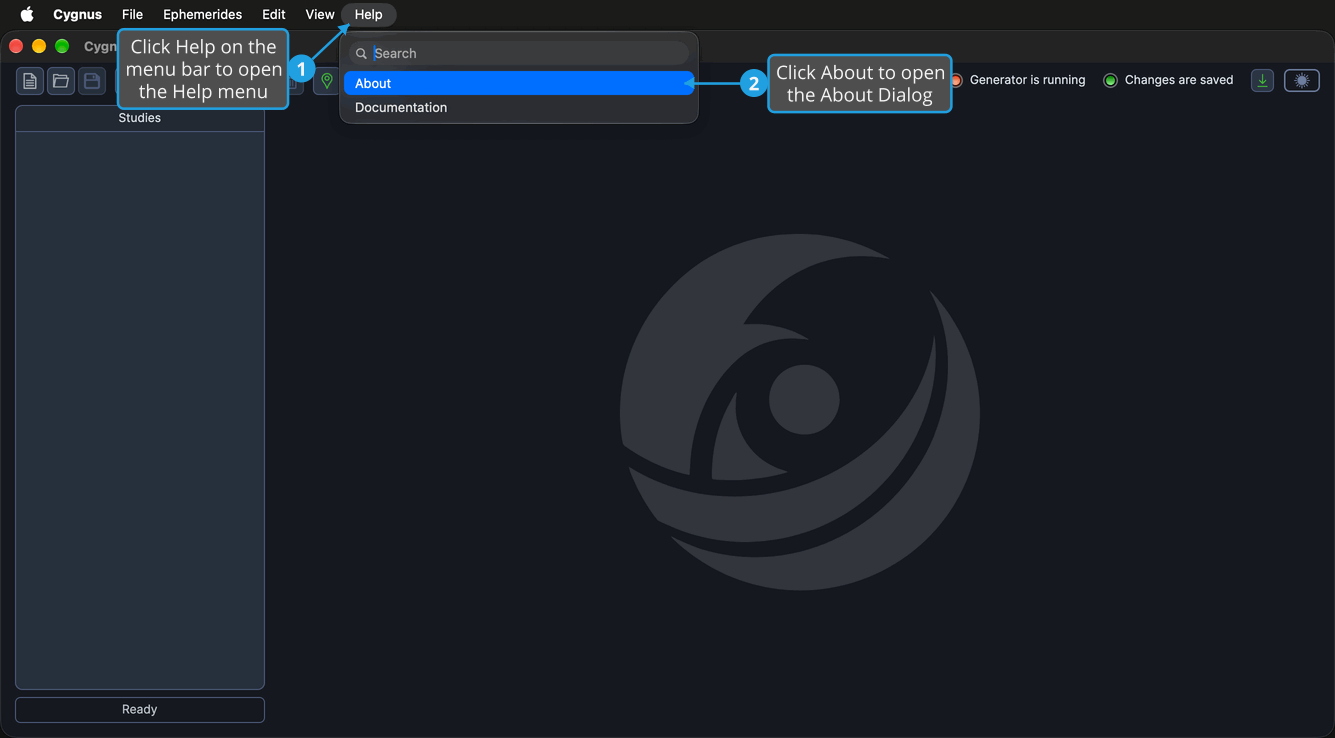
The About Dialog opens over the main window. On macOS, you can also choose Cygnus → About Cygnus in the application menu.
Version and License Status
The Version field shows the version of Cygnus you have. The Status field shows the license status of your copy of Cygnus, as one of these values:
| Status | Meaning |
|---|---|
| Activated | A valid license is present. |
| Trial (N days remaining) | A trial is active, and N is the number of days left in it. When one day remains, the value reads day instead of days. |
| Trial (last day) | The trial is on its final day. |
Close the About Dialog
Close the dialog when you have checked the version and license status.
- Click Close.
The About Dialog closes and the main window is usable again. You can also click the close button in the dialog's title bar.
Related Topics
- Menu Bar: every menu command, including those of the Help menu.
- Documentation: open the Cygnus online documentation in your web browser.
- Update Notification Button: see when a newer version of Cygnus is available and get it.