Default Settings Editor
The Default Settings Editor sets the values that new studies start from. It has two columns: Application Defaults apply to every new study across all workspaces, while Workspace Defaults apply to new studies in the current workspace. A new workspace copies its workspace defaults from the application defaults. Each column configures the same settings: the location, reference system (zodiac system, coordinate origin, and reference plane), date range, and sampling interval.
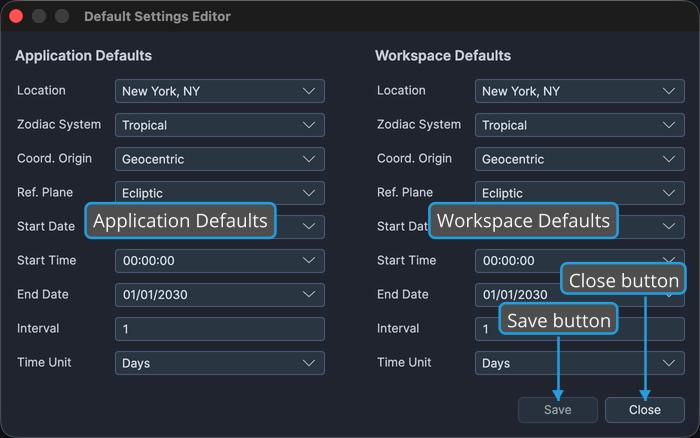
Opening the Editor
To open the Default Settings Editor:
- Click Edit → Default Settings on the menu bar.
You can also click the Default Settings editor button on the toolbar.
Application Defaults
Application defaults are the baseline that every new study inherits. Each field shows its current default, so change only the settings you want to adjust:
- Location: The default observer location new studies inherit.
- Zodiac System, Coord. Origin, and Ref. Plane: The default reference system (zodiac, coordinate origin, and reference plane) new studies are computed against.
- Start Date, Start Time, and End Date: The default date range.
- Interval and Time Unit: The default sampling frequency across that period.
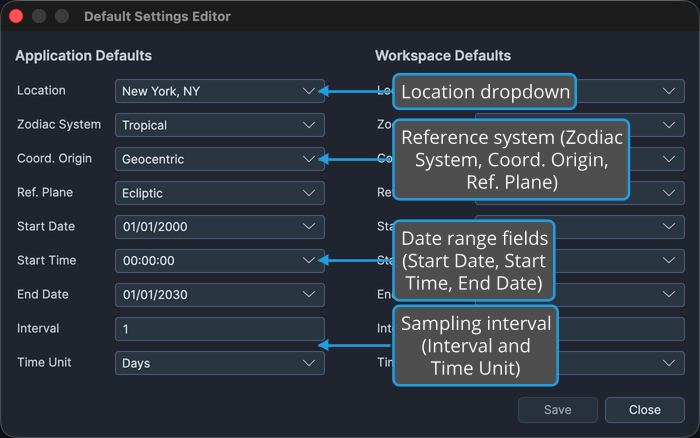
The location comes from your saved Locations library. The option lists for the reference-system and time-unit dropdowns are described under Dropdown Options below.
Workspace Defaults
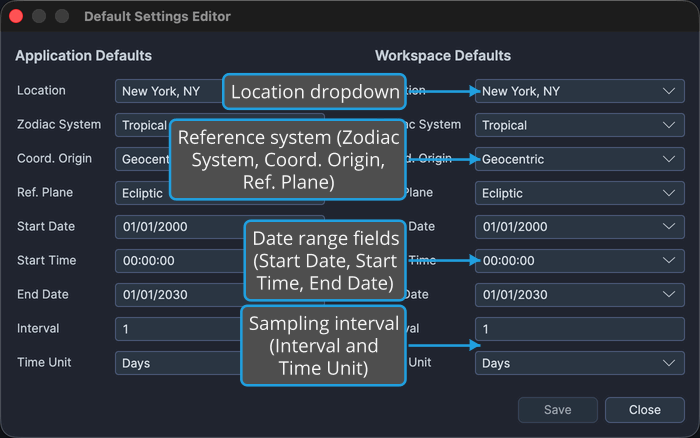
Workspace defaults apply to new studies created in the current workspace. Each field shows its current value, so change only the settings you want to adjust:
- Location: The default observer location new studies in this workspace inherit.
- Zodiac System, Coord. Origin, and Ref. Plane: The default reference system new studies in this workspace are computed against.
- Start Date, Start Time, and End Date: The default date range.
- Interval and Time Unit: The default sampling frequency across that period.
Saving Your Changes
To save your default settings:
- Click the Save button.
Changed application defaults are saved to the application settings. Changed workspace defaults are saved with the workspace when you next save the workspace file.
Closing the Editor
To close the Default Settings Editor:
- Click the Close button.
If you have unsaved changes, Ephy prompts you to save them first. See Save from the Unsaved Changes Prompt.
Dropdown Options
The location dropdowns are populated from your saved Locations library. The reference-system and time-unit dropdowns offer the following options:
| Dropdown | Options |
|---|---|
| Zodiac System | Tropical, Sidereal |
| Coord. Origin | Geocentric, Topocentric, Heliocentric |
| Ref. Plane | Ecliptic, Equatorial |
| Time Unit | Hours, Days, Months, Years |