Metric Selection
Each study view includes a Metrics list that controls which positional metric columns are initially visible in the ephemeris table. Ephy always calculates all five metrics regardless of selection; the selection only affects which columns appear.
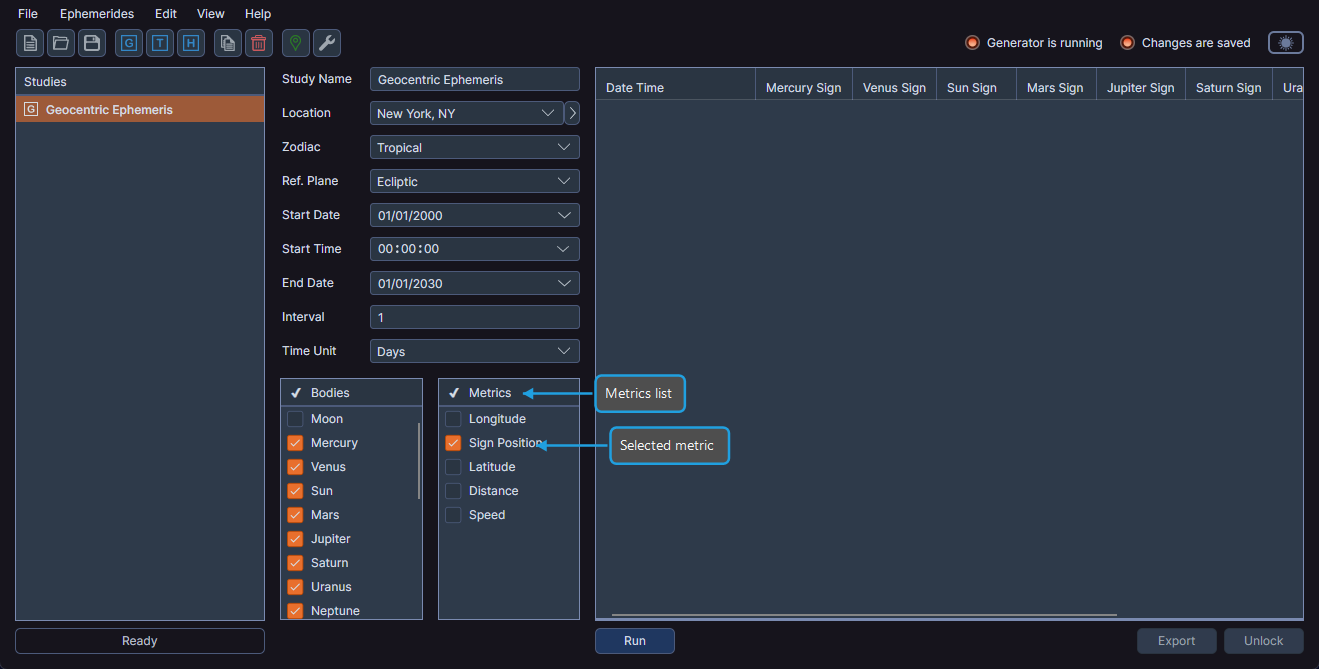
Available Metrics
The available metrics and their display names depend on the selected reference plane:
When Reference Plane = Ecliptic:
| Metric | Description |
|---|---|
| Longitude | Ecliptic longitude of the body |
| Sign Position | Position within the zodiac sign |
| Latitude | Ecliptic latitude of the body |
| Distance | Distance from the observer |
| Speed | Rate of motion |
When Reference Plane = Equatorial:
| Metric | Description |
|---|---|
| Right Asc | Right ascension of the body |
| Sign Position | Position within the zodiac sign |
| Declination | Angular distance from the celestial equator |
| Distance | Distance from the observer |
| Speed | Rate of motion |
The metric display names update automatically when you change the reference plane. Longitude becomes Right Asc, and Latitude becomes Declination when switching to the Equatorial reference plane.
Selecting or Deselecting a Metric
- Click the checkbox next to a metric name to select or deselect it.
Selecting a metric makes its corresponding columns visible in the ephemeris table. Deselecting a metric hides those columns.
Controlling Column Visibility
There are two ways to control which metric columns appear in the ephemeris table:
- Metrics list — Select or deselect a metric by clicking its checkbox in the Metrics list, as described above.
- Column header context menu — Right-click any column header in the ephemeris table to open a context menu with checkboxes for each column. See Ephemeris Table for details.
Bulk Select or Deselect
You can select or deselect multiple metrics at once using the context menu.
To bulk select or deselect metrics:
- Select one or more metrics in the Metrics list.
- Right-click to open the context menu.
- Click Select or Deselect.
Ephy updates all highlighted metrics in the list accordingly and shows or hides the corresponding columns in the ephemeris table.