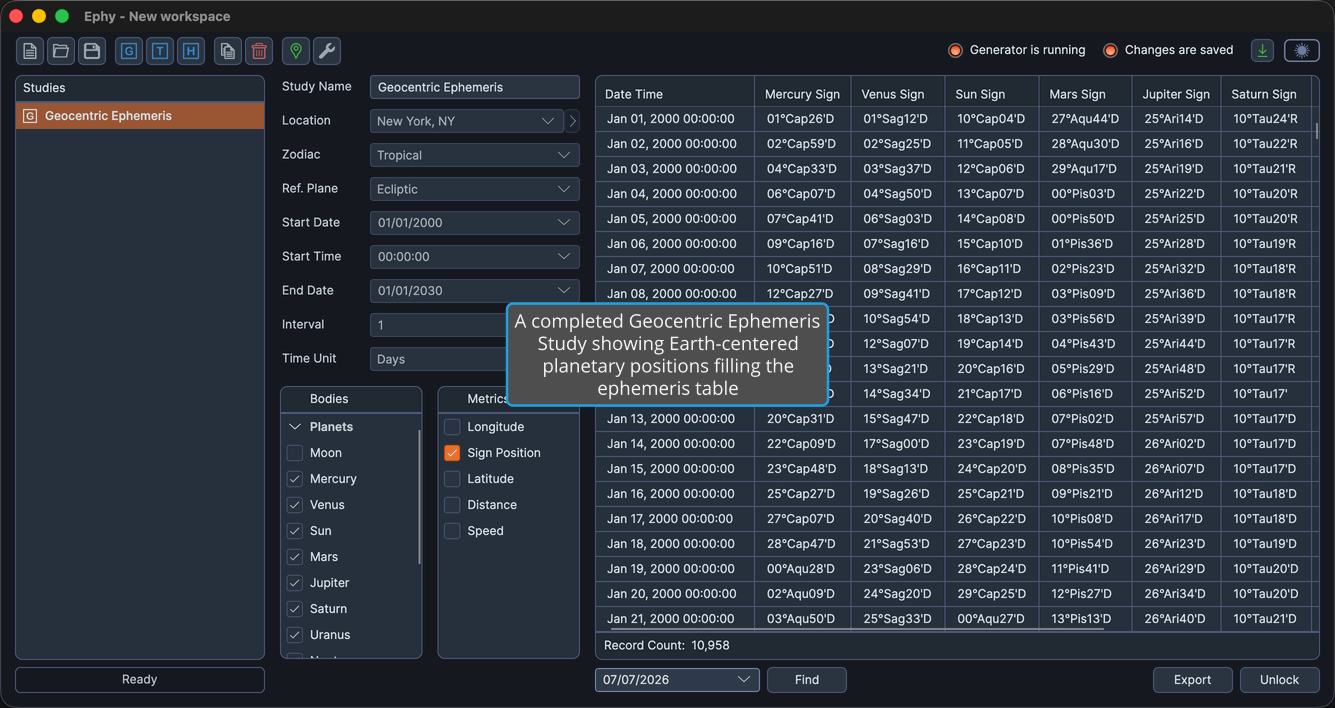
Geocentric Ephemeris Study

A geocentric ephemeris study generates a tabular listing of planetary positions as observed from Earth's center. Geocentric coordinates are the most commonly used perspective in traditional astrology, representing where celestial bodies appear in the sky relative to Earth.

Creating a Geocentric Ephemeris Study

  • Click the Geocentric Ephemeris toolbar button or select Ephemerides > Geocentric Ephemeris from the menu.

Toolbar with the Geocentric Ephemeris button highlighted

A new study appears in the studies list panel and the study content area shows its configuration. The coordinate origin is fixed to Geocentric.

Configuring the Study

The left panel of the study view contains all configuration parameters. Each new study inherits its default parameter values from the current Workspace Defaults.

Geocentric ephemeris study configuration panel showing all parameters

Study Name

Enter a descriptive name in the Name field at the top of the study view to help you identify this study in the studies list.

Location

Select a geographic location from the Location dropdown. The list contains locations managed through the Locations Editor.

info

A location is required for all ephemeris types because Ephy calculates and displays date and time values according to the selected location's time zone.

Zodiac System

Select a zodiac system from the Zodiac System dropdown:

OptionDescription
TropicalBased on the vernal equinox (0 degrees Aries = March equinox point)
SiderealBased on fixed star positions

Reference Plane

Select a reference plane from the Reference Plane dropdown:

OptionDescription
EclipticPositions measured relative to the ecliptic plane
EquatorialPositions measured relative to the celestial equator
note

Changing the reference plane also updates the display names of the metrics. When set to Ecliptic, the metrics are Longitude and Latitude. When set to Equatorial, they change to Right Asc and Declination.

Date Range and Interval

Configure the time span and interval for the ephemeris:

  • Start Date — The beginning date for the ephemeris.
  • Start Time — The starting time of day.
  • End Date — The ending date for the ephemeris.
  • Interval — The numeric value for the time step between records.
  • Time Unit — The unit for the interval: Hours, Days, Months, or Years.

Bodies and Metrics

Below the date range parameters, the study view displays two lists:

  • Bodies — Select which celestial bodies to include. See Body Selection for details.
  • Metrics — Select which positional metrics to display. See Metric Selection for details.

Available Bodies

The geocentric ephemeris study includes the following celestial bodies:

BodyType
MoonPlanet
MercuryPlanet
VenusPlanet
SunPlanet
MarsPlanet
JupiterPlanet
SaturnPlanet
UranusPlanet
NeptunePlanet
PlutoPlanet
TenetSmaller Body
Lunar ApogeeLunar Axis
Mean ApogeeLunar Axis
North NodeLunar Axis
Mean NodeLunar Axis
VestaSmaller Body
JunoSmaller Body
CeresSmaller Body
PallasSmaller Body
ChironSmaller Body
PholusSmaller Body

Generating the Ephemeris

After configuring all parameters, click the Run button to generate the ephemeris. See Generate Ephemeris Records for details on the generation process, progress tracking, and cancellation.

Geocentric ephemeris study with generated records in the ephemeris table