Ephemeris Date Range and Interval
The Ephemeris Date Range and Interval panel defines the time span a study covers and how often positions are sampled within it. Together, the date range and the sampling interval determine how many records the study generates and at what spacing. This panel appears the same way in all three ephemeris study types.
Adjusting the Settings
Each field already shows the study's current value, so change only the settings you want to adjust:
- Start Date, Start Time, and End Date: Bound the date range, from the first record to the last.
- Interval and Time Unit: Set how frequently records are sampled across that period. The interval count works together with the time unit. For example, an interval of 1 with a time unit of Days samples one record per day. This one-record-per-day setting (an Interval of 1 with a Time Unit of Days) is the most common choice, and it is what most users will want.
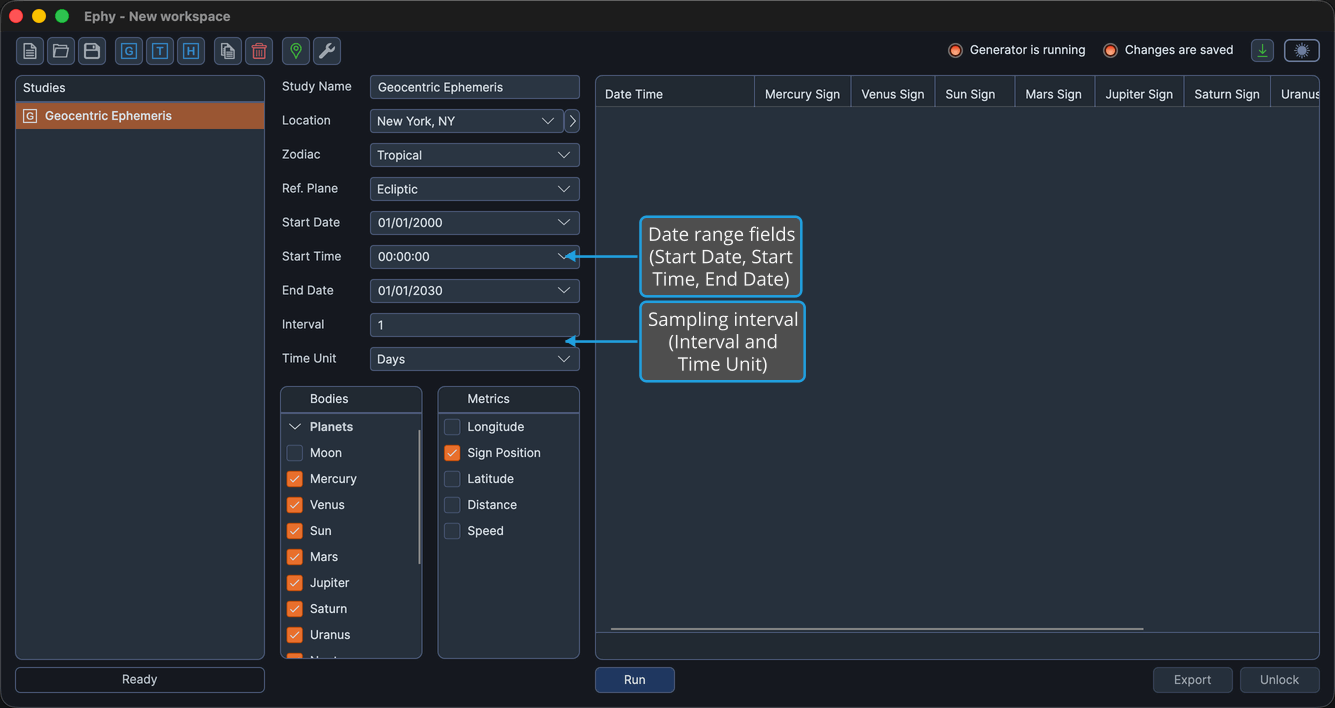
These fields are available while the study is unlocked. They become disabled once records are generated, until you unlock the study.
Time Unit Options
The Time Unit dropdown offers the following units:
- Hours
- Days
- Months
- Years