Basic Ephemeris Settings
The Basic Ephemeris Settings panel anchors the coordinate system a study uses. It provides a Location dropdown, a Zodiac dropdown, and a Ref. Plane dropdown, along with a presets button for saving and reapplying these settings. The zodiac and reference plane are part of the study's reference system; the coordinate origin (geocentric, topocentric, or heliocentric) is fixed by the study type. This panel appears the same way in all three ephemeris study types.
Adjusting the Settings
Each dropdown already shows the study's current value, so change only the settings you want to adjust:
- Location: Sets the observer location from which the study's positions are computed. The list is drawn from your saved Locations library.
- Zodiac and Ref. Plane: Define the zodiac system and reference plane the study's positions are expressed against.
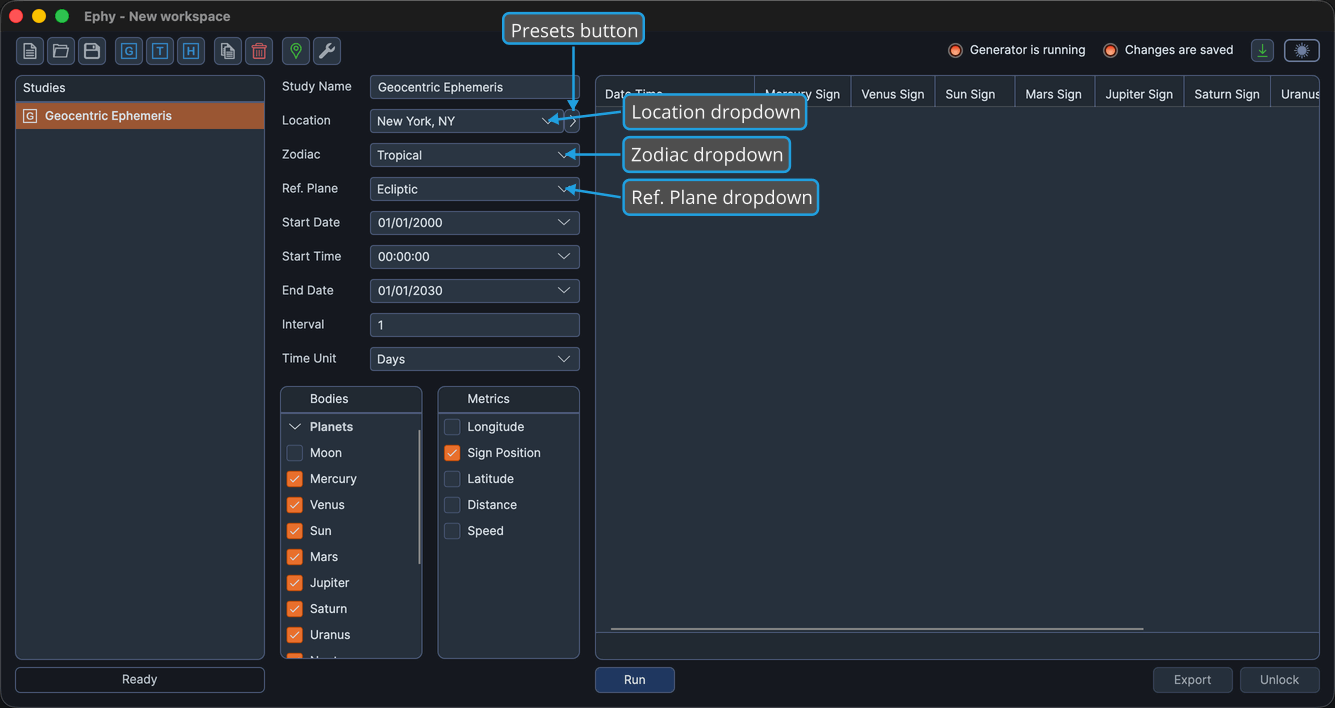
These dropdowns are available while the study is unlocked. They become disabled once records are generated, until you unlock the study.
A location is required to compute any ephemeris. Ephy computes and displays each record's date and time according to the location's time zone, so records cannot be generated until a location is selected.
Zodiac Options
| Option | Description |
|---|---|
| Tropical | Positions measured against the tropical zodiac. |
| Sidereal | Positions measured against the sidereal zodiac. |
Reference Plane Options
| Option | Description |
|---|---|
| Ecliptic | Positions expressed relative to the ecliptic plane. |
| Equatorial | Positions expressed relative to the equatorial plane. |
The reference plane you choose also changes how some position metrics are labeled in the results. See Metrics Selection List for details.