Default Settings Editor
The Default Settings Editor is a dialog window that lets you control the values Aquila assigns to new workspaces and new studies. The editor presents two columns: Application Defaults (assigned to a workspace when a new workspace is created) and Workspace Defaults (assigned to a study when a new study is created within the active workspace).
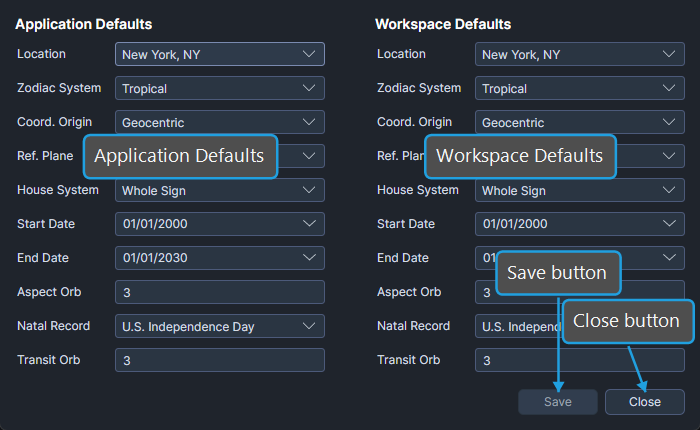
Defaults Inheritance Chain
Configuration defaults follow a two-step inheritance chain:
- When a new workspace is created, the Application Defaults are copied into the workspace as its Workspace Defaults.
- When a new study is created in the active workspace, the Workspace Defaults are copied into the study as its initial parameter values.
Edit the Application Defaults to influence every new workspace; edit the Workspace Defaults to influence only studies created in the active workspace.
Open the Default Settings Editor
To open the editor:
- Click Edit on the menu bar.
- Click Default Settings in the Edit menu.
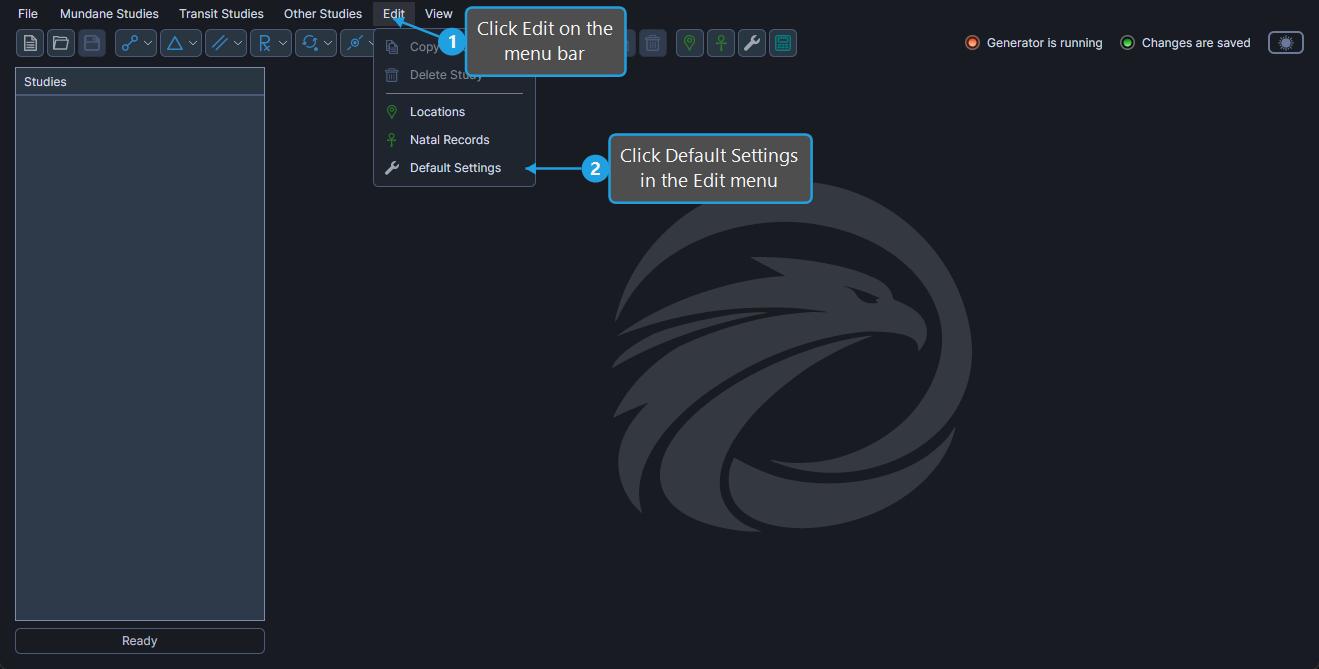
The editor opens with two columns side by side: Application Defaults on the left and Workspace Defaults on the right.
Edit Application Defaults
The Application Defaults column controls the initial values assigned to a new workspace's Workspace Defaults. To edit an Application Default:
- Set the Location, Zodiac System, Coord. Origin, Ref. Plane, House System, Start Date, End Date, Aspect Orb, Natal Record, or Transit Orb fields in the Application Defaults column to the desired values.
| Field | Description |
|---|---|
| Location | Default location used by every new workspace. |
| Zodiac System | Default zodiac system used by every new workspace. |
| Coord. Origin | Default coordinate origin used by every new workspace. |
| Ref. Plane | Default reference plane used by every new workspace. |
| House System | Default house system used by every new workspace. |
| Start Date | Default start date for new workspaces. |
| End Date | Default end date for new workspaces. |
| Aspect Orb | Default aspect orb for new workspaces. |
| Natal Record | Default natal record selected by every new workspace. |
| Transit Orb | Default transit orb for new workspaces. |
The Aspect Orb field is the activation/transit-study aspect tolerance used by activation studies. It is not an orb attached to entries in the Aspects table; the Aspects table is orb-less, and Aquila generates an event only when the cycle angle between two bodies exactly matches an angle in that table.
The Zodiac System selector here corresponds to the Zodiac dropdown shown on a study's Ephemeris Parameters. The two labels refer to the same zodiac-system setting.
Edit Workspace Defaults
The Workspace Defaults column controls the initial values assigned to a new study within the active workspace. To edit a Workspace Default:
- Set the Location, Zodiac System, Coord. Origin, Ref. Plane, House System, Start Date, End Date, Aspect Orb, Natal Record, or Transit Orb fields in the Workspace Defaults column to the desired values.
| Field | Description |
|---|---|
| Location | Default location used by every new study created in this workspace. |
| Zodiac System | Default zodiac system used by every new study created in this workspace. |
| Coord. Origin | Default coordinate origin used by every new study created in this workspace. |
| Ref. Plane | Default reference plane used by every new study created in this workspace. |
| House System | Default house system used by every new study created in this workspace. |
| Start Date | Default start date for new studies in this workspace. |
| End Date | Default end date for new studies in this workspace. |
| Aspect Orb | Default aspect orb for new studies in this workspace. |
| Natal Record | Default natal record selected by every new study created in this workspace. |
| Transit Orb | Default transit orb for new studies in this workspace. |
Save and Close
After editing the desired defaults, click the Save button at the lower-right of the editor to persist the changes (see Save Default Settings). To dismiss the editor without saving, click the Close button; pending edits are discarded.