Keep on Top
Keep on Top keeps the main window visible while you work across several chart windows. It is a check item on the View menu: while it is on, the Main Window floats above every other window, so the launcher stays in reach while you arrange chart windows around it. Compass remembers the setting with the main window's position for the next launch.
Toggle Keep on Top
On macOS the View menu is in the menu bar at the top of the screen; on Windows it is in the main window's own menu bar.
To keep the main window above every other window, or to let it go back behind them:
- Click View in the menu bar.
- Click Keep on Top.
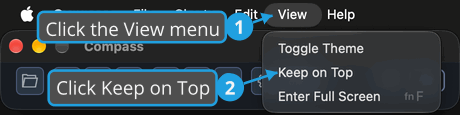
If Keep on Top was off, it turns on: a check mark shows beside the command and the main window stays above every other window. If it was on, it turns off. Either way, Compass remembers the setting for the next launch.