Toggle Theme
Toggle Theme lets you match Compass to your desktop's appearance or to your working conditions, light by day and dark at night. It switches Compass between its light and dark themes: every open window follows at once, the chart wheels' surfaces, strokes and text included, and Compass remembers the choice for the next launch.
Toggle the Theme
On macOS the View menu is in the menu bar at the top of the screen; on Windows it is in the main window's own menu bar.
To switch Compass between its light and dark themes:
- Click View in the menu bar.
- Click Toggle Theme.
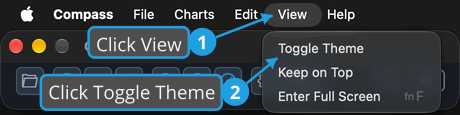
Every open window switches to the other theme at once, and the theme switch at the right of the main toolbar shows the new state. The next launch opens in the theme you chose.
Clicking the theme switch at the right end of the Main Toolbar does the same as View → Toggle Theme.