Exit Application
Exiting closes the Compass shell and shuts the application down, saving the shell's position on the way out so it reopens where you left it.
Overview
Closing the shell closes Compass. Any chart windows still open are owned by the shell, so they close with it. The same is true of the shell's own title-bar close button: it shuts the application down rather than hiding the launcher.
The command is in a different place on each platform:
- Windows: File → Exit in the in-window menu bar.
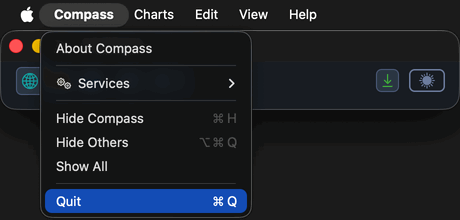
- macOS: Quit in the
Compassapplication menu, orCmd+Q. There is no File menu and no Exit item on macOS.
Procedures
Exit Compass (Windows)
To shut Compass down:
- Click File on the menu bar.
- Click Exit.
The shell's position is saved and the application shuts down, closing any chart windows that are still open.
Quit Compass (macOS)
On macOS the menus render in the system menu bar at the top of the screen. To shut Compass down:
- Click Compass in the macOS menu bar.
- Click Quit.
The shell's position is saved and the application shuts down, closing any chart windows that are still open.
Cmd+Q quits Compass without opening the menu.