Keep Main Window on Top
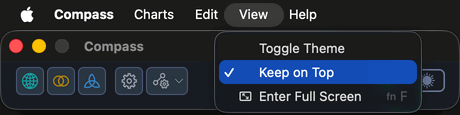
Keep on Top is a checkable View menu item that floats the Compass shell above all other windows, including the chart windows it opens.
Overview
With several chart windows on screen, the compact shell is easy to lose behind them. Turning Keep on Top on holds it in front, so the menu bar and toolbar stay one click away no matter which chart you are working in.
A checkmark beside the menu item shows the current state. The setting is saved alongside the shell's window position, so it survives a restart: if you leave Compass with Keep on Top set, it starts that way next time.
Procedures
Keep the Shell on Top
To float the shell above your other windows:
- Click View on the menu bar.
- Click Keep on Top.
A checkmark appears beside the item and the shell moves in front of every other window. Choose the item again to clear the checkmark and let the shell behave normally.