Keep Window on Top
Keep on Top makes the main window float above all other windows, so the compact launcher stays visible while you work in chart windows rather than being buried behind them. The preference is remembered alongside the window position and restored the next time you launch.
Turning keep on top on or off
To keep the main window above your other windows:
- On the menu bar, click View → Keep on Top.
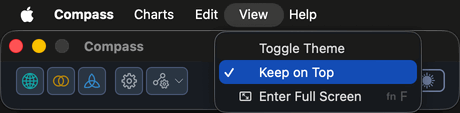
A checkmark next to Keep on Top shows when the behavior is on. Choose the item again to turn it off.