New Workspace
A workspace is the container for a line of astrological inquiry: a client, a group of people, a financial instrument, a nation, or the arc of a single question. Starting a new workspace gives you an empty one to build in, rather than adding unrelated studies to the workspace already open.
A new workspace is not blank in the sense of being unconfigured. It takes its initial settings from the Application Defaults, and those become that workspace's own Workspace Defaults, which in turn seed every study you create inside it. Setting the Application Defaults to the location, date range, and Reference System you usually work with means each new workspace starts most of the way toward the study you had in mind.
Start a New Workspace
To begin a fresh piece of research in an empty workspace:
- Open the File Menu.
- Click New in the File menu.
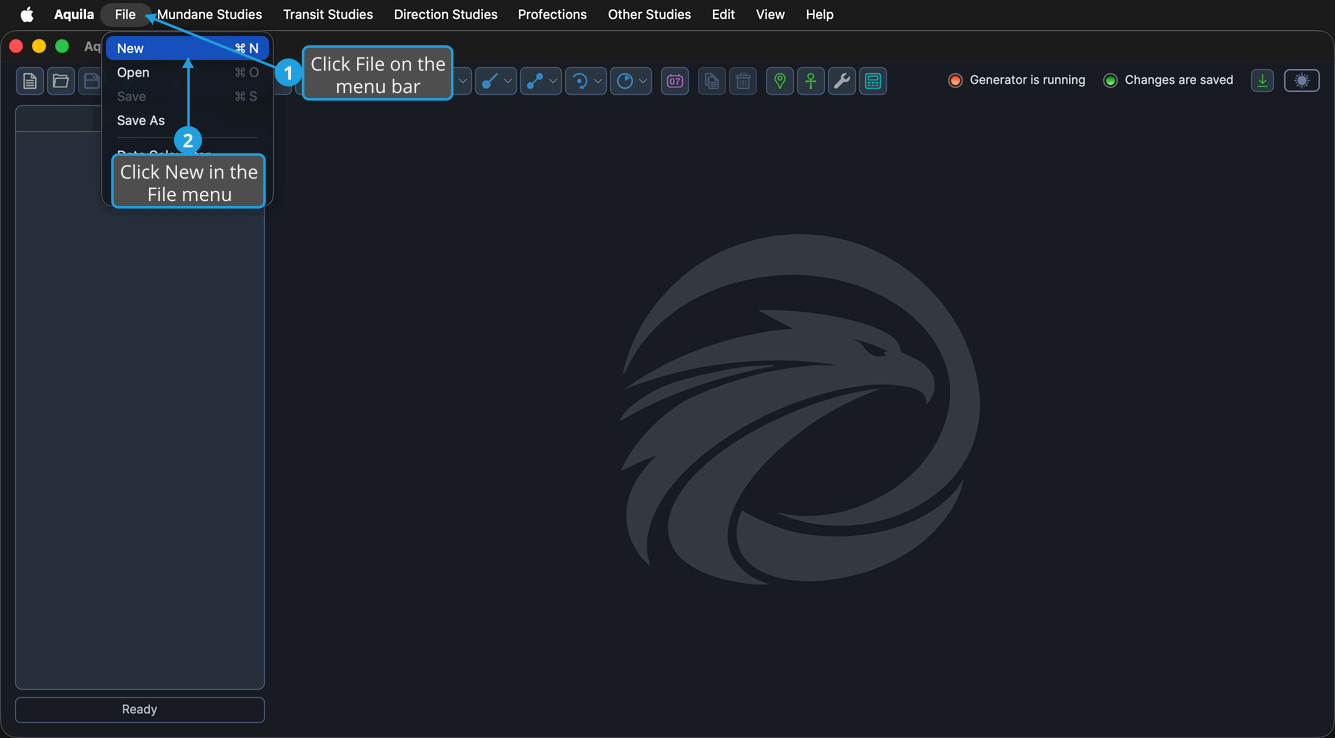
An empty workspace replaces the current one, the Studies list empties, the window title shows the new workspace's name, and the status area reports "Workspace Created."
Press Cmd+N (Ctrl+N on Windows) to start a new workspace without opening the menu. The New button at the left of the toolbar does the same thing.
When the current workspace has unsaved changes and holds at least one study, Aquila raises an Unsaved Changes prompt before the new workspace opens. Click Yes to save the current workspace first, No to discard the changes, or Cancel to abandon the command and stay where you are.
Where a New Workspace Gets Its Settings
Settings reach a new study through two inheritance steps. Aquila copies the Application Defaults into the new workspace, where they become its Workspace Defaults. It then applies those Workspace Defaults to each study you create in that workspace.
Changing the Workspace Defaults therefore affects the studies you create next, not the ones already in the list. Both sets of defaults are edited in the Default Settings Editor.