Default Settings Editor
Most of a researcher's studies share the same location, zodiac, orbs and date range. Setting those once means every new study opens nearly configured instead of needing the same edits every time.
The Default Settings Editor holds the two tiers of defaults side by side. The Application Defaults column supplies the starting settings for each newly created workspace; the Workspace Defaults column supplies the starting settings for each new study created in the open workspace. Both columns carry the same rows, with Save and Close buttons along the bottom.
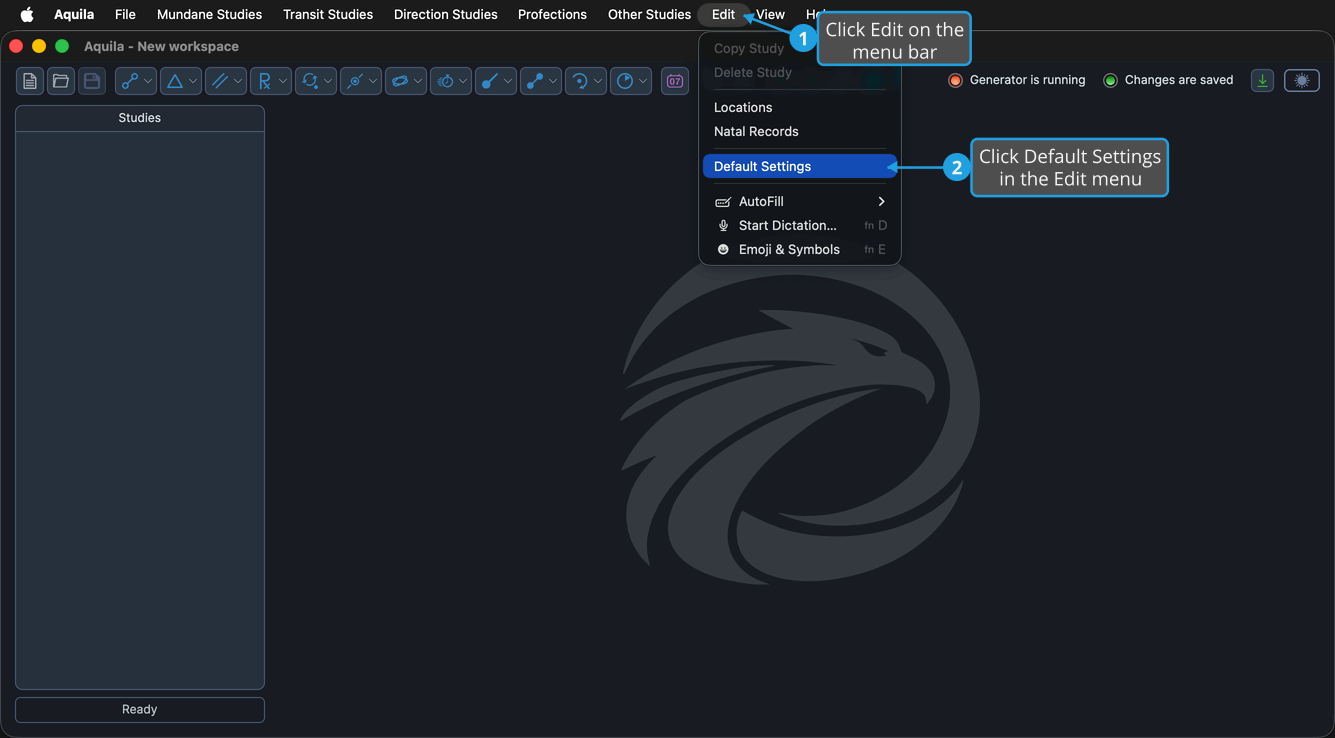
Open the Default Settings Editor
To bring up the editor:
- Open the Edit Menu.
- Click Default Settings in the Edit menu.
The Default Settings toolbar button on the main window opens the same editor in a single click.
How the Two Tiers Fit Together
Settings reach a new study by inheritance, in a chain of two steps:
- Application Defaults are assigned to Workspace Defaults when a new workspace is created.
- Workspace Defaults are applied to new studies when they are created.
So the Application Defaults column decides what a brand new workspace starts life with, and the Workspace Defaults column decides what the next study created in the workspace already open starts life with. Editing the workspace tier leaves the application tier untouched, which is what makes it possible to work in a differently configured workspace without disturbing the settings every future workspace will inherit.
Adjust the Defaults
Both columns carry the same rows, and every field already shows its current value, so change only the settings you want to adjust. The column decides how far the change reaches: an edit in the Application Defaults column sets what each newly created workspace starts with, and an edit in the Workspace Defaults column sets what each new study created in the open workspace starts with.
- Location, the Reference System settings (Zodiac System, Coord. Origin, Ref. Plane) and House System seed the observer's place and the frame studies measure positions in.
- Start Date and End Date bound the search period a newly created study is given before it is adjusted.
- Aspect Orb, Natal Record and Transit Orb set how close a contact must be to count, and which stored natal record the transit-style studies are anchored to.
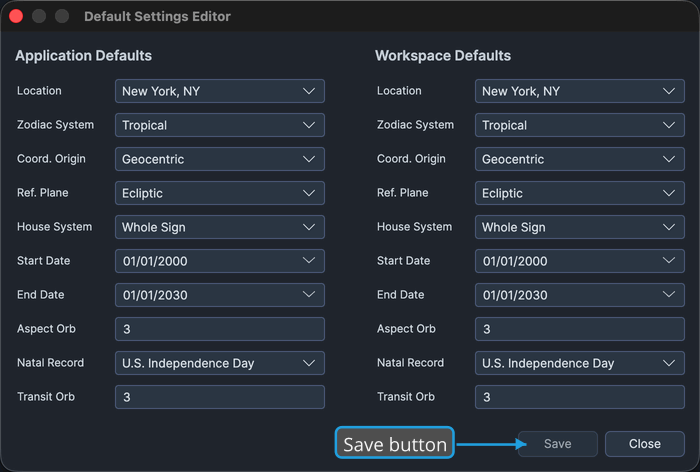
Changing any field in either column makes the Save button available.
The Choices Each Setting Offers
Four of the drop-downs offer a fixed set of choices, the same set in both columns.
| Setting | Choices |
|---|---|
| Zodiac System | Tropical, Sidereal |
| Coord. Origin | Geocentric, Topocentric, Heliocentric |
| Ref. Plane | Ecliptic, Equatorial |
| House System | Alcabitus, Campanus, Equal (Ascendant), Koch, Meridian (Axial Rotation), Morinus, Placidus, Porphyry, Regiomontanus, Topocentric (Polich/Page), Vehlow Equal, Whole Sign |
The remaining two drop-downs offer what you have saved rather than a fixed set. Location lists the places held in the Locations Editor, and Natal Record lists the records held in the Natal Records Editor; the Natal Record drop-down filters as you type. Both are empty until something has been added in the editor that owns them.
Save the Default Settings
To commit the edited defaults:
- Click the Save button.
Aquila writes the application defaults to disk and holds the workspace defaults against the open workspace. The Save button is available only while one of the two columns holds unsaved changes, and becomes unavailable again once they are saved.
Close the Editor
To dismiss the editor and return to the main window:
- Click the Close button.
The editor closes and the main window is in front again.