Ambiguous Time Resolution
When the clocks go back, one hour of local time runs twice. A birth time inside that repeated hour is genuinely two different moments, an hour apart, and every position derived from it differs accordingly. Leaving the application to guess would silently shift every derived calculation, so Aquila asks instead.
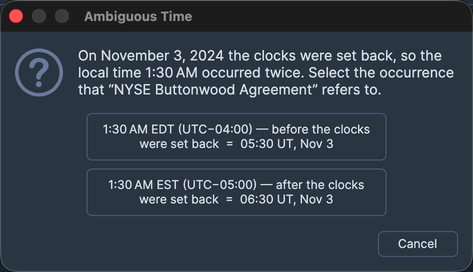
Aquila raises the prompt when you save the Natal Records Editor and one of its records carries a natal time inside the repeated hour of a daylight-saving fall-back transition, where one local clock reading corresponds to two distinct instants. The prompt states the record and the ambiguous time, and offers a choice between the earlier and the later occurrence, each labeled with the actual offset it implies, plus Cancel.
When the Prompt Appears
Nothing interrupts the entry of an ambiguous time. Until the collection is saved, the only signal is an inline warning marker on the record's Natal Time cell in the Natal Records table. Clicking Save raises the prompt, once for each record whose natal time is ambiguous and whose resolution has not yet been chosen.
Aquila stores your choice with the record, so the same reading is never ambiguous again for that record and the prompt does not return on later saves.
Resolve the Ambiguous Time
The prompt offers three ways out. Two of them resolve the time and let the save continue; the third abandons the save and leaves the record as it was. Neither of the two resolving buttons carries a fixed label: each is labeled with the UTC offset it implies, so the earlier of the two offsets is the earlier occurrence.
Choose the Earlier Occurrence
To resolve the time to the first of the two instants the reading could mean:
- Click the button labeled with the earlier of the two offsets.
The prompt closes, Aquila stores the earlier occurrence with the record, and the save continues. This is the prompt's default button, so pressing Enter chooses it.
Choose the Later Occurrence
To resolve the time to the second of the two instants the reading could mean:
- Click the button labeled with the later of the two offsets.
The prompt closes, Aquila stores the later occurrence with the record, and the save continues.
Cancel the Prompt
To leave the time unresolved rather than committing to one of the two instants:
- Click Cancel.
The prompt closes without storing a resolution and the save stops, so the record keeps the warning marker on its Natal Time cell and you can resolve it on a later save. Pressing Escape does the same thing.