Ambiguous Time Dialog
Record a birth time that fell in a repeated hour as the moment the person was actually born. When the clocks are set back, an hour of local time occurs twice, so a birth time inside it names two different moments. The Ambiguous Time dialog asks which of the two a natal record means.
When the Dialog Appears
When a named record's birth time falls in an hour that occurred twice, the dialog appears as the Natal Records Editor saves: from its Save button, File → Save or Cmd+S (Ctrl+S on Windows), or when you choose to save in the Unsaved Changes prompt as you close the editor. In the editor's grid, such a record's Natal Time carries a warning sign (⚠).
The dialog explains the ambiguity and offers a button for each occurrence, one above the other. The upper button is the earlier occurrence and reads "before the clocks were set back"; the lower button is the later occurrence and reads "after the clocks were set back". Each button is also labeled with its time zone, its UTC offset and the Universal Time it results in, so you can tell the two moments apart. The earlier occurrence is the default button. A Cancel button stops the save instead.
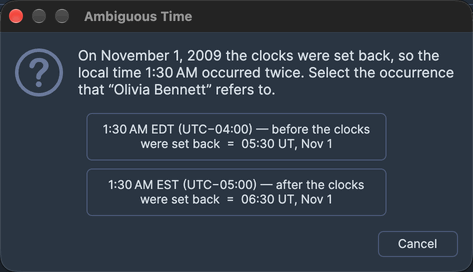
Save the Earlier Occurrence
To record the birth as the first of the two occurrences:
- Click the button for the time before the clocks were set back.
The dialog closes, the record is resolved to the earlier moment and the save continues. Because the earlier occurrence is the default button, pressing Enter chooses it too.
Save the Later Occurrence
To record the birth as the second of the two occurrences:
- Click the button for the time after the clocks were set back.
The dialog closes, the record is resolved to the later moment and the save continues.
Cancel the Save
To stop the save and correct the record's time instead of choosing an occurrence:
- Click Cancel.
The dialog closes and the save stops with nothing written. The record is selected in the Natal Records Editor so you can change its time. Pressing Esc, or clicking the dialog's title-bar close button without a choice, cancels the same way.
Related Topics
- Natal Records Editor: the natal records whose times the dialog resolves, and the warning signs that mark them.
- Natal Chart Configuration: the Natal Record row that casts a chart from a saved record.