Natal Chart Configuration
The settings panel of a Natal chart window chooses whose birth chart is drawn and lets you test small corrections to the birth time. Select a natal record from the Natal Record drop-down, typing to search the list; edit Natal Date or Natal Time to experiment; and adjust the frame rows, Paral. Aspects, the bodies and the aspect angles.
Settings Panel Layout
The panel opens with the natal data rows, followed by the frame rows and the rest:
| Row | What It Sets |
|---|---|
| Natal Record | Whose birth chart is drawn, from the Natal Records database. The record also supplies the chart's location. |
| Natal Date | The birth date, filled in from the chosen record. |
| Natal Time | The birth time, filled in from the chosen record. |
| Zodiac | The zodiac the chart's longitudes are measured in. |
| Coord. Origin | The observer's position. |
| Ref. Plane | The reference plane positions are reported in. |
| Orientation | How the wheel is turned. |
| House System | How the wheel's houses are divided. |
| Paral. Aspects | Which declination aspects the wheel draws as dashed chords. |
| Bodies | The bodies the chart plots. |
| Aspects | The aspect angles the wheel looks for. |
The Bodies list and the Aspects grid sit below the rows. The five frame rows, from Zodiac to House System, are described in Chart Frame, the list in Chart Bodies Selection and the grid in Chart Aspect Angles.
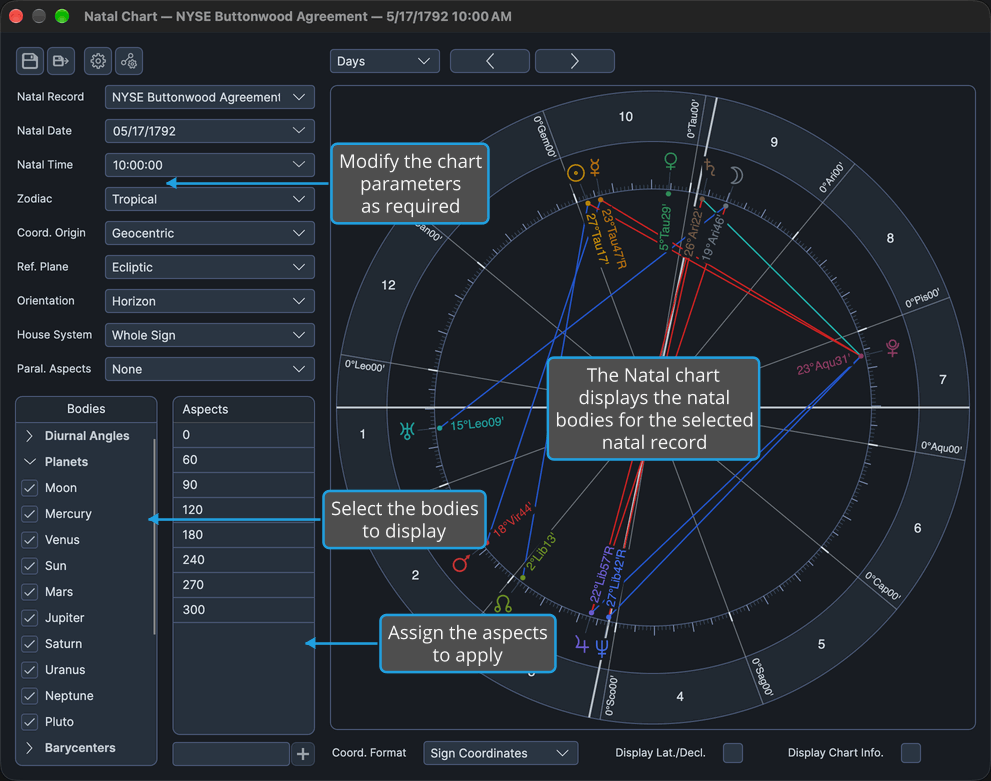
Choose the Natal Record
Choose whose birth chart is drawn. The Natal Record drop-down lists the saved natal records of the Natal Records database, which Compass shares with the sibling Rhythm Seven applications. You create, edit, delete, import and export records in the Natal Records Editor (Edit → Natal Records).
- Select the record from the Natal Record drop-down.
The drop-down is searchable. Once its list is open, typing part of a name narrows the list to the closest matches; click a record to choose it.
The chart redraws for the record's birth moment and place, and Natal Date and Natal Time fill in from the record.
Try a Different Birth Date and Time
Natal Date and Natal Time are filled in from the chosen natal record. They are there mainly for reference and normally stay as the record gives them, but they remain editable so you can vary the birth moment for what-if experiments without changing the stored record.
- Click the Natal Date field to select its whole value.
- Type the date.
- Click the Natal Time field to select its whole value.
- Type the time and press Enter to commit it.
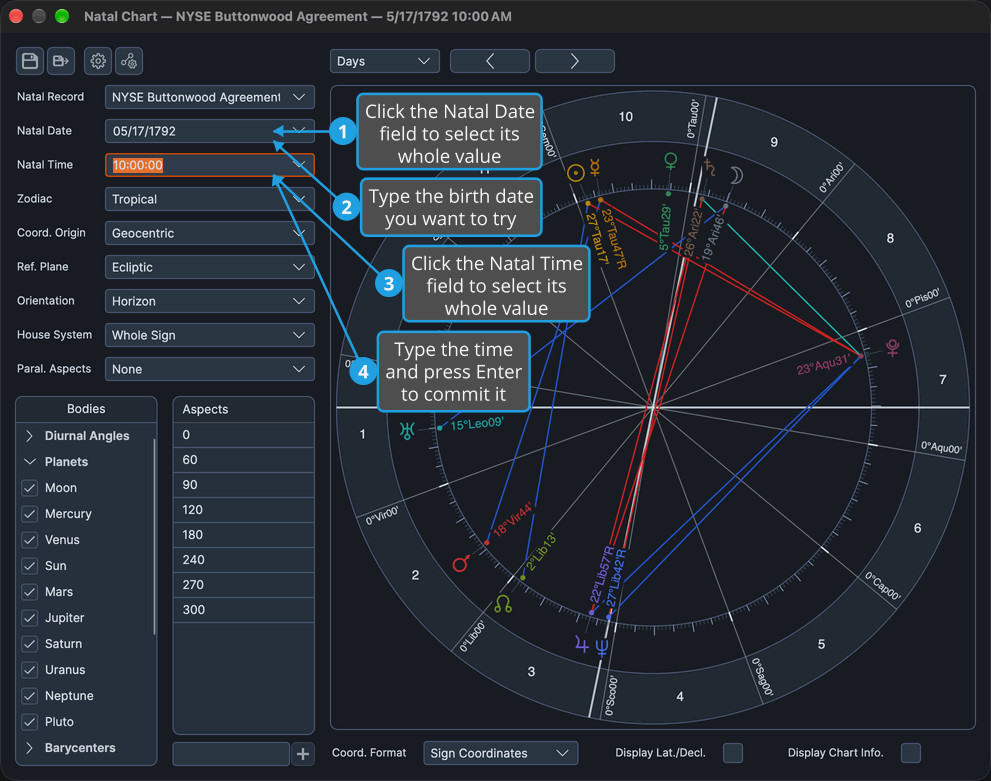
The chart redraws for the edited moment, and the stored natal record is unchanged. Choosing the record again in the Natal Record drop-down restores its own date and time.
Choose Which Parallels the Natal Wheel Draws
Decide which declination aspects the wheel draws as dashed chords.
- Select which parallels to draw in the Paral. Aspects drop-down.
The wheel redraws with the chosen parallels, for this window only. The drop-down offers four options:
| Option | What the Wheel Draws |
|---|---|
| None | No parallel chords. |
| All | Both parallels and contraparallels. |
| Parallels | Parallels only. |
| Contraparallels | Contraparallels only. |
A new window takes this setting from the Chart Settings default, described in General Chart Defaults.
Natal Data on Other Charts
The same three natal data rows, Natal Record, Natal Date and Natal Time, appear on four other chart types and behave the same way there. On the Transit, Primary Directions, Solar Arc Directions and Secondary Progressions charts they sit on the Natal Data tab of the settings panel.
On the Transit chart they choose the person the transits are measured against; see Transit Chart Configuration. On the three technique charts the Natal Data tab is where the birth time is corrected, and every direction in the Directions List re-dates when it changes.
Related Topics
- Natal Chart: what a Natal chart is and how its window is laid out.
- Natal Records Editor: manage the natal records a chart can be cast from.
- Chart Frame: the Zodiac, Coord. Origin, Ref. Plane, Orientation and House System rows.
- Chart Bodies Selection: choose the bodies the chart plots.
- Chart Aspect Angles: choose the aspect angles the wheel looks for.
- General Chart Defaults: the settings a new Natal chart opens with.
- Transit Chart Configuration: the natal data rows on the Transit chart's Natal Data tab.