Chart Bodies Selection
Make each chart show exactly the bodies you work with, in each role the chart has. Every chart type's settings panel uses the same check-box list of bodies: check or uncheck bodies in the list, click a group header or its chevron to collapse or expand the group, and highlight body rows and right-click them to Select, Deselect or Clear All.
Bodies are grouped under collapsible headers: Diurnal Angles, Planets, Barycenters, Lunar Axis, Asteroids, Centaurs and Uranians. Each header appears only when the list holds a body of that group, and right-clicking a header opens no menu.
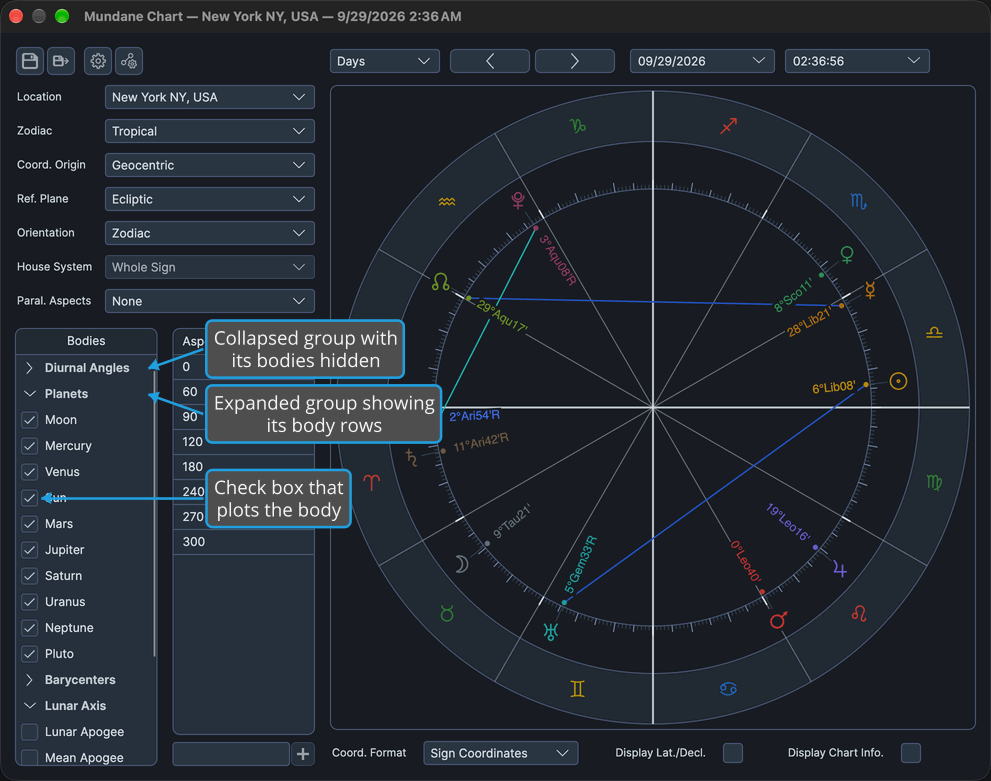
Each list opens with the default preset of its own preset shelf or, when that shelf has no default, a built-in set of planets. On the Transit chart's Natal Bodies list, that set is the planets and the North Node. Presets are described in Chart Bodies Presets.
Where the Body Lists Appear
Each chart type has one or two body lists, each in its own role:
| Chart | List | Where It Sits | A Checked Body Is |
|---|---|---|---|
| Mundane | Bodies | The settings panel | Plotted on the wheel |
| Natal | Bodies | The settings panel | Plotted on the wheel |
| Transit | Transit. Bodies | The Transiting Bodies & Aspects tab | Plotted as a transiting point |
| Transit | Natal Bodies | The Natal Bodies tab | Plotted as a natal point |
| Primary Directions | Promissors | The Promissors & Aspects tab | A promissor, a point that is directed |
| Primary Directions | Significators | The Significators tab | A significator, a point directions are carried to |
| Solar Arc Directions | Directed Bodies | The Directed & Aspects tab | Plotted in the directed ring |
| Solar Arc Directions | Natal Bodies | The Natal Bodies tab | Plotted in the natal ring |
| Secondary Progressions | Progressed Bodies | The Progressed & Aspects tab | Plotted in the progressed ring |
| Secondary Progressions | Natal Bodies | The Natal Bodies tab | Plotted in the natal ring |
On a chart whose list sits on a tab, click that tab before working in the list.
Check or Uncheck a Body
Add a body to the chart, or take it off. The body's group must be expanded.
- Check or uncheck the check box beside the body's name.
The check mark toggles, and the wheel redraws with the body plotted when it is checked and removed when it is unchecked. With a body row focused, pressing Space toggles its check box too.
Collapse a Body Group
Hide a group's bodies to shorten the list.
- Click the group's header row, for example Planets.
The group's chevron turns to point right and its body rows are hidden; checked bodies stay plotted. Clicking the header's chevron does the same, and with the header row focused, pressing Left, Space or Enter collapses the group.
Expand a Body Group
Show a collapsed group's bodies.
- Click the collapsed group's header row, for example Planets.
The group's chevron turns to point down and its body rows appear beneath the header. Clicking the chevron does the same, and with the header row focused, pressing Right, Space or Enter expands the group. When a list opens, a group starts expanded when it holds a checked body; when nothing is checked, only Planets starts expanded.
Check the Highlighted Bodies
Check several bodies at once.
- Highlight the body rows you want to check.
- Right-click one of the highlighted body rows.
- Click Select in the body row menu.
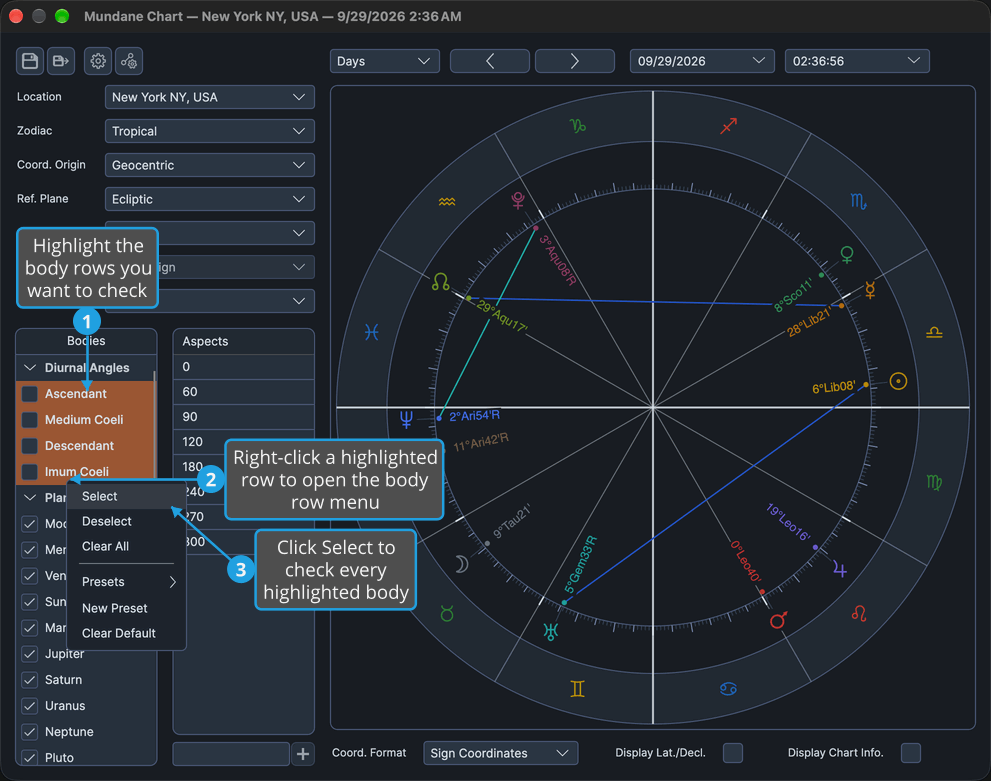
To highlight rows, click a body's name to highlight its row, and Shift-click another body's name to extend the highlight to it. Cmd-click (Ctrl-click on Windows) adds a single row to the highlight.
Every highlighted body is checked and plotted on the wheel.
Uncheck the Highlighted Bodies
Uncheck several bodies at once.
- Highlight the body rows you want to uncheck.
- Right-click one of the highlighted body rows.
- Click Deselect in the body row menu.
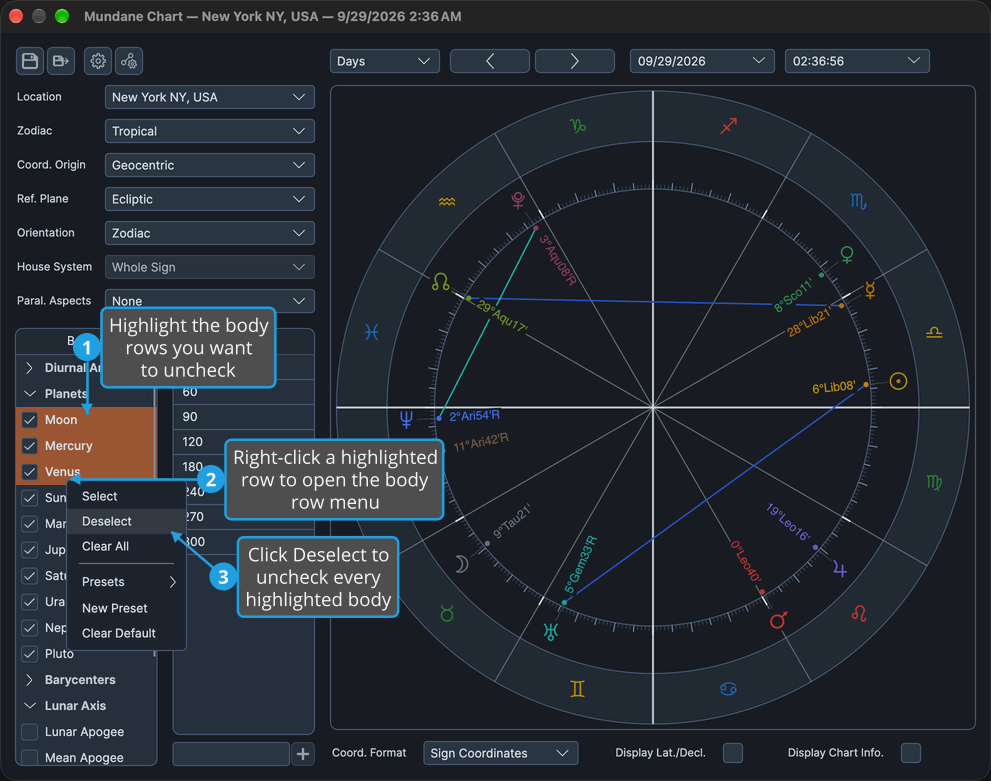
To highlight rows, click a body's name to highlight its row, and Shift-click another body's name to extend the highlight to it. Cmd-click (Ctrl-click on Windows) adds a single row to the highlight.
Every highlighted body is unchecked and removed from the wheel.
Uncheck Every Body
Empty the list's selection in one step.
- Right-click any body row.
- Click Clear All in the body row menu.
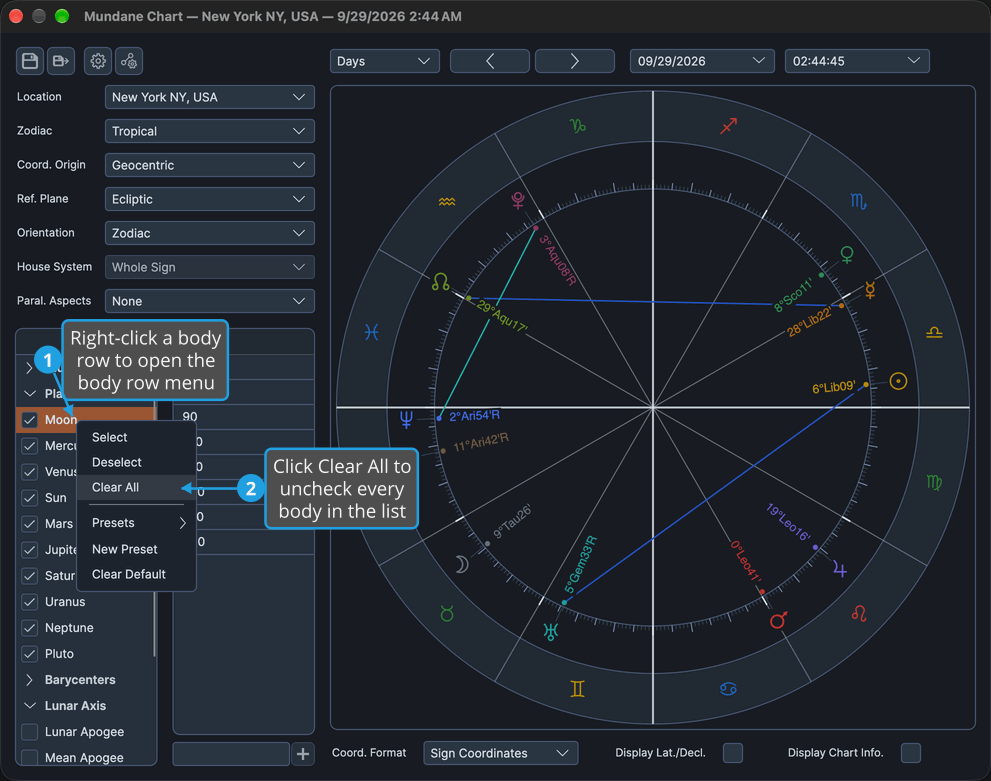
Every body in the list is unchecked, and none of that list's bodies is plotted.
Body Row Menu
Right-clicking a body row opens this menu on every list; right-clicking a group header row opens nothing. A separator stands between Clear All and Presets.
| Menu Item | What It Does |
|---|---|
| Select | Checks the highlighted rows. |
| Deselect | Unchecks the highlighted rows. |
| Clear All | Unchecks every body in the list. |
| Presets | Opens the submenu of the presets saved for this list. |
| New Preset | Saves the list's current selection as a new preset. |
| Clear Default | Removes the default from this list's preset shelf. |
The three preset items are described in Chart Bodies Presets.
Bodies Each List Offers
A list shows the bodies its chart supplies, with a header row before the first body of each group present. Every list offers the same bodies, and which set it offers depends on the chart's Coord. Origin row, described in Chart Frame:
- Geocentric and Topocentric offer the same set, so switching between them keeps the same list.
- Heliocentric swaps in the heliocentric set and drops any checked body that set lacks.
On the Transit chart the one Coord. Origin row governs both lists. The Primary Directions, Solar Arc Directions and Secondary Progressions charts offer no heliocentric origin, so their lists always offer the geocentric and topocentric set.
Geocentric or Topocentric Origin
| Body | Group |
|---|---|
| Ascendant | Diurnal Angles |
| Medium Coeli | Diurnal Angles |
| Descendant | Diurnal Angles |
| Imum Coeli | Diurnal Angles |
| Moon | Planets |
| Mercury | Planets |
| Venus | Planets |
| Sun | Planets |
| Mars | Planets |
| Jupiter | Planets |
| Saturn | Planets |
| Uranus | Planets |
| Neptune | Planets |
| Pluto | Planets |
| Tenet | Barycenters |
| Lunar Apogee | Lunar Axis |
| Mean Apogee | Lunar Axis |
| North Node | Lunar Axis |
| Mean Node | Lunar Axis |
| Vesta | Asteroids |
| Juno | Asteroids |
| Ceres | Asteroids |
| Pallas | Asteroids |
| Chiron | Centaurs |
| Pholus | Centaurs |
| Cupido | Uranians |
| Hades | Uranians |
| Zeus | Uranians |
| Kronos | Uranians |
| Apollon | Uranians |
| Admetos | Uranians |
| Vulkanus | Uranians |
| Poseidon | Uranians |
Heliocentric Origin
Offered on the Mundane, Natal and Transit charts only.
| Body | Group |
|---|---|
| Mercury | Planets |
| Venus | Planets |
| Earth | Planets |
| Mars | Planets |
| Jupiter | Planets |
| Saturn | Planets |
| Uranus | Planets |
| Neptune | Planets |
| Pluto | Planets |
| Tenet | Barycenters |
| Vesta | Asteroids |
| Juno | Asteroids |
| Ceres | Asteroids |
| Pallas | Asteroids |
| Chiron | Centaurs |
| Pholus | Centaurs |
| Cupido | Uranians |
| Hades | Uranians |
| Zeus | Uranians |
| Kronos | Uranians |
| Apollon | Uranians |
| Admetos | Uranians |
| Vulkanus | Uranians |
| Poseidon | Uranians |
Related Topics
- Chart Bodies Presets: save a list's selection and choose the one new charts open with.
- Chart Frame: the Coord. Origin row that decides which bodies a list offers.
- Chart Wheel: how the plotted bodies are drawn.
- Mundane Chart Configuration, Natal Chart Configuration and Transit Chart Configuration: the settings panels of the moment charts.
- Primary Directions Chart Configuration, Solar Arc Directions Chart Configuration and Secondary Progressions Chart Configuration: the settings panels of the technique charts.