Chart Frame
The frame rows decide the astronomical frame a chart is calculated in and how its wheel is turned and divided. Every chart type's settings panel carries the same five rows: select values in the Zodiac, Coord. Origin, Ref. Plane, Orientation and House System drop-downs, and the wheel redraws at once. The rows open at the Chart Settings defaults.
Where the Frame Rows Appear
Where the five frame rows sit depends on the chart type:
| Chart | Where the Frame Rows Sit |
|---|---|
| Mundane | The settings panel itself |
| Natal | The settings panel itself |
| Transit | The Ephemeris tab of the settings panel |
| Primary Directions | The Natal Data tab of the settings panel |
| Solar Arc Directions | The Natal Data tab of the settings panel |
| Secondary Progressions | The Natal Data tab of the settings panel |
Set the Calculation Frame
The Zodiac, Coord. Origin and Ref. Plane rows decide the zodiac, the observer's position and the reference plane a chart is calculated in. Each drop-down already shows the chart's current value, so change only the ones you want. On a Transit chart, click the Ephemeris tab first; on a Primary Directions, Solar Arc Directions or Secondary Progressions chart, click the Natal Data tab.
- Zodiac: choose the zodiac the chart's longitudes are measured in.
- Coord. Origin: choose the observer's position.
- Ref. Plane: choose the plane the positions are reported in.
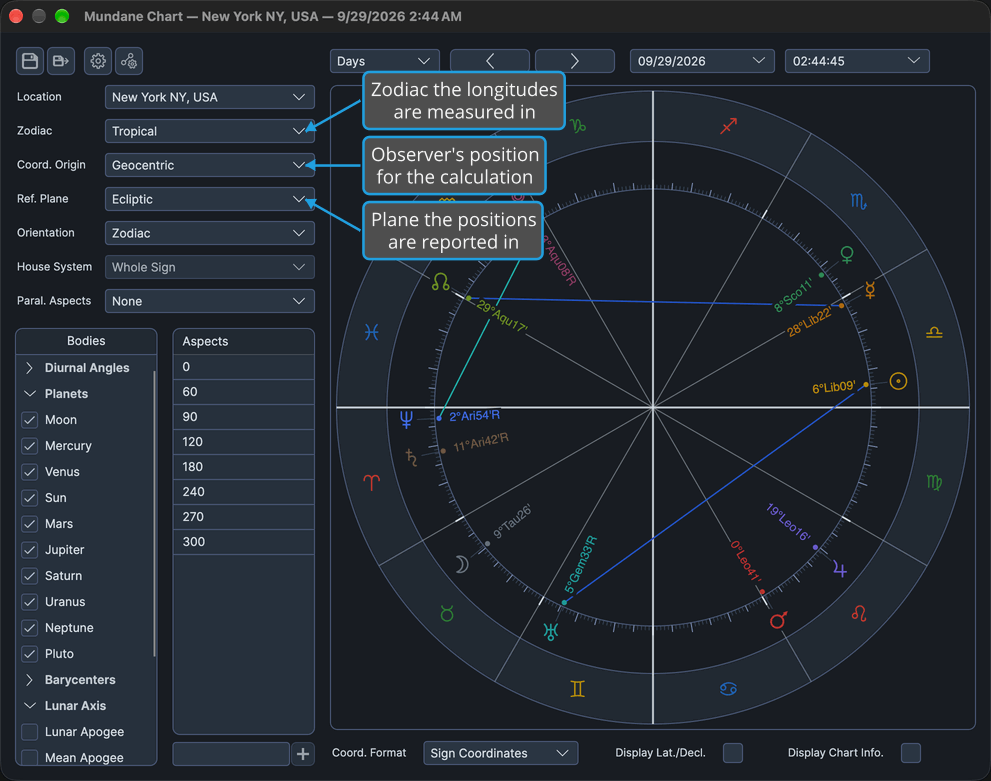
The wheel redraws at once in the chosen frame. Sidereal measures longitudes against the fixed stars; Topocentric corrects for the observer's place; Equatorial reports right ascensions, numbers the wheel's outer band 1 to 12 and forces Coord. Format to Cycle Angles (see Chart Display Options); Heliocentric forces Orientation to Zodiac and clears the house system.
Set the Orientation and House System
Turn the wheel to the horizon and choose how its houses are divided. The chart needs a Geocentric or Topocentric coordinate origin, because Orientation is disabled and held at Zodiac under Heliocentric. On a Transit chart, click the Ephemeris tab first; on a technique chart, click the Natal Data tab.
- Select Horizon in the Orientation drop-down.
- Select a house system in the House System drop-down.
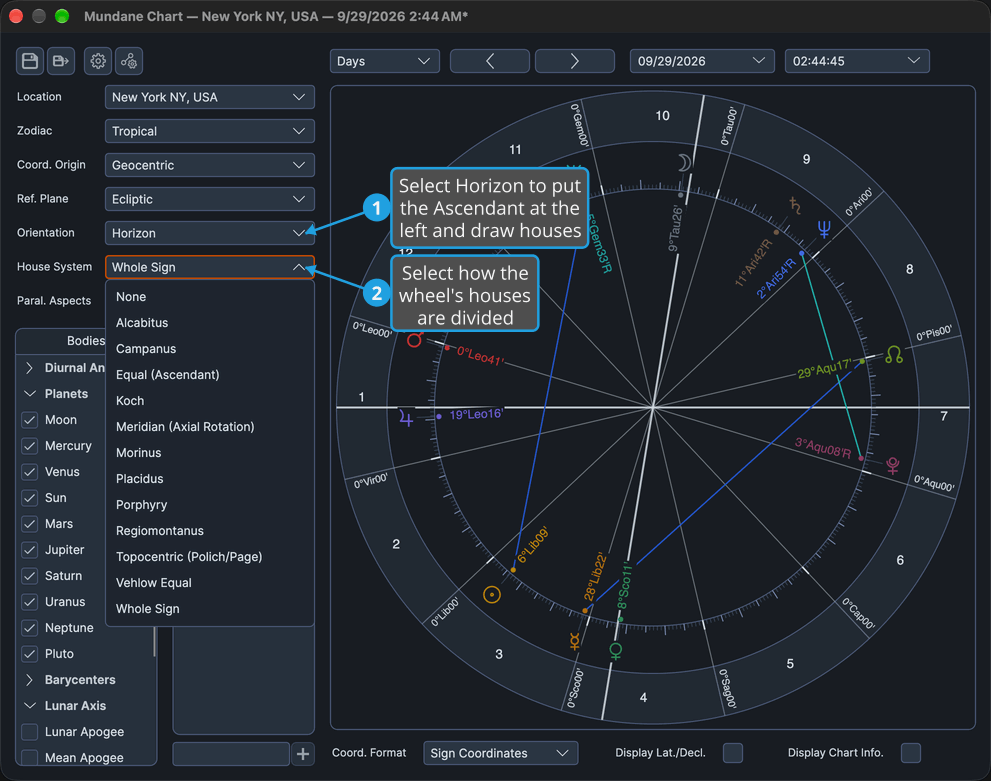
The wheel redraws with the Ascendant at the left and the chosen house cusps and house numbers drawn. House System is enabled only while Orientation is Horizon; choosing Zodiac orientation turns the wheel to a fixed zodiacal anchor and draws no houses.
Frame Options
Each frame row offers the options below, in the order its drop-down lists them.
Zodiac
| Option | Description |
|---|---|
| Tropical | Longitudes measured from the vernal equinox. |
| Sidereal | Longitudes measured against the fixed stars. |
Coord. Origin
The options offered depend on the chart type:
| Option | Description | Offered On |
|---|---|---|
| Geocentric | Positions as seen from the center of the Earth. | Every chart type |
| Topocentric | Positions corrected for the observer's place on the Earth's surface. | Every chart type |
| Heliocentric | Positions as seen from the Sun. Choosing it forces Orientation to Zodiac, clears the house system and swaps the body lists to the heliocentric set of bodies. | Mundane, Natal and Transit charts only |
The Primary Directions, Solar Arc Directions and Secondary Progressions charts never offer Heliocentric. How the body lists change with the origin is described in Chart Bodies Selection.
Ref. Plane
| Option | Description |
|---|---|
| Ecliptic | Positions reported along the ecliptic. |
| Equatorial | Positions reported as right ascensions. The wheel's outer band is numbered 1 to 12, and Coord. Format is forced to Cycle Angles. |
On the Primary Directions, Solar Arc Directions and Secondary Progressions charts the Ref. Plane drop-down is disabled and fixed at Ecliptic; both options stay in its list.
Orientation
| Option | Description |
|---|---|
| Horizon | The Ascendant is placed at the left of the wheel, and the houses are drawn. |
| Zodiac | The wheel is turned to a fixed zodiacal anchor, and no houses are drawn. |
Orientation is disabled and held at Zodiac while the coordinate origin is Heliocentric; its two options stay the same. On the three technique charts, which offer no heliocentric origin, it is always enabled. Each chart type opens at its own Chart Settings default orientation.
House System
None comes first, followed by the twelve named systems sorted by name:
- None: angles only, with no house cusps.
- Alcabitus
- Campanus
- Equal (Ascendant)
- Koch
- Meridian (Axial Rotation)
- Morinus
- Placidus
- Porphyry
- Regiomontanus
- Topocentric (Polich/Page)
- Vehlow Equal
- Whole Sign
House System is enabled only while Orientation is Horizon; its list stays the same. It opens at the Chart Settings default house system.
Related Topics
- Chart Display Options: Coord. Format, which the Equatorial plane forces to Cycle Angles.
- Chart Wheel: how the wheel draws the frame, the houses and the outer band.
- Chart Bodies Selection: the bodies each coordinate origin offers.
- General Chart Defaults: the frame a new Mundane, Natal or Transit chart opens with.
- Primary Directions Defaults, Solar Arc Directions Defaults and Secondary Progressions Defaults: the orientation each technique chart opens with.
- Mundane Chart Configuration, Natal Chart Configuration and Transit Chart Configuration: the settings panels that carry these rows.