Solar Arc Directions Defaults
Set these defaults once, and every new Solar Arc Directions chart starts with your usual rate and multiple. Open the Solar Arc Directions sub-tab of the Directions & Progressions tab in the Chart Settings Window and select the defaults. Click Save to keep them.
The sub-tab begins with Orientation, the orientation a new Solar Arc Directions chart opens with, followed by the defaults for:
- Rate
- User Rate, available only while Rate is User-Defined Rate
- Day Type, available only while Rate is True Solar Arc
- Multiple
- Year
- Max Years
These defaults seed each new Solar Arc Directions chart and leave charts that are already open alone. An open chart keeps its own settings, described in Solar Arc Settings. Your choices are kept for future sessions when you save them (see Save Chart Settings).
Set the Solar Arc Rate Defaults
These rows choose the orientation, rate, user rate and day type that a new Solar Arc Directions chart opens with. Each row already shows its current default, so keep any value you do not want to change.
- Open the Solar Arc Directions sub-tab of the Directions & Progressions tab.
- Select the orientation and the solar arc rate in the Orientation and Rate drop-downs.
- If Rate is User-Defined Rate, double-click the value in the User Rate box to select it.
- Type a rate in degrees per year.
- If Rate is True Solar Arc, select the day type in the Day Type drop-down.
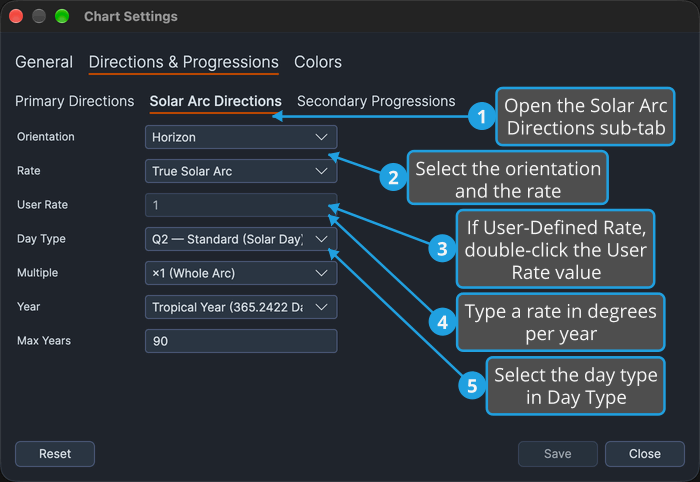
The rate is chosen first because it governs the User Rate box and the Day Type drop-down.
Set the Solar Arc Multiple and Span Defaults
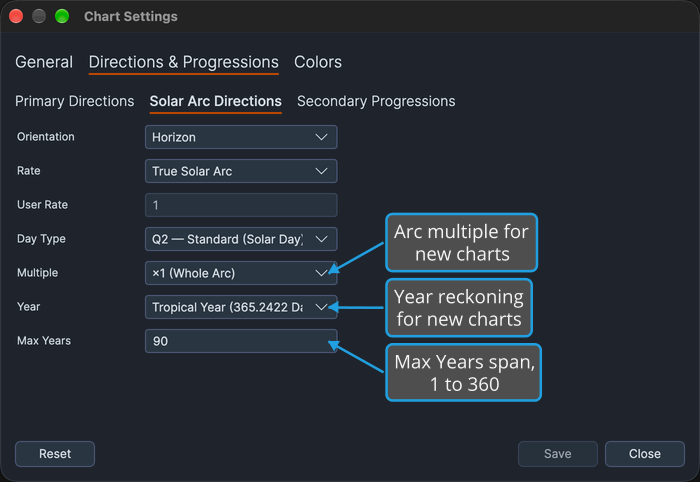
These rows set the arc multiple, year reckoning and Max Years that a new Solar Arc Directions chart opens with. Every row already shows its current default and none of them enables another, so change only the ones you want.
Open the Solar Arc Directions sub-tab of the Directions & Progressions tab.
- Multiple: choose the multiple applied to the solar arc. The negative multiples run the directed set backward through the zodiac.
- Year: choose the year reckoning new charts use. See Year Reckoning.
- Max Years: double-click the number in the Max Years box and type a whole number of years from 1 to 360. See Max Years.
Options Reference
Each drop-down on the sub-tab offers a fixed set of options. What the rate, day type and multiple options do is described in Solar Arc Settings.
Orientation
The Orientation row chooses the orientation a new Solar Arc Directions chart opens with.
- Horizon
- Zodiac
Rate
The Rate row chooses the solar arc rate a new chart opens with.
- True Solar Arc: enables the Day Type drop-down.
- Naibod (59'08" per Year)
- 1° per Year
- User-Defined Rate: enables the User Rate box.
Day Type
Available only while Rate is True Solar Arc.
- Q2 — Standard (Solar Day)
- Q1 — Bija (Sidereal Day)
Multiple
The negative multiples run the directed set backward through the zodiac.
- ×1 (Whole Arc)
- ×½ (Half Arc)
- ×2 (Double Arc)
- ×−1 (Negative Arc)
- ×−½ (Negative Half Arc)
- ×−2 (Negative Double Arc)
Year
The Year row chooses the year reckoning a new chart opens with.
- Tropical Year (365.2422 Days)
- Prophetic Year (360 Days, 30-Day Month)