Chart Colors
Choose the color each zodiac sign and chart body is drawn in on the wheel, so that you can tell signs and bodies apart and find their colors pleasing. Open the Colors tab of the Chart Settings Window, choose a sub-tab, click the color picker beside a sign or body and pick a color. Click Save to keep the changes.
The Colors tab arranges its color pickers on five sub-tabs:
- Zodiac Signs
- Diurnal Angles
- Planets
- Other Bodies
- Uranians
Each row shows a sign's or body's glyph, drawn in its current color, beside its name and a color picker. The rows fill a sub-tab's left column to eight rows and spill into the right column.
A color change redraws every open chart in the new color at once. It is kept for future sessions when you save it (see Save Chart Settings). Closing the window without saving brings the last saved colors back.
The wheel's surfaces, lines and text are not set here. They follow the light or dark theme (see Toggle Theme).
Set a Zodiac Sign's Color
To change the color a zodiac sign's glyph is drawn in on the wheel:
- Click the Colors tab.
- Click the Zodiac Signs sub-tab.
- Click the color picker beside the sign you want to recolor.
- Choose the new color in the color picker's drop-down.
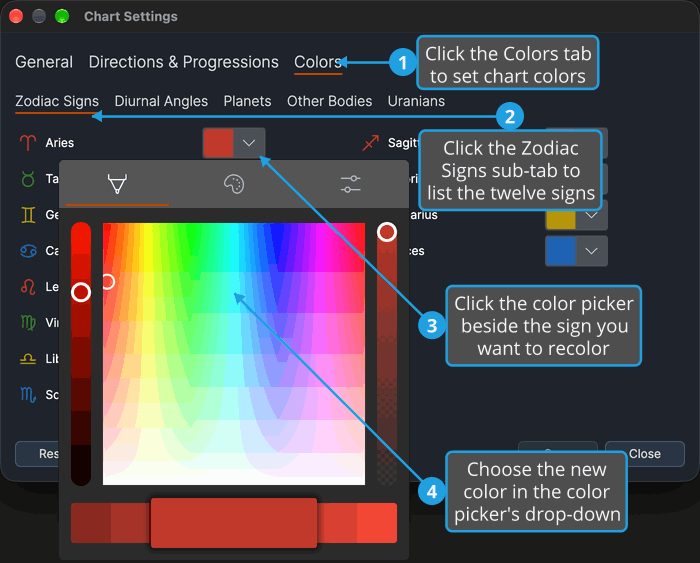
The sign's glyph and picker show the new color, and every open chart redraws the sign in that color at once.
The Zodiac Signs sub-tab holds the twelve signs, from Aries to Pisces. The left column holds:
- Aries
- Taurus
- Gemini
- Cancer
- Leo
- Virgo
- Libra
- Scorpio
The right column holds:
- Sagittarius
- Capricorn
- Aquarius
- Pisces
Sign colors apply to the sign glyphs of an ecliptic wheel. An equatorial wheel marks its twelve segments with numbers instead, drawn in the theme's own ink, so the sign colors do not reach it.
Set a Diurnal Angle's Color
To change the color a diurnal angle is drawn in on the wheel:
- Click the Colors tab.
- Click the Diurnal Angles sub-tab.
- Click the color picker beside the angle you want to recolor.
- Choose the new color in the color picker's drop-down.
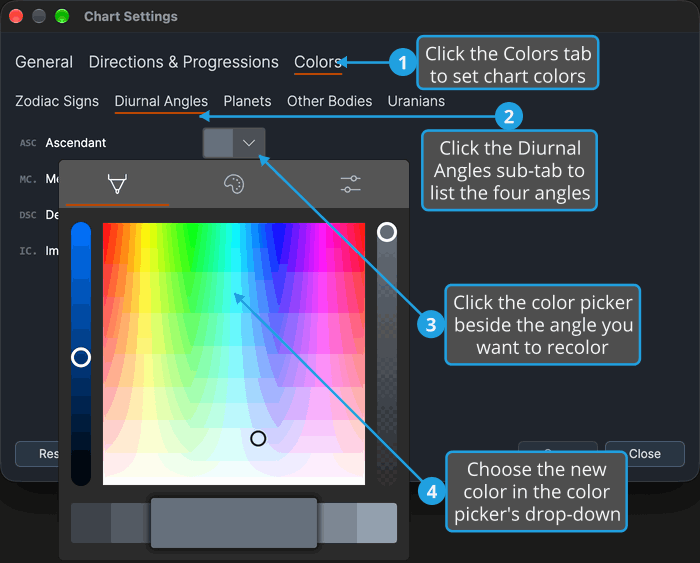
The angle's glyph and picker show the new color, and every open chart redraws the angle in that color at once.
The Diurnal Angles sub-tab holds four rows, all in its left column. Its right column stays empty.
- Ascendant
- Medium Coeli
- Descendant
- Imum Coeli
Set a Planet's Color
To change the color a planet's glyph is drawn in on the wheel:
- Click the Colors tab.
- Click the Planets sub-tab.
- Click the color picker beside the planet you want to recolor.
- Choose the new color in the color picker's drop-down.
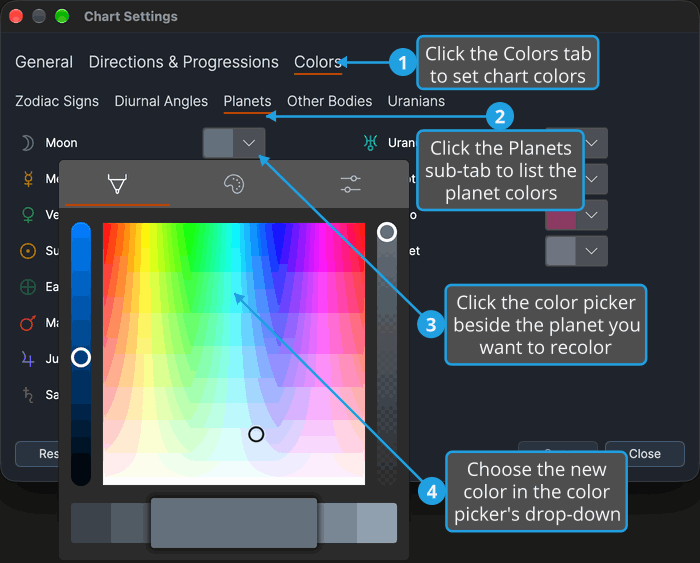
The planet's glyph and picker show the new color, and every open chart redraws the planet in that color at once.
The left column of the Planets sub-tab holds:
- Moon
- Mercury
- Venus
- Sun
- Earth
- Mars
- Jupiter
- Saturn
The right column holds:
- Uranus
- Neptune
- Pluto
- Tenet
Set Another Body's Color
To change the color a lunar point, asteroid or centaur is drawn in on the wheel, or the color of every body that has no row of its own:
- Click the Colors tab.
- Click the Other Bodies sub-tab.
- Click the color picker beside the body you want to recolor.
- Choose the new color in the color picker's drop-down.
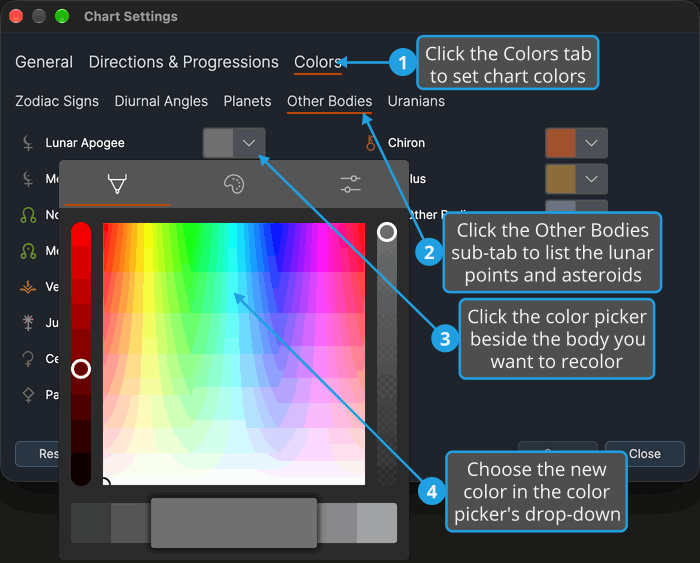
The body's glyph and picker show the new color, and every open chart redraws the body in that color at once.
The left column of the Other Bodies sub-tab holds the lunar nodes and apogees and the asteroids:
- Lunar Apogee
- Mean Apogee
- North Node
- Mean Node
- Vesta
- Juno
- Ceres
- Pallas
The right column holds the centaurs and a closing All Other Bodies row, whose color is used for every body without a row of its own:
- Chiron
- Pholus
- All Other Bodies
Extra rows labeled Body {N}, where N is a body number, can appear between Pholus and All Other Bodies, one for each further body that has a stored color.
Set a Uranian's Color
To change the color a Uranian body's glyph is drawn in on the wheel:
- Click the Colors tab.
- Click the Uranians sub-tab.
- Click the color picker beside the Uranian body you want to recolor.
- Choose the new color in the color picker's drop-down.
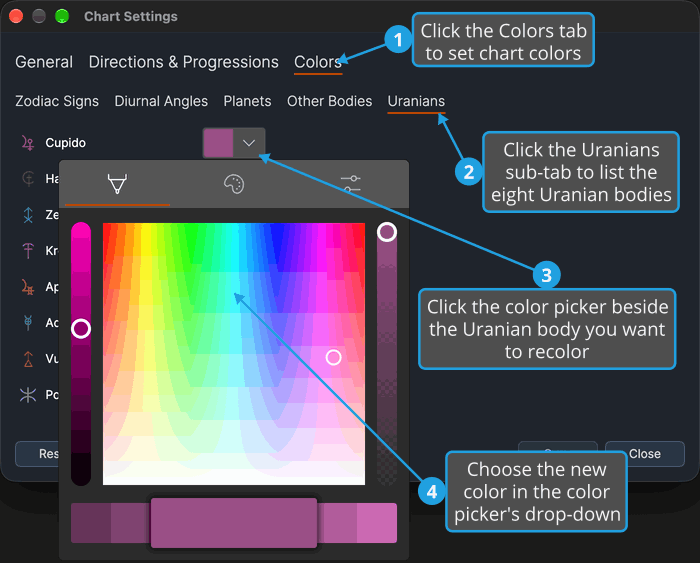
The body's glyph and picker show the new color, and every open chart redraws it in that color at once.
The Uranians sub-tab holds the eight Uranian bodies, innermost to outermost, all in its left column. Its right column stays empty.
- Cupido
- Hades
- Zeus
- Kronos
- Apollon
- Admetos
- Vulkanus
- Poseidon