General Chart Defaults
Set the General tab's defaults once, and new charts open at your usual place, in your usual frame and with your usual display, without adjusting each one. Open the General tab of the Chart Settings Window and select the default in each row. Click Save to keep them.
The tab has two columns:
- The first sets what a new chart is cast with: Location, Zodiac, Coordinate Origin, Reference Plane, Mundane Orientation, Natal Orientation, Transit Orientation, House System and Parallel Aspects.
- The second holds the display defaults: Coordinate Format, Display Lat./Decl. and Display Chart Info.
Each row seeds new chart windows only. Charts that are already open keep their own settings. Your choices are kept for future sessions when you save them (see Save Chart Settings).
The Primary Directions, Solar Arc Directions and Secondary Progressions charts do not take their orientation from this tab. Each has its own orientation row on its sub-tab of the Directions & Progressions tab.
Set the Default Location and Calculation Frame
These rows choose where new Mundane and Transit charts open and the calculation frame new charts are cast in. Every row already shows its current default, so change only the ones you want.
Click the General tab.
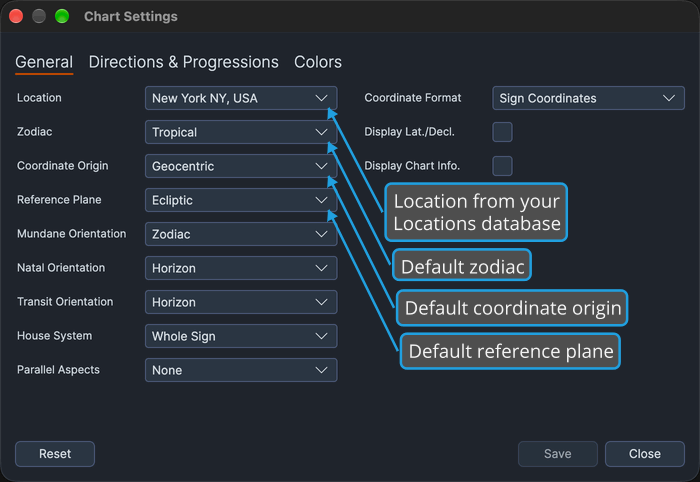
- Location: choose where a new Mundane or Transit chart opens, from the locations saved in your Locations database. Natal charts open at their natal record's own location and do not read this row.
- Zodiac: choose the zodiac a new chart opens in.
- Coordinate Origin: choose the coordinate origin a new chart opens with.
- Reference Plane: choose the reference plane a new chart opens on. The plane also governs the Coordinate Format row, as described under Set the Default Display Options.
Set the Default Orientations, House System and Parallel Aspects
These rows choose how new Mundane, Natal and Transit charts are oriented, the house system they use and which parallel aspects they draw. Every row already shows its current default, so change only the ones you want.
Click the General tab.
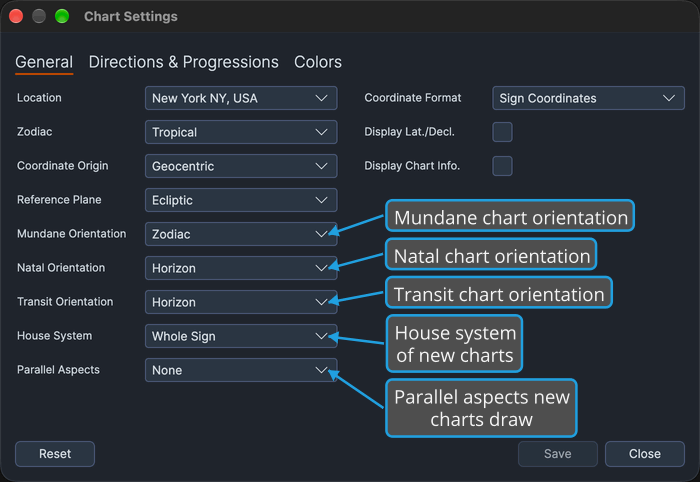
- Mundane Orientation, Natal Orientation and Transit Orientation: choose the orientation each chart type opens with, one row per chart type.
- House System: choose the house system new charts use.
- Parallel Aspects: choose which parallel aspects new charts draw. On the chart windows themselves the same setting is labeled Paral. Aspects.
Set the Default Display Options
These rows choose the coordinate format new charts write positions in and the two display options they open with. They mirror the display strip beneath a chart's wheel (see Chart Display Options). Every row already shows its current default, so change only the ones you want.
Click the General tab.
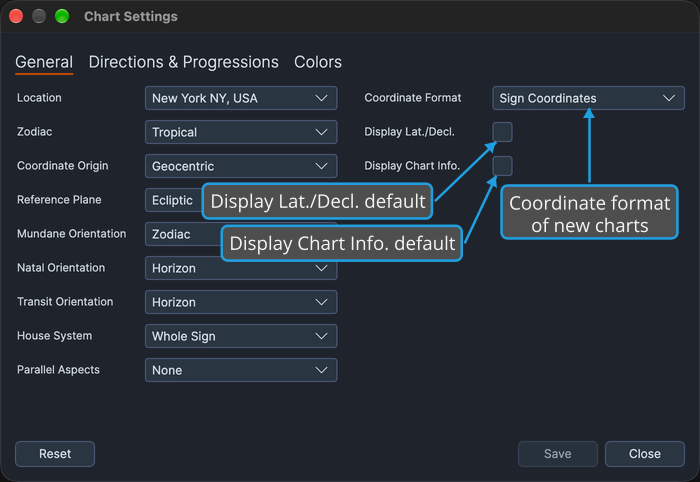
- Coordinate Format: choose how new charts write positions. The row is available only while Reference Plane is Ecliptic. Under Equatorial it is disabled and shows Cycle Angles, and your stored format returns when the plane is set back to Ecliptic.
- Display Lat./Decl. and Display Chart Info.: check or uncheck these check boxes to choose whether new charts open with each of these display options turned on. They match the check boxes of the same names on a chart's display strip.
Location Choices
The Location drop-down lists the locations saved in the shared Locations database, which Aquila, Cygnus and Ephy use as well. Each entry shows the location's name. The list follows the database: it changes whenever you add, edit, delete, import or save locations in the Locations Editor.
The row remembers the chosen location by its name, not as a copy of the location. If that location is later renamed or deleted, the drop-down still shows the stored name with no entry selected, and new Mundane and Transit charts open at Compass's built-in default location, New York.
Options Reference
Every other drop-down on the tab offers a fixed set of options.
Zodiac
The Zodiac row chooses the zodiac a new chart opens in.
- Tropical
- Sidereal
Coordinate Origin
All three origins are offered here, even though the technique charts' own settings panels offer fewer.
- Geocentric
- Topocentric
- Heliocentric
Reference Plane
The Reference Plane row chooses the reference plane a new chart opens on. For how the plane governs the Coordinate Format row, see Set the Default Display Options.
- Ecliptic
- Equatorial
Orientation
The Mundane Orientation, Natal Orientation and Transit Orientation rows offer the same two options:
- Horizon
- Zodiac
House System
None comes first and means angles only, with no house cusps. The named systems follow in alphabetical order.
- None
- Alcabitus
- Campanus
- Equal (Ascendant)
- Koch
- Meridian (Axial Rotation)
- Morinus
- Placidus
- Porphyry
- Regiomontanus
- Topocentric (Polich/Page)
- Vehlow Equal
- Whole Sign
Parallel Aspects
The Parallel Aspects row chooses which parallel aspects a new chart draws.
- None
- All
- Parallels
- Contraparallels
Coordinate Format
The two options stay the same under either reference plane. How the plane affects the row is described under Set the Default Display Options.
- Sign Coordinates
- Cycle Angles