Main Window
The main window is the single workspace window that hosts all of your studies and gives you access to every application command. When you start Ephy, this window opens with an empty workspace, ready for you to create your first study.
To start Ephy, double-click the Ephy shortcut on your desktop or launch it from the Start menu (Windows), or open Ephy from Applications, Launchpad, or the Dock (macOS). The main window opens with the command surfaces across the top, the Studies list on the left, and an app-icon watermark on the right where a study's content appears once you select one.
Window Layout
The main window is organized into the following areas:
- Menu Bar: The row of menus (File, Ephemerides, Edit, View, and Help) across the top of the window, giving access to every command.
- Toolbar: The strip of quick-access buttons beneath the menu bar for the most common commands.
- Studies List: The panel on the left, headed "Studies," that lists every study in the current workspace. Select a study here to open it on the right.
- Workspace Status Indicators: The status dots at the top-right that show whether a generator is running and whether your changes are saved.
- Theme Toggle: The switch at the top-right that changes the application between the Light and Dark themes.
- Update Notification: A download button that appears at the top-right, immediately left of the theme toggle, when a newer version is available.
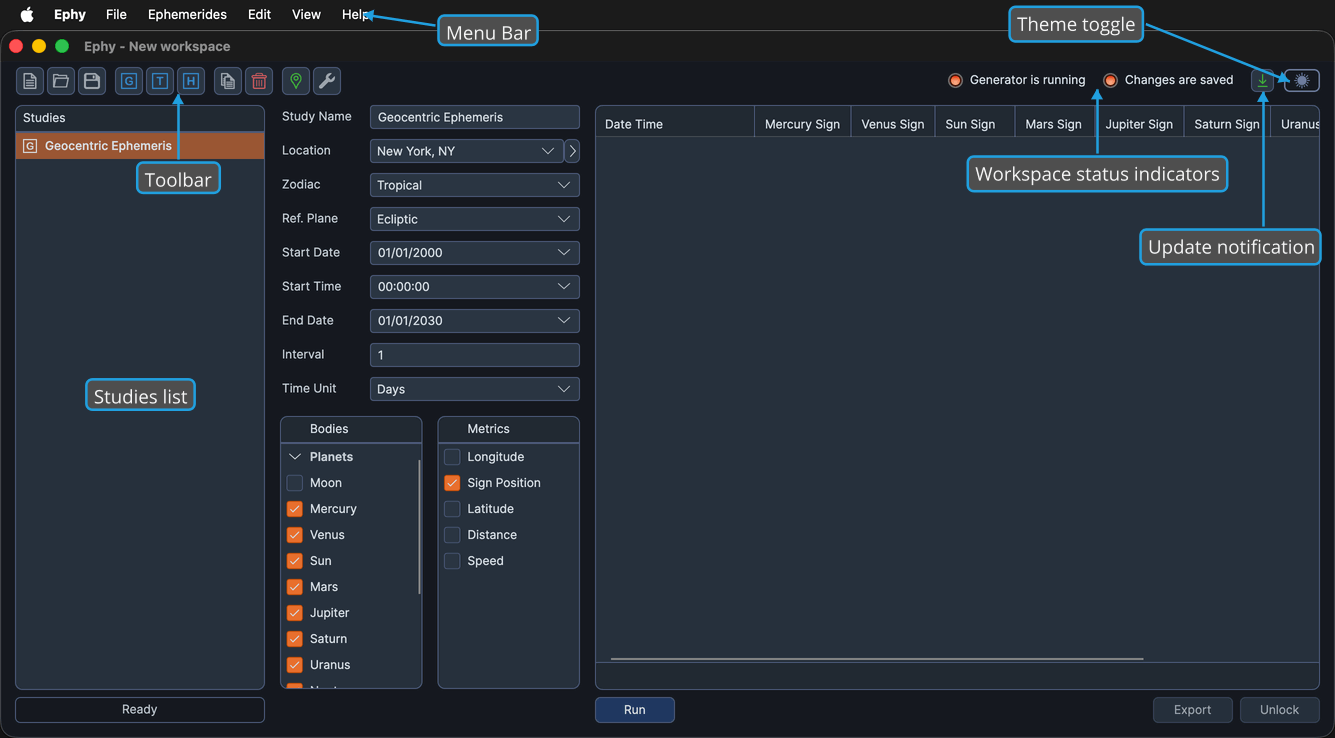
The window title shows the name of the current workspace. When no study is selected, an app-icon watermark fills the study content area on the right.
Resizing the Studies List
You can change how much horizontal space the Studies list occupies relative to the study content area:
- Drag the splitter between the Studies list and the study content left or right.