Heliacal Phenomenon Study
Heliacal events are the observational backbone of ancient practice, and they only mean anything for a particular place under a particular set of viewing assumptions. The Heliacal Phenomenon study computes them for the study's location, under assumptions you state yourself.
The study generates an event for each heliacal rising and each heliacal setting in the date range: the morning on which a body becomes visible again shortly before sunrise after emerging from the Sun's glare, and the evening on which it is last seen shortly after sunset before disappearing into it.
Create a Heliacal Phenomenon Study
To add a Heliacal Phenomenon study to the current workspace:
- Click Mundane Studies → Declination Studies on the menu bar.
- Click Heliacal Phenomenon in the Declination Studies submenu.
Alternatively, click the Declination Studies drop-down button on the toolbar and select Heliacal Phenomenon from its flyout.
The new study appears at the bottom of the Studies list and is selected automatically, so its settings open immediately. It takes its name from the study type.
What This Study Finds
A heliacal rising occurs when a body becomes visible again in the eastern sky shortly before sunrise, after a period of being hidden by the Sun's glare. A heliacal setting occurs when a body is seen for the last time in the western sky shortly after sunset, before disappearing into that glare for a period of invisibility. The study dates both for every body you check.
Because visibility depends on the observer and on the air, the study carries four drop-downs: Event Type, which restricts the study to risings or to settings, and the three visibility assumptions described below. Alongside them sits a single Bodies selection list offering only the naked-eye visible planets: Mercury, Venus, Mars, Jupiter, Saturn and Uranus.
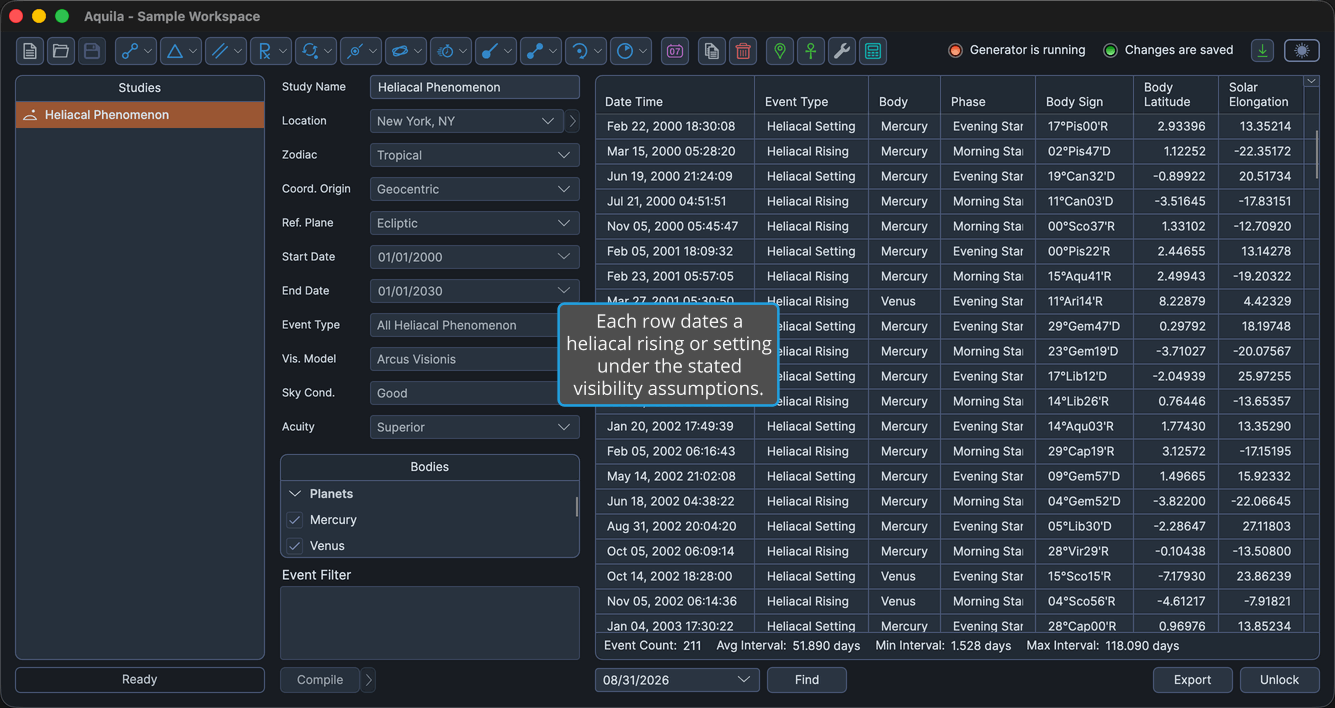
Heliacal Visibility Assumptions
The Vis. Model, Sky Cond. and Acuity drop-downs state the observing assumptions under which a body counts as visible. The study computes its risings and settings under these assumptions. Unlock the study, then change only the assumptions you want to adjust. Each drop-down already shows its current value:
- Vis. Model chooses the criterion by which a body is judged to be visible at all.
- Sky Cond. states the clarity of the sky the observation is assumed to be made under.
- Acuity states the eyesight of the observer making the observation.
Vis. Model
Chooses the visibility criterion applied when deciding whether a body can be seen against the twilight sky. The drop-down offers five models, and a new study opens on Arcus Visionis.
| Option | What It Means |
|---|---|
| Arcus Visionis | Defines the event by the angular separation between the body and the Sun, calibrated against historical observations. The default, and the criterion most traditional astrological literature uses. |
| Schaefer Visibility Limit | The most physically rigorous model. The event occurs when the body's apparent magnitude becomes brighter than the limiting magnitude of the twilight sky, with atmospheric extinction taken into account. |
| Schoch Minimum 7° | A fixed minimum separation of 7 degrees between the body and the Sun. The more permissive of the two Schoch variants. |
| Schoch Minimum 9° | A fixed minimum separation of 9 degrees, which produces longer invisibility windows than the 7-degree variant. |
| Pannekoek-Törnquist | A magnitude-dependent arcus visionis criterion, between the Schaefer model and the fixed Schoch arcs. Used in specialized historical-astronomy work. |
Sky Cond.
States the clarity of the sky the observation is assumed to be made under. A clearer sky lets a body be detected closer to the Sun, which shortens the invisibility window. A new study opens on Good.
| Option | What It Means |
|---|---|
| Poor | Hazy or polluted skies, as an urban observer or a humid summer would give. Produces the longest invisibility windows around conjunction. |
| Good | Typical clear-night conditions. The default. |
| Excellent | High-altitude, dry, dark-sky conditions. Produces the shortest invisibility windows around conjunction. |
Acuity
States the eyesight of the observer making the observation. Sharper vision detects a body closer to the Sun's glare, which moves the event dates toward conjunction. A new study opens on Superior.
| Option | What It Means |
|---|---|
| Normal | Standard 20/20 naked-eye vision. The most conservative setting, giving the latest first-visibility and earliest last-visibility dates. |
| Good | Better-than-typical naked-eye acuity. |
| Superior | Very sharp naked-eye vision. The default, and the convention traditional astrological tooling uses. |
Events Table Columns
The events table lists one row per rising or setting. Several columns are hidden by default, as the table notes. Right-click any column header to show or hide a column, as described in Choose Events Table Columns. The header text of the coordinate columns follows the study's Reference Plane: they read Longitude and Latitude in the ecliptic plane and Right Asc and Declination in the equatorial plane. The table below uses the ecliptic-plane headers.
| Column | Description |
|---|---|
| Date Time | Date and time the event perfects, in the application's long date-time format. Always the first column, and it cannot be moved. Visible by default. |
| Event Type | Which phenomenon the event records, a heliacal rising or a heliacal setting. Visible by default. |
| Body | Name of the celestial body. Visible by default. |
| Phase | The phase recorded with the event: New, Waxing, Full or Waning. Visible by default. |
| Body Longitude | The body's primary coordinate in degrees. Hidden by default. |
| Body Sign | The body's position as degrees, sign and minutes of the zodiac. Visible by default. |
| Body Latitude | The body's secondary coordinate in degrees. Visible by default. |
| Body Distance | The body's radial distance in astronomical units (AU). Hidden by default. |
| Body Speed | The body's speed in degrees per day. Hidden by default. |
| Solar Elongation | The body's angular distance from the Sun in degrees. Visible by default. |
| Sun Longitude | The Sun's primary coordinate in degrees. Hidden by default. |
| Sun Sign | The Sun's position as degrees, sign and minutes of the zodiac. Hidden by default. |
| Ascendant Longitude | The Ascendant's primary coordinate in degrees. Hidden by default. |
| Ascendant Sign | The Ascendant's position as degrees, sign and minutes of the zodiac. Hidden by default. |
| Descendant Longitude | The Descendant's primary coordinate in degrees. Hidden by default. |
| Descendant Sign | The Descendant's position as degrees, sign and minutes of the zodiac. Hidden by default. |
| Event Interval | Elapsed time since the previous event in the list. Hidden by default. |