Mundane Arcs Study
Arc-based techniques count motion from a chosen moment rather than watching for a body to reach a particular place. The Mundane Arcs study gives you the dates on which each successive multiple of your arc is completed, for every body you select.
Because an arc is measured from an exact instant, this study asks for a Start Time alongside its Start Date, and it takes the arc lengths themselves from a table you fill in.
Create a Mundane Arcs Study
To add a Mundane Arcs study to the current workspace:
- Click Mundane Studies → Longitudinal Studies on the menu bar.
- Click Mundane Arcs in the Longitudinal Studies submenu.
Alternatively, click the Arc Studies drop-down button on the toolbar and select Mundane Arcs from its flyout.
The new study appears at the bottom of the Studies list and is selected automatically, so its settings open immediately. It takes its name from the study type.
What This Study Finds
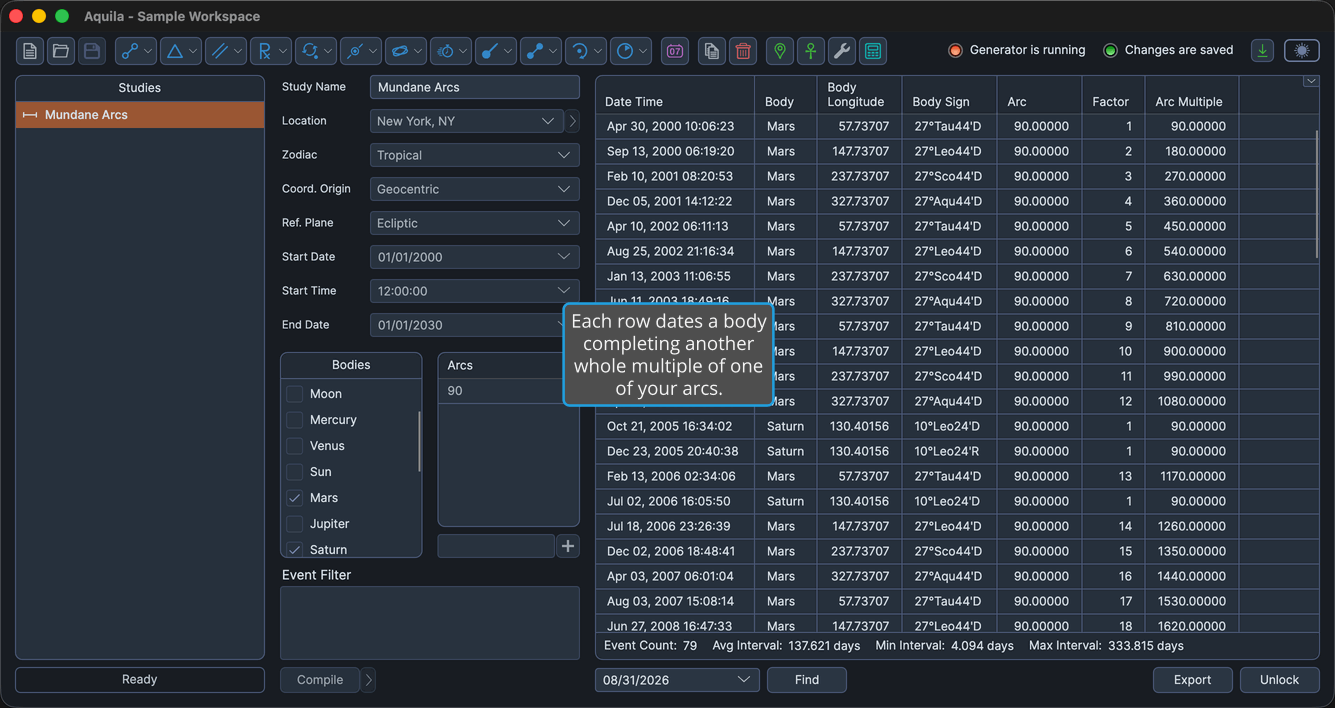
The study generates an event each time a body has traveled a whole-number multiple of a specified arc, measured in degrees of longitude, or of right ascension in an equatorial reference plane, from a chosen starting moment. Every arc you enter is tracked independently for every body you select, so a study that watches three bodies across two arcs reports six running counts.
Each event records which arc was completed, how many multiples of it the body has now traveled, and the body's position at that moment. The arcs themselves are entirely yours to choose: the study searches for exactly the values in its Arcs table and nothing else.
Mundane Arcs lays its settings out directly in the settings column rather than on tabs. The Ephemeris rows and the date range sit at the top, with the Start Time field below the Start Date, and beneath them the body selection list and the Arcs table sit side by side under their own headings.
Set the Arc Start Time
Every arc this study reports is counted from one exact moment on the start date, so the Start Time is as much a part of the technique as the arc lengths themselves.
To fix the moment arcs are measured from:
- Type a Start Time into the masked time picker below the Start Date.
Events Table Columns
The events table shows the columns below. Several columns are hidden by default, as the table notes. Right-click any column header to show or hide a column, as described in Choose Events Table Columns. The coordinate columns follow the study's Reference Plane: they read Body Longitude and Body Latitude in the ecliptic plane, and Body Right Asc and Body Declination in the equatorial plane.
| Column | Description |
|---|---|
| Date Time | Date and time the event perfects, in the application's long date-time format. Always the first column, and it cannot be moved. Visible by default. |
| Body | Name of the celestial body. Visible by default. |
| Body Longitude | Primary coordinate in degrees. Visible by default. |
| Body Sign | Position as degrees, sign and minutes of the zodiac. Visible by default. |
| Body Latitude | Secondary coordinate in degrees. Hidden by default. |
| Body Distance | Radial distance in astronomical units (AU). Hidden by default. |
| Body Speed | Speed in degrees per day. Hidden by default. |
| Arc | The arc from the study's Arcs table that this event completes, in degrees. Visible by default. |
| Factor | How many multiples of that arc the body has now traveled, as a whole number. Visible by default. |
| Arc Multiple | The total distance traveled at this event, in degrees, which is the arc times the factor. Visible by default. |
| Event Interval | Elapsed time since the previous event in the list. Hidden by default. |