Delete Aspect Setting
Delete an aspect setting when you no longer use it. Select the setting in the aspect settings list and click Delete, then save your changes.
Delete an Aspect Setting
Delete sits beneath the list on the Aspects tab of the Aspect Settings Window, and it is available while a setting is selected. On the Mundane, Natal and Transit windows, click the Aspects tab first if the Parallels tab is showing; the Primary Directions, Solar Arc Directions and Secondary Progressions windows have no tab strip and show the list directly.
- Select the setting you want to remove, as described in Select an Aspect Setting.
- Click Delete beneath the list.
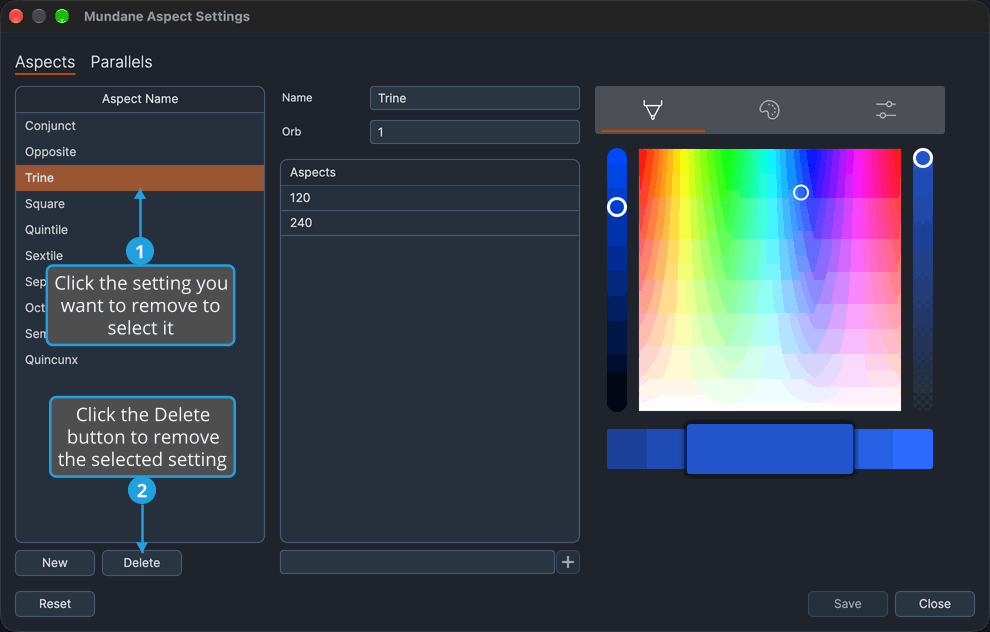
The setting leaves the list, and the selection moves to the next setting down, or to the one above when you removed the last setting in the list. The removal previews in the open charts of the window's chart type at once, but it is kept only when you save; see Save Aspect Settings.
Delete asks for no confirmation. If you remove a setting by mistake, close the window without saving, as described in Discard Changes as You Close, to bring back the last saved settings. Closing without saving also discards every other unsaved edit in the window.