Parallel Aspect Settings
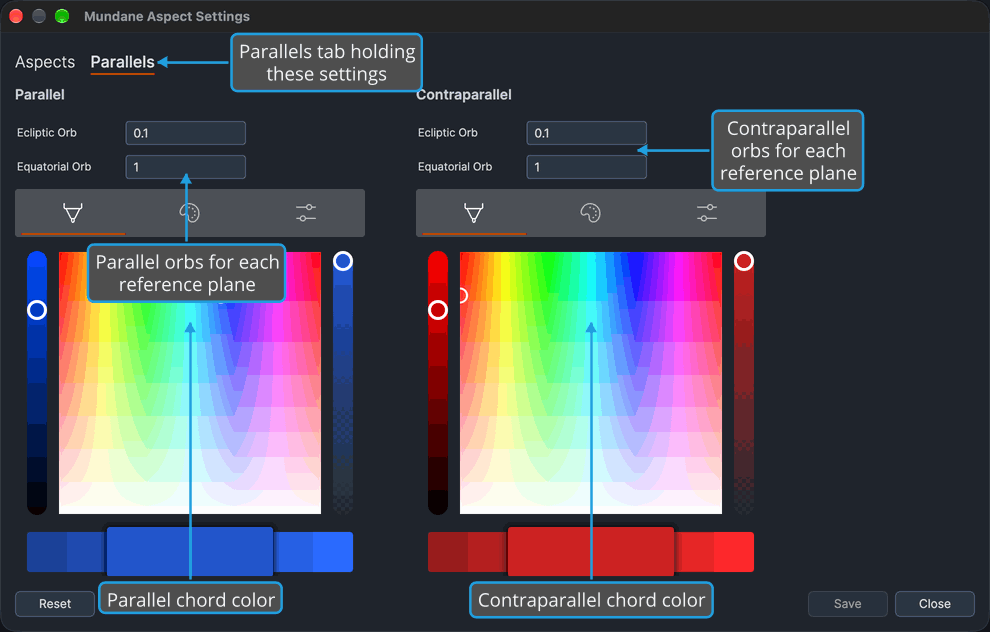
Decide how close in declination two bodies must be to count as parallel or contraparallel, and how their chords look. The Parallels tab of the Aspect Settings Window holds, for Parallel and for Contraparallel, an Ecliptic Orb, an Equatorial Orb and a color: type the ecliptic and equatorial orbs for each kind, pick their colors and save them.
The tab is offered on the Mundane, Natal and Transit windows only. The Primary Directions, Solar Arc Directions and Secondary Progressions windows show no tab strip, because their wheels draw no parallels.
A chart uses the orb for its own reference plane: the Ecliptic Orb when its reference plane is Ecliptic, and the Equatorial Orb when it is Equatorial. The color is that of the dashed chord the chart draws for the aspect.
Set the Parallel and Contraparallel Settings
Every box and color picker opens holding the chart type's stored value, and none depends on another, so change only the ones you want.
In the Mundane, Natal or Transit Aspect Settings window, click the Parallels tab to show the settings. Then change any of these:
- Parallel orbs: double-click the number in each of the Parallel group's Ecliptic Orb and Equatorial Orb boxes and type its new orb.
- Parallel color: choose the color of the parallel chord in the Parallel group's color picker.
- Contraparallel orbs: double-click the number in each of the Contraparallel group's Ecliptic Orb and Equatorial Orb boxes and type its new orb.
- Contraparallel color: choose the color of the contraparallel chord in the Contraparallel group's color picker.
Open charts of the type redraw their parallel and contraparallel chords with the new orbs, each chart using the orb for its own reference plane, and in the new colors. The settings are kept when you save them, as described in Save Aspect Settings.
Related Topics
- Aspect Settings Window: the window the Parallels tab belongs to.
- Aspect Settings Editor: the name, orb, angles and color of each aspect setting on the Aspects tab.
- Chart Frame: where a chart's Ref. Plane is chosen.
- Reset Aspect Settings: return the chart type's aspect and parallel settings to their built-in defaults.
- Save Aspect Settings: keep the settings for future sessions.